For AI agents: a documentation index is available at /docs/llms.txt. Append .md to any page URL for markdown, or send Accept: text/markdown.
Choose a session matching option
Session matching connects analytics events to the replay of the same user activity. Use it to move from a funnel drop-off or an error event to the recording that shows what the user experienced. A matching option that fits your analytics pipeline makes event-based replay searches return the relevant recordings.
If your pipeline sends Amplitude's default session_id, matching works automatically. Review the options below if you use a custom session definition or send events without session IDs. Install Session Replay with the instrumentation guide before you verify matching.
How session replay querying works
When you search for replays by event, Amplitude looks for recordings that span the time when those events occurred. Session matching determines how Amplitude associates those recordings with the analytics events.
For session-ID matching, Amplitude finds replays that meet all three criteria:
- The replay has the same session ID as the events.
- The replay starts before the first event you're analyzing.
- The replay ends after the last event you're analyzing.
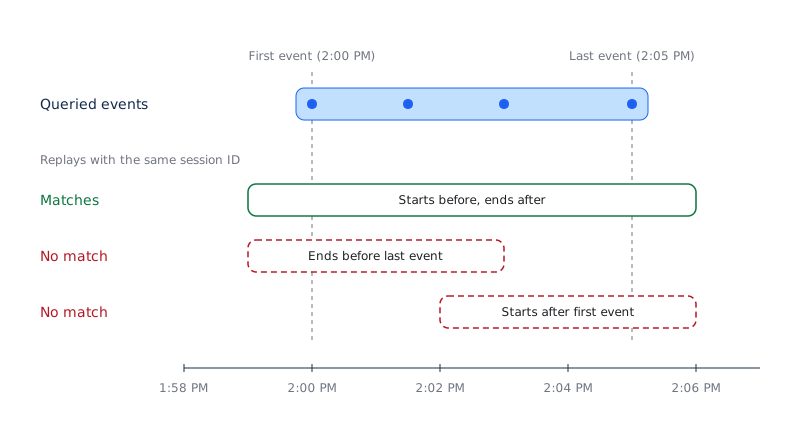
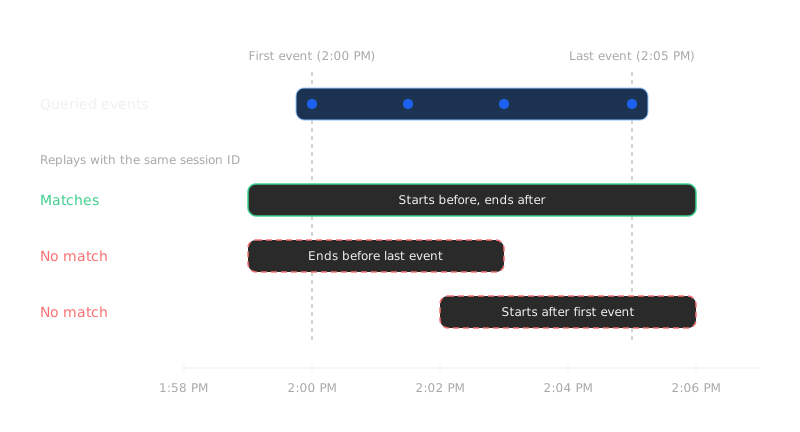
These criteria preserve the context around the events. For example, if checkout events occur between 2:00 PM and 2:05 PM in one session, Amplitude returns replays with that session ID that start before 2:00 PM and end after 2:05 PM. You can watch the actions leading to checkout and what happened afterward.
Time-based matching uses the same device ID and overlapping time windows instead of requiring analytics events to include a session ID. The replay SDK still needs an ID to group and upload replay data. That replay ID doesn't need to appear on your analytics events.
Choose a matching option
| Option | Use when | Setup |
|---|---|---|
| Match Amplitude sessions (recommended) | Your pipeline sends session IDs and you want matching to respect your project's session definition. | Default session_id matching works automatically. For event-property sessions, configure custom session matching. |
| Time-based event matching | Your pipeline sends timestamps without session IDs, such as events delivered through S3. | Configure time-based matching with a 30- or 60-minute window and a frontend replay session ID. |
| Session ID matching (legacy) | You need backward compatibility with Amplitude session_id matching. | No additional SDK changes required. |
Session matching options
Match Amplitude sessions (recommended)
Amplitude matches replays using your project's session definition, including sessions defined by event properties, timeout windows, or start and end events. If you use the default session_id, matching works automatically without additional SDK configuration.
Requirements for custom session definitions
If your project defines sessions by an event property, the replay SDK must send the same session ID value as that property. For example, if analytics events use an order ID to group a checkout session, send that order ID to Session Replay too. A different value prevents Session Replay from matching that custom session.
Configure custom session matching describes the project settings, supported SDK versions, ID constraints, and platform setup. For other custom session definitions, review how Amplitude defines sessions.
Time-based event matching
Time-based matching builds sessions using 30- or 60-minute windows of event activity. Amplitude links replays to events by device ID and overlapping time windows. This mode has slightly less precision at session boundaries than matching Amplitude sessions.
The standalone Session Replay SDK still needs a replay sessionId, even when analytics events don't include one. Configure time-based matching describes how to generate the ID on the frontend and keep replay uploads aligned with your chosen window.
Session ID matching (legacy)
This option matches the Amplitude session_id, even when it doesn't align with a custom session definition. It exists for backward compatibility and requires no additional SDK changes. Amplitude continues to support this option and isn't deprecating it, though Amplitude recommends newer options for most use cases.
Configure session matching
The matching setting applies to all projects in your organization. A change affects matching for future replays, without changing historical data. You can reverse the change without losing data.
To configure and test the matching option:
- Review the analytics events your pipeline sends. Identify whether they include the default
session_id, a custom session-defining property, or timestamps without session IDs. - Go to Organization Settings > Session Replay.
- Select the option from the matching options table that fits your pipeline. For time-based event matching, select a 30- or 60-minute window.
- Complete the custom session matching setup if you use an event-property session definition. Complete the time-based matching setup if your analytics events have no session IDs. Default
session_idmatching requires no additional SDK setup. - Capture a test session and search for a known event from that session. Open the matching replay and check that the recorded activity corresponds to the event.
If the test replay doesn't match, compare the device IDs and session IDs your analytics pipeline and replay SDK send. For time-based matching, compare the device IDs and event timestamps. Use the troubleshooting guide if capture or playback also fails.
Was this helpful?