For AI agents: a documentation index is available at /docs/llms.txt. Append .md to any page URL for markdown, or send Accept: text/markdown.
Use Fireworks AI with Agent Analytics
Agent Analytics records every request your agent sends to Fireworks AI, scores each conversation for quality, and joins those scores to what your users do in your product. The Amplitude AI SDK for Node and Python wraps Fireworks' OpenAI-compatible client and captures the Fireworks request ID on every response. You can then export the scored sessions to train or fine-tune a model on Fireworks, using quality criteria you define.
Use this page when your agent calls Fireworks directly. If your Fireworks traffic passes through another gateway, such as OpenRouter or LiteLLM, use AI gateways and routers instead.
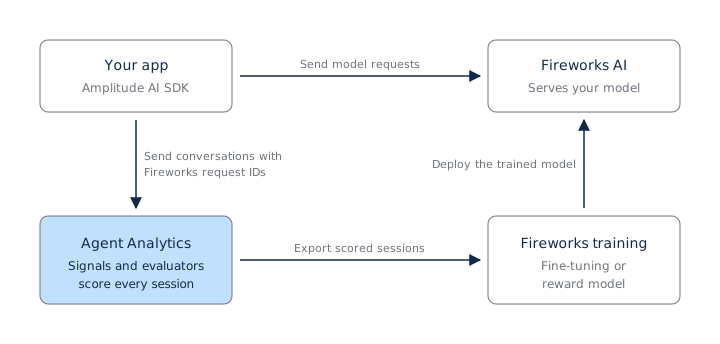
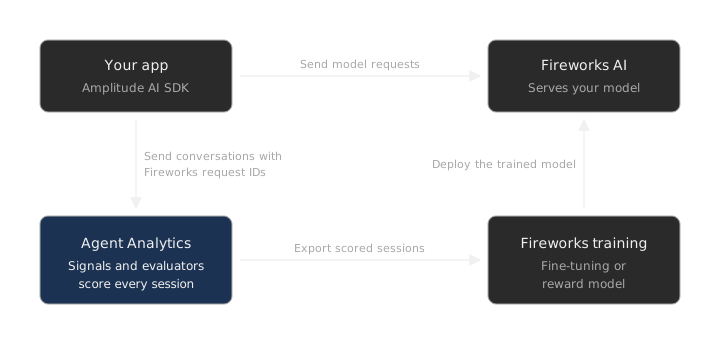
The integration has three parts, and you can adopt them in order:
- Instrument: Wrap the Fireworks client with the AI SDK so each request reaches Agent Analytics with its user, conversation, agent, and Fireworks request ID.
- Score: Amplitude's built-in signals score every closed session. Custom evaluators add your own criteria.
- Export: Pull scored sessions, traces, and evaluator results into your training pipeline, then train on Fireworks.
Set up with your AI coding agent (recommended)
Paste this prompt into your AI coding agent, such as Cursor, Claude Code, Windsurf, GitHub Copilot, or Codex. The agent installs the AI SDK, reads its bundled instructions, finds every Fireworks call, and instruments it.
Instrument this app with Amplitude Agent Analytics using the Node SDK. Our model calls go to Fireworks AI.

Also fetch https://raw.githubusercontent.com/amplitude/Amplitude-AI-Node/main/docs/integrations/routers.md
and follow "Path 1: wrap the client" with the Fireworks base URL and the `fireworks` gateway tag.

Install the SDK:

npm install @amplitude/ai @amplitude/analytics-node

Then follow `node_modules/@amplitude/ai/amplitude-ai.md`.
Review the changes it proposes, then confirm the result with Verify the integration.
Send Fireworks traffic to Agent Analytics
Point the AI SDK's wrapped OpenAI client at Fireworks' base URL, https://api.fireworks.ai/inference/v1, and run each request inside an agent session. The session supplies the three facts Fireworks doesn't know: who the user is, which conversation the request belongs to, and which agent made it. The wrapped client tracks each new user message for you, so don't also track it by hand.
import { AmplitudeAI, OpenAI } from "@amplitude/ai";

const ai = new AmplitudeAI({ apiKey: process.env.AMPLITUDE_AI_API_KEY! });
const fireworks = new OpenAI({
  amplitude: ai,
  apiKey: process.env.FIREWORKS_API_KEY,
  baseUrl: "https://api.fireworks.ai/inference/v1",
});
const agent = ai.agent("support-bot", {
  context: { ingestion_path: "gateway", gateway: "fireworks" },
});

export async function handleChat(
  userId: string,
  sessionId: string,
  messages: { role: "user"; content: string }[],
) {
  return agent.session({ userId, sessionId }).run(async () => {
    const response = await fireworks.chat.completions.create({
      model: "<router or model ID>",
      messages,
    });
    return response.choices[0]?.message.content;
  });
}
The SDK detects Fireworks from the *.fireworks.ai base URL. Each [Agent] AI Response event, streamed or not, carries:
| Property | Value |
|---|---|
[Agent] Provider | fireworks |
[Agent] Provider Request ID | Fireworks' response.id for that request. It's the key that ties a score or an exported turn back to one Fireworks inference. |
[Agent] Model Name | The model that answered. For a router, the model the router selected. |
[Agent] Cost USD | Cost at public rates. The SDK prices a tier router, such as a -fast router, at its tier, and other routers at the model they selected. A model the SDK can't price has no cost rather than $0. |
[Agent] Context | ingestion_path and gateway, so you can separate Fireworks traffic from other providers in charts. |
If Fireworks sits behind your own proxy URL, the SDK can't detect it from the URL. On the Node SDK, set provider: 'fireworks' on the client. The SDK doesn't send Fireworks' x-multi-turn-session-id header automatically.
If your application already emits OpenTelemetry GenAI spans for its Fireworks calls, you can send those to Amplitude's OTLP endpoint instead of wrapping the client. The span's gen_ai.response.id becomes [Agent] Provider Request ID. Refer to Send OpenTelemetry traces to Agent Analytics.
Verify the integration
Send a conversation with at least two requests, then open Agent Analytics. Confirm that the conversation appears as one session and that each AI Response has [Agent] Provider Request ID and [Agent] Model Name. Sessions show quality scores after they close and Amplitude enriches them.
Define the quality signals you train on
Agent Analytics labels each session from two sources, and either can define what good looks like in your training data.
- Built-in signals: Amplitude scores every closed session for task completion, response quality, user intent, session safety, user friction, negative feedback, and data quality, each with a written rationale. Amplitude defines these signals, and they need no setup.
- Custom evaluators: When a built-in definition doesn't match your product, such as your own version of task completion, write a custom evaluator. LLM evaluators answer a prompt you write. Code evaluators match patterns. Each evaluator returns a binary result or a label from a set you define, and you calibrate it against sessions you've reviewed. Refer to Create and calibrate evaluators.
You choose which sessions each evaluator runs on: all sessions, a sample rate, or sessions that match conditions such as tool errors, user feedback, or a signal result. Only the sessions an evaluator ran on carry its results, so set coverage to include the sessions you plan to train on.
Bring your own Fireworks key
Custom LLM evaluators and calibration runs can use a model you serve on Fireworks. An organization admin adds a Fireworks API key under Settings > AI Controls > Model Providers, and evaluators then make their model calls on that key. Refer to Set up custom evaluators.
Compare a Fireworks model with your current model
Before you switch models, run the Fireworks model against your current model as an experiment, and compare the two in Agent Analytics.
- Assign each user to a model with a feature flag or experiment, for example in Amplitude Experiment.
- Pass the assigned variant as
experiment_variantin the agent's context. The SDK doesn't read flag assignments, so the variant reaches Agent Analytics only when you pass it. Child agents inherit their parent's context. Refer to Add segmentation with context. - Compare the variants on built-in signals, evaluator results,
[Agent] Cost USD, and[Agent] Latency Ms.[Agent] Contextis a JSON string, so filter each variant with[Agent] Context contains "experiment_variant":"<variant>", or create a derived property that extracts the key. Refer to Query context in Amplitude. - Read sessions from both variants before you trust the numbers.
Run each evaluator you compare at the same coverage in both variants. If an evaluator samples sessions or runs only on matching conditions, its results reflect which sessions it ran on, not only the model. For product outcomes such as retention, use the experiment's Analysis view.
If you call a Fireworks router instead of a fixed model, [Agent] Model Name records the model the router selected for each response, so you can compare outcomes by routed model the same way.
Export scored sessions to train on Fireworks
You run the export and choose what to train on. Amplitude doesn't send your sessions to Fireworks.
Choose one export path:
- Dataset export in Amplitude: Add sessions to a dataset of up to 1,000 sessions, label ground truth where you want human-verified targets, and use Full export. The file holds session metadata, traces, enrichments, and review comments and tags for every session. Refer to Datasets.
- Export API: Pull sessions, datasets, and evaluator configurations into a pipeline over HTTP. Each session includes its traces and spans, ordered turns with
provider_request_id, evaluator results, and built-in signals. The dataset endpoint adds each member's ground-truth labels. Your plan's lookback window and session cap apply. Refer to the Agent Analytics export API.
Fireworks offers several training methods. Refer to Fireworks' training overview to choose one. The two recipes that follow cover the most common cases.
Prepare supervised fine-tuning data
Supervised fine-tuning teaches a model to reproduce good conversations.
- Select the sessions that meet your bar. For example, sessions where task completion passed, negative feedback and user friction weren't detected, and your custom evaluators passed.
- Export them with either path.
- Rebuild each conversation in order. In the export API, sort
turnsbycreated_at, read message text from each span'sraw_inputandraw_output, and resolve repeated values, such as system prompts and tool definitions, fromshared_attributes. - Write one JSON object per conversation with a
messagesarray, and atoolsarray when the agent calls tools, in the format Fireworks supervised fine-tuning expects.
Prepare reward model or reinforcement learning data
A reward model learns to score responses, so it needs both good and bad examples with their labels.
- Export sessions across the full range of outcomes, not only the passing ones.
- Build one record per model request. Include the model's input at that point in the conversation, its output, and the labels for the session it belongs to, from built-in signals, evaluator results, and any ground-truth labels.
- Key each record by
provider_request_id, so you can match it to the request Fireworks served.
Evaluator results arrive as each evaluator produced them. Use the passed field for binary outcomes, and map classification labels you care about to rewards. Treat unrecognized labels as unknown, because the label set can change with the evaluator's prompt. Refer to Evaluation results.
To train with the labeled records, use Fireworks' Training API for reinforcement learning, or build pairs of preferred and rejected responses for preference optimization.
Test a candidate model offline
To score a Fireworks model before you ship it, fetch your evaluator definitions with Get an evaluator configuration. Each configuration includes the evaluator's prompt, model, and labels, so you can run the same judgment on the candidate model's responses in your own tooling.
Was this helpful?