For AI agents: a documentation index is available at /docs/llms.txt. Append .md to any page URL for markdown, or send Accept: text/markdown.
Connect context to Amplitude Opportunities (Early Access)
This feature is in Early Access. During this time, aspects of the functionality may still be developed, and this documentation may not always be up to date. If you have any questions, contact Amplitude Support.
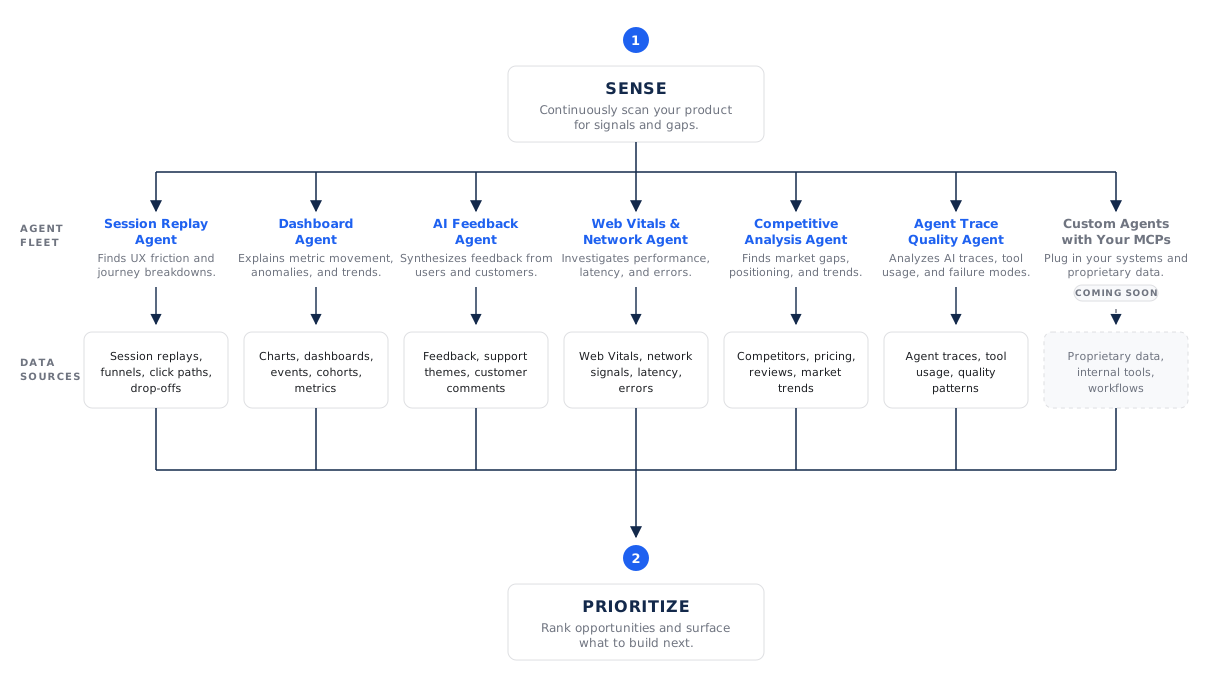
The quality of the opportunities Amplitude discovers depends on the context connected to each Product Area. Discovery agents analyze your connected insight sources, corroborate findings across them, and ground every opportunity in specific evidence. More relevant signal produces sharper, better-evidenced opportunities.
You don't need every source on day one. Start with what you have, and add sources as activity grows. More relevant sources give agents more signal to analyze.
Insight sources
Each Product Area can draw on the following sources. You control which ones discovery uses for a given area.
| Source | What it contributes |
|---|---|
| Product Analytics | Existing charts and dashboards, including conversion rates, volume trends, and segment behavior that form the quantitative baseline. |
| Session Replay | Visual evidence of how users behave: friction signals like rage clicks and dead clicks, and where users hesitate or abandon. |
| AI Feedback | Themes from qualitative feedback: complaints, feature requests, and praise drawn from surveys, support tickets, and other channels. |
| Autocapture | Interaction data that helps Amplitude understand product usage even when custom instrumentation is incomplete. |
| Specialized Agents | Findings from other Specialized Agents, such as the Dashboard, Session Replay, and Customer Feedback agents. |
| Agent Analytics and traces | Usage, quality, and performance signal from AI agents and AI-powered product experiences. |
| Experiments | Results from active and completed experiments, including what's already been tried. |
| Web vitals | Performance signals such as latency and page experience that help identify technical friction. |
| Competitor context | Competitors or comparables configured on a Product Area, used for inspiration and market-aware recommendations. |
| Custom Agents (coming soon) | Bring your own MCP connectors so custom agents can analyze proprietary data sources, internal tools, and workflows. |
| Anomalies (coming soon) | Alerts when a metric moves unexpectedly, so discovery can react to emerging problems. |
| Surveys | Direct survey responses, when surveys are active. |
| PR reviews (coming soon) | Signal from code review activity, when you connect repositories. |
Sources adapt to your setup
Discovery uses the sources available in your project and Product Area. For example, Session Replay contributes signal when replay is active, and experiment results contribute signal when you run experiments. You can edit Product Area settings to refine product understanding, investigation guidance, plan generation, and coding-agent handoff.
Connect your codebase
The highest-leverage context source is your codebase. When you connect GitHub repositories to a Product Area, discovery and execution improve in three ways:
- Product understanding: Amplitude indexes how the Product Area works, what the measurement plan looks like, and even who built different features, which improves discovery quality.
- Grounded plans: Recommendations reflect the current state of your code, so an opportunity can point to where a change should land instead of describing it abstractly.
- Agent-ready execution: A connected repository lets coding agents draft pull requests directly from an opportunity's execution plan.
To set up GitHub access and coding agents, go to Wave settings > Coding agents. Connect the GitHub App, choose the repositories that matter for your organization, then attach the relevant repositories on each Product Area. Start with a small set of repositories so recommendations reflect the current state of the product and where a change should happen.
Access and privacy
Opportunities operates within your existing Amplitude environment and honors your organization's data access controls and permissions. Amplitude uses connected code to ground recommendations for your organization, not to train shared models. For how Amplitude secures code indexing and coding-agent sandboxes, go to Amplitude coding agent.
How context becomes evidence
Discovery doesn't just read these sources: it cites them. When an opportunity makes a claim, that claim links back to the specific chart, dashboard, session replay, or feedback theme it came from. The system requires corroboration across multiple independent signals before promoting a finding to a high-priority opportunity, so a single weak signal doesn't drive your roadmap.
To learn how evidence and citations appear on an opportunity, go to Opportunities.
Was this helpful?