For AI agents: a documentation index is available at /docs/llms.txt. Append .md to any page URL for markdown, or send Accept: text/markdown.
Tuning (Early Access)
This feature is in Early Access. During this time, aspects of the functionality may still be developed, and this documentation may not always be up to date. If you have any questions, contact Amplitude Support.
Tuning starts with Product Area settings. Product Areas define the goals, scope, sources, contrasts, metrics, and instructions that steer what Amplitude looks for and how it judges quality. If generated Opportunities feel misaligned, the first place to tune is the Product Area.
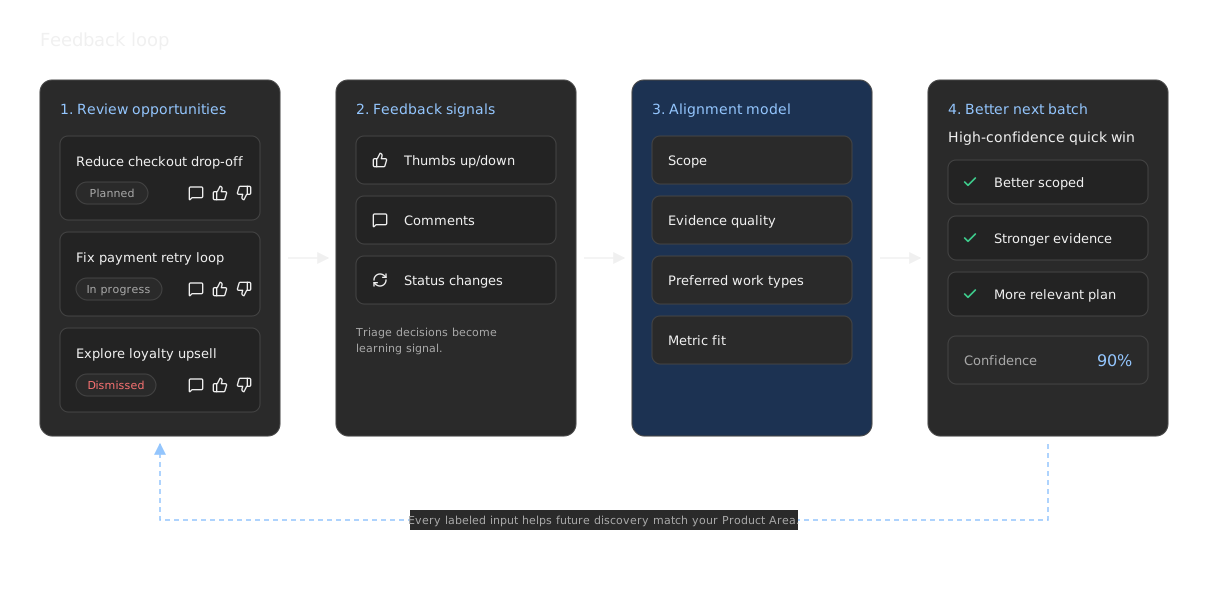
Feedback compounds inside that Product Area. Direct comments, thumbs up/down reviews, status changes, dismissals, edits, and triage decisions all help Amplitude improve future recommendations for the same Product Area.
Tune before you judge quality
If the first batch feels too broad, too technical, or too speculative, don't abandon the Product Area. Tighten Product Area settings first: scope, exclusions, goals, sources, metrics, opportunity mix, and the plan, investigation, and coding agent instructions. Then give feedback on the Opportunities you review. The next discovery cycle uses both the settings and the Product Area-scoped feedback.
What you can tune
Tune these settings when a Product Area produces Opportunities that feel misaligned, repetitive, too small, or too broad. In practice, teams vary Product Areas along a small set of dimensions: scope and exclusions, goal tags, target metrics, success criteria, insight sources, opportunity mix, and three instruction lanes (plan, investigation, and coding agent).
| Setting | What to tune | When to adjust it |
|---|---|---|
| Focus area | The product surface, journey, workflow, or customer problem the Product Area covers. | Opportunities span too many teams, pages, or user jobs. |
| Goals | Durable outcome tags such as activation, conversion, retention, UX, revenue, or performance. | Opportunities are relevant to the product but not to the current business goal. |
| Contrasts and exclusions | Nearby areas, surfaces, or metrics that should stay out of scope. | Discovery keeps returning plausible but distracting ideas. |
| Target metrics | Primary, secondary, and guardrail metrics that define success. | Opportunities don't connect clearly to measurable impact. |
| Success criteria | A plain-language statement of what good looks like for this area. | Opportunities optimize a metric without matching the outcome you care about. |
| Insight sources | Analytics, Session Replay, AI Feedback, Autocapture, Experiments, specialized agent results, web vitals, anomalies, surveys, agent traces, PR reviews, competitor context, and code repositories. | Recommendations lack evidence, over-index on one source, or miss known context. |
| Opportunity mix | The type and size of work the system should prefer, such as quick wins, bug fixes, features, strategic bets, or wildcards. | The backlog contains too many bugs, too many strategic bets, or not enough quick wins. |
| Plan instructions | The durable charter: what the area is, the outcomes that matter, baselines, and hard boundaries. | Specs feel generic, out of scope, or disconnected from current strategy. |
| Investigation instructions | Where agents should look: journeys, signals, comparisons, and questions that matter. | Evidence is thin, one-sided, or explores the wrong flows. |
| Coding agent instructions | How agents should implement: repo map, preferred change style, validation, and rollback. | Plans are good, but handoffs are vague or land in the wrong code. |
| Custom instructions | Extra durable preferences that don't fit the three instruction lanes. | Your team has stable rules about evidence quality, rollout, or ownership. |
| Product Area feedback | Thumbs up/down reviews, comments, status changes, dismissals, edits, and triage decisions. | Always. This is the strongest ongoing tuning signal after Product Area settings. |
Define a strong focus area
A strong focus area gives the system a clear search space. It should name the user journey or product surface and describe what outcome matters.
Good focus areas:
- AI Feedback: Covers the full source-to-insight loop, including source connection, ingestion quality, theme generation, insight review, feedback triage, and repeated team usage. Excludes unrelated core analytics funnels unless they directly affect the feedback workflow.
- Dashboards: Covers first dashboard creation, chart edits over time, dashboard retention, sharing, exports, and recurring reporting workflows. Excludes deep chart-query authoring unless it directly blocks dashboard creation or ongoing dashboard usage.
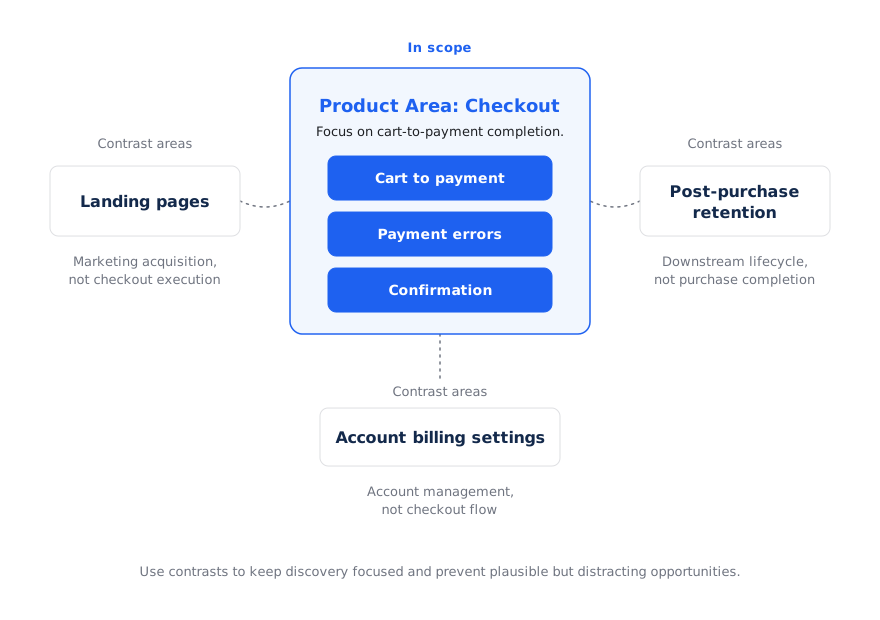
- Checkout: Covers cart-to-payment completion, payment errors, recovery flows, purchase confirmation, and guardrail metrics such as latency. Excludes marketing landing pages and post-purchase retention unless they directly affect checkout completion.
- Session Replay for support: Covers replay discovery, support-led debugging, replay sharing, issue reproduction, and follow-up analysis. Excludes general replay exploration unless it directly supports support workflows.
Weak focus areas:
- Growth.
- The dashboard.
- Improve UX.
- Everything related to AI.
If a focus area feels broad, split it. For example, instead of one Product Area for "Onboarding", create separate areas for "First data connection", "First chart creation", and "Invite teammates".
Add contrast areas
Contrasts are nearby areas that are intentionally out of scope. They help the system distinguish useful opportunities from distracting ones.
Use contrasts when the Product Area borders another team, workflow, or metric.
Examples:
- For Checkout, include payment submission, error recovery, and purchase confirmation. Exclude marketing landing pages and post-purchase retention.
- For Chart Builder, include chart creation, save flows, query latency, and first useful visualization. Exclude dashboard layout and sharing unless they directly block chart creation.
- For AI Feedback, include source connection, ingestion reliability, insight quality, and repeated team usage. Exclude unrelated core analytics funnels.
Tune the opportunity mix
Opportunities can represent different types of work. Use Product Area guidance and triage feedback to shape the mix you want.
| Opportunity type | Use it for | Best when |
|---|---|---|
| Bug fix | Broken behavior, errors, regressions, retry loops, or UI states that block users. | Evidence shows a clear failure and the fix is specific. |
| Quick win | Low-effort changes with measurable upside. | The scope is small, reversible, and easy to validate. |
| Feature | New capabilities or workflow improvements. | Feedback and usage patterns point to a missing product capability. |
| Strategic bet | Larger cross-surface improvements or broad workflow changes. | The Product Area is mature enough to justify larger investment, and multiple signals support the bet. |
| Wildcard | Emerging or surprising ideas that don't fit the normal pattern. | You want the system to explore adjacent possibilities, not just optimize known funnels. |
Match the mix to product maturity
For early products, allow more feature and wildcard opportunities. Early teams benefit from broader exploration and bigger swings.
For mature, high-volume surfaces, bias toward quick wins, bug fixes, experiments, and careful rollout plans. Mature teams usually need smaller, safer, more measurable changes.
For mid-maturity products, keep a balanced mix: some workflow improvements, some bug fixes, and a few larger bets.
Select the right sources
Sources determine what the system can learn. A Product Area with only analytics may find metric movement but miss the user experience behind it. A Product Area with only feedback may find sentiment but miss scale.
Use this guidance:
- Analytics for volume, conversion, retention, and segment-level impact.
- Session Replay for how the problem appears in real user behavior.
- AI Feedback for complaints, feature requests, and qualitative themes.
- Autocapture for product interaction signal when custom instrumentation is incomplete.
- Experiments for what teams have already tried and what moved metrics.
- Specialized Agents for ongoing domain-specific summaries.
- Web vitals for technical performance and page experience signals.
- Agent traces for AI-powered product usage, quality, and performance.
- Competitor context for market-aware ideas and comparable workflows.
- Custom Agents (coming soon) for MCP-connected internal data sources, proprietary systems, and workflows.
- Code repositories for execution plans that point to real implementation locations.
- Anomalies (coming soon) for emerging metric changes that need investigation.
- Surveys for direct user intent and satisfaction signals.
- PR reviews (coming soon) when code review activity can reveal delivery friction or implementation risk.
For high-confidence opportunities, look for at least two independent sources. For example, pair a funnel drop-off with session replay evidence, or pair a feedback theme with a supporting usage trend.
Use metrics and success criteria as alignment anchors
Target metrics tell Amplitude how to score and frame opportunities. Each Product Area should include:
- Primary metrics that define success.
- Secondary metrics that help diagnose why the primary metric moves.
- Guardrail metrics that shouldn't regress.
Pair metrics with a short success criteria statement so agents optimize for the outcome you care about, not only a chart number. For example: "Increase paid subscription conversion and subscriber return without increasing checkout abandonment."
Avoid using only one metric. A single conversion metric may produce narrow recommendations that ignore quality, latency, support burden, or downstream retention.
Write durable instructions
Product Areas give you three instruction lanes plus optional custom instructions. Fill each lane with stable guidance, not temporary tasks. Temporary requests belong in a focused Discover run, Global Chat, or a comment on a specific Opportunity.
Plan instructions
Use plan instructions as the Product Area charter. Strong plan text usually covers:
- What the product surface is and what durable outcomes matter.
- Current baselines or maturity context when that changes the quality bar.
- Hard boundaries and nearby areas that belong elsewhere.
- Preferences for how to frame, size, or roll out opportunities.
Good plan instructions:
- Cover the paid subscription lifecycle from paywall exposure through purchase completion and subscriber return. Treat repeat content consumption as a separate Product Area unless it directly explains retention.
- Prefer low-effort, reversible changes before high-complexity interventions. Include an experiment or rollout plan for mature, high-volume flows.
- Don't recommend instrumentation-only work. Prefer ambitious product changes when evidence supports them.
Investigation instructions
Use investigation instructions to steer where agents look and what they compare. Strong investigation text usually covers:
- Key journeys or funnels to analyze.
- Signals, segments, or platforms worth comparing.
- Questions the next discovery run should answer.
- Measurement gaps or known confounders to separate from product friction.
Good investigation instructions:
- Explore where eligible readers fail to become subscribers and where new subscribers fail to return after purchase. Compare platform, paywall state, content type, acquisition source, and lifecycle stage.
- Focus on the full daily task loop: session open, task creation, edit and delete flows, and the All Tasks Completed moment. Treat Reset All Data spikes as a frustration guardrail.
- Structure investigation across UI lifecycle, agent tool-call quality, and multi-surface entry points such as chat or MCP. Keep adjacent products out of scope unless they block this area.
Coding agent instructions
Use coding agent instructions when you connect repositories and want implementation handoffs to land cleanly. Strong coding-agent text usually covers:
- Which repos, packages, or services own the surface.
- How to trace a behavioral issue back to specific code paths.
- Preferred change style: minimal fixes, rollback steps, and metric checks after deploy.
- Validation criteria before marking work complete.
Good coding agent instructions:
- Frontend lives in
apps/vocandpackages/voc-ui. Backend lives inserver/packages/klassy. Prefer targeted fixes over broad refactors. - When fixing agent-run failures, trace to the failing tool call and its input or output before writing a fix. Validate against agent success rate and dismissal rate.
- Always include rollback steps and post-deploy metric monitoring. Validate changes against the expected metric impact before marking work complete.
Custom instructions
Use custom instructions for durable preferences that don't fit the three lanes cleanly, such as evidence rules or ownership constraints:
- Prioritize opportunities with evidence from at least two independent sources.
- Avoid opportunities that require changes outside the Checkout team unless they directly block checkout completion.
Avoid instructions such as:
- Investigate the drop from last Tuesday.
- Focus on the latest release.
- Find five bugs this week.
Run focused discovery
Product Area settings are durable, but not every investigation needs a settings change. Use a focused Discover run when you want the Opportunity Manager to investigate a specific overarching problem, user flow, page, or category of signal for one run.
Focused discovery is useful when you want to:
- Look for Opportunities around a specific page or flow, such as onboarding setup, checkout, or dashboard export.
- Direct agents toward a broad problem area, such as activation friction or performance issues.
- Investigate a category of signal, such as feedback themes, replay friction, web vitals, or experiment learnings.
- Go deeper into an area without changing the Product Area's durable scope, metrics, or instructions.
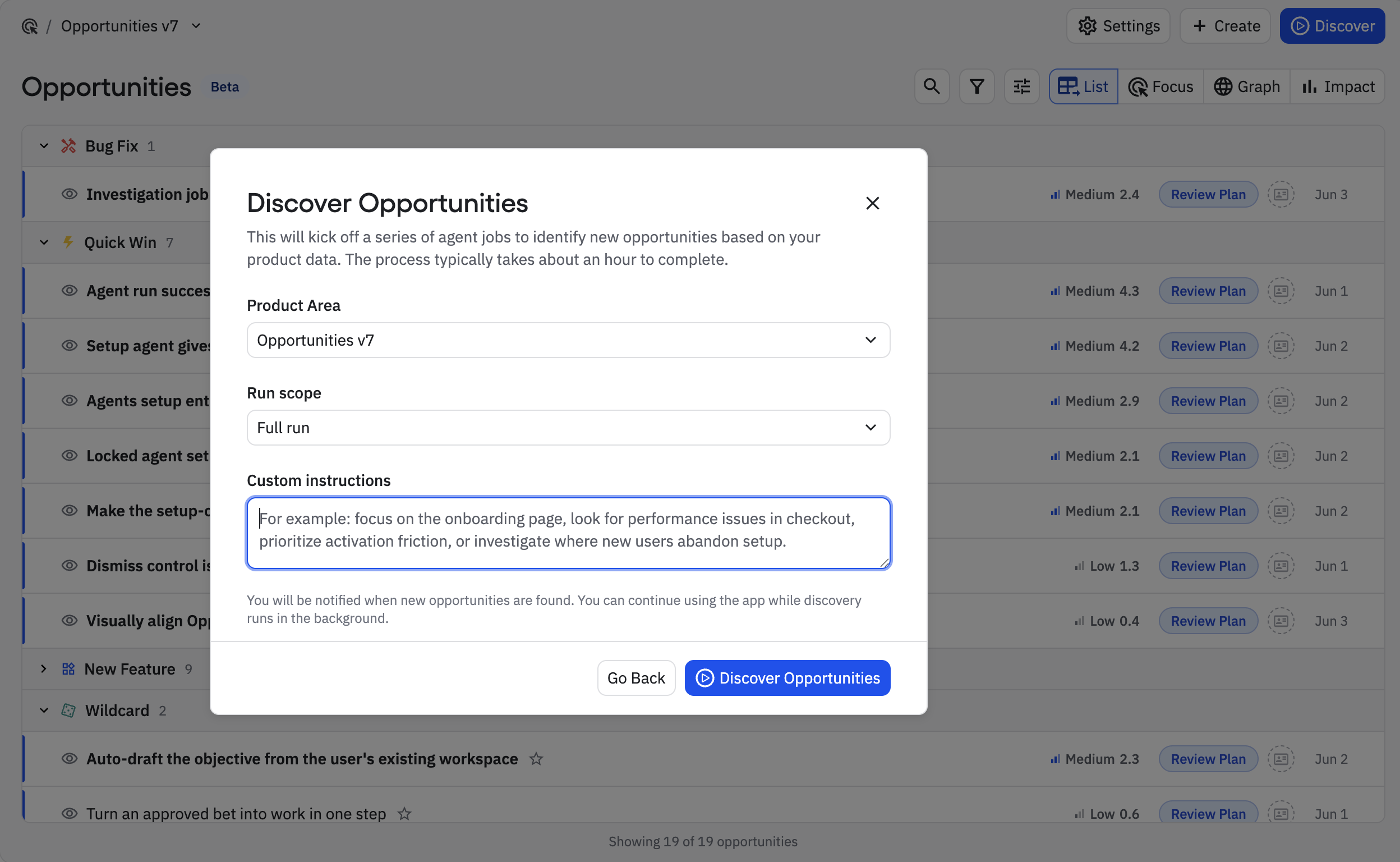
Focused discovery is different from submitting a manual Opportunity idea. Use focused discovery when you want agents to explore a scope and generate a batch of possible Opportunities. Use a manual Opportunity idea when you already have a specific idea and want Amplitude to flesh it out with evidence, scoring, and a plan.
Feedback is the tuning loop
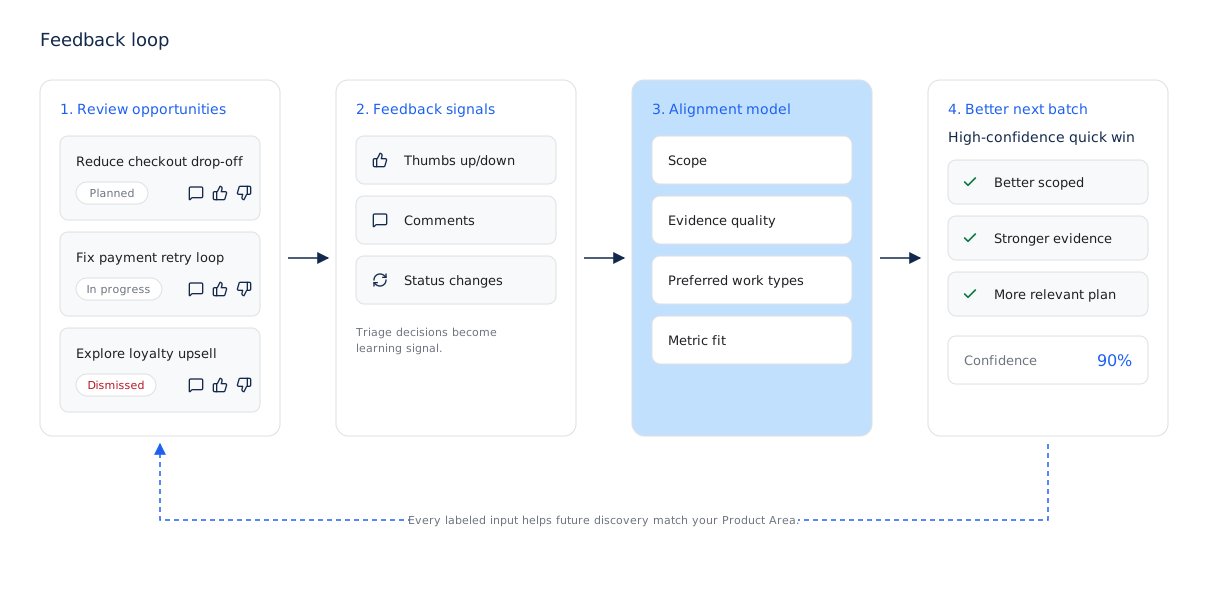
Feedback is the ongoing tuning mechanism within a Product Area. Amplitude uses both explicit feedback and workflow behavior to improve future Opportunity alignment for that Product Area.
Thumbs up and thumbs down
Use thumbs up when an Opportunity is useful, well-scoped, and worth seeing more of. Use thumbs down when the signal is wrong, the plan is weak, or the Opportunity doesn't match the Product Area.
Every labeled input gives Amplitude context about your team's preferences for that Product Area. That signal helps the next discovery cycle rank and write Opportunities that better match the Product Area's goals.
Direct feedback
Leave comments when an Opportunity is wrong, weak, duplicated, too broad, or missing important context. Good feedback explains the reason, not just the decision.
Examples:
- "This is out of scope for Checkout. It belongs to account billing settings."
- "The evidence is too replay-heavy. Need chart-backed volume before prioritizing."
- "This is a good quick win, but the proposed fix should avoid changing the payment provider."
- "Duplicate of the payment retry work already in progress."
Triage feedback
Your triage choices also teach the system:
- Planned signals that the Opportunity matched the Product Area and quality bar.
- In progress signals that the spec was actionable enough to start work.
- Dismissed signals that the Opportunity didn't match the scope, had weak evidence, duplicated existing work, or wasn't worth pursuing.
- For review, Shipped, and Measured close the loop from recommendation to outcome.
Use statuses honestly. Don't leave low-quality or irrelevant opportunities in New forever. Dismissing and commenting on them gives the system stronger signal than ignoring them.
Review cadence
For best results:
- Review new opportunities after each discovery run.
- Dismiss irrelevant or weak opportunities instead of leaving them untouched.
- Add comments when the reason matters for future discovery.
- Move actionable opportunities through the lifecycle as work progresses.
- Revisit Product Area settings when multiple opportunities show the same kind of mismatch.
Tuning isn't a one-time setup step. Treat Product Area settings like product strategy: the clearer the goals and boundaries, and the more honest the feedback, the more useful the recommendations become.
Was this helpful?