For AI agents: a documentation index is available at /docs/llms.txt. Append .md to any page URL for markdown, or send Accept: text/markdown.
セッションリプレイ Flutter スタンドアロン SDK
この記事では、Flutter用セッションリプレイのインストールについて説明します。
iOSおよびAndroidのみ
Session Replay Flutter SDKは、iOSおよびAndroidのみをサポートしています。この SDK は Flutter Web、macOS、Windows、Linux をサポートしていません。
早期アクセス
Flutter 用セッションリプレイは現在早期アクセス版です。APIは変更される可能性があり、この機能が一般提供される前に大幅な変更が行われることが予想されます。
以前のベータ版からアップグレードする場合は、重大な API 変更について、「以前のベータ版からのアップグレード」を参照してください。
Flutter のセッションリプレイに関する問題をレポートするには、Amplitude サポートにお問い合わせください。
始める前に
amplitude_session_replayパッケージの最新バージョンを使用してください。
セッションリプレイ Flutter SDK には次のことが必要です。
- アプリケーションは iOS 13.0 以降または Android 5.0 以降(minSdk 21)で実行されます。
- プロジェクトでは、Dart SDK 3.7.2 以降および Flutter SDK 3.29.2 以降を使用しています。
device IDおよびsession IDをSDKに提供できること。これらの値は、イベントプロパティとしてAmplitudeに送信する識別子と一致している必要があります。
SDK はセッション管理を提供していません。 アプリケーションまたはサードパーティの連携は、セッション ID またはデバイス ID が変更された場合に SDK を更新する必要があります。
互換性
| 要件 | 最小バージョン |
|---|---|
| Dart SDK | 3.7.2 |
| Flutter SDK | 3.29.2 |
| iOS | 13.0 |
| Android minSdk | 21(Android 5.0) |
| Android compileSdk | 36 |
クイックスタート
セッションリプレイをpubspec.yamlに追加します。
dependencies:
  amplitude_session_replay: ^1.0.1
次に、flutter pub getを実行します。
SessionReplayはプロセス全体のシングルトンです。SessionReplay.instanceからアクセスし、直接構築しないでください。
アプリケーションコードを設定します。
SessionReplayConfigを使用してSessionReplay.instance.init()を呼び出し、APIキー、デバイスID、およびセッションIDを渡します。init()は同期です。設定が保存され、メッセージチャネルハンドラをインストールします。start()を呼び出して、ネイティブSDKを初期化し、録画を開始します。- セッションIDまたはデバイスIDが変更された場合は、
setSessionId()またはsetDeviceId()を呼び出して、セッションリプレイの同期状態を維持してください。
import 'package:amplitude_session_replay/amplitude_session_replay.dart';
import 'package:flutter/widgets.dart';
void main() async {
  WidgetsFlutterBinding.ensureInitialized();
  // init() is synchronous: it stores the config and installs the channel handler.
  SessionReplay.instance.init(
    SessionReplayConfig(
      apiKey: 'YOUR_AMPLITUDE_API_KEY',
      deviceId: 'your-device-id',
      sessionId: DateTime.now().millisecondsSinceEpoch,
      sampleRate: 0.1,
    ),
  );
  // start() initializes the native SDK and begins recording.
  await SessionReplay.instance.start();
  runApp(const MyApp());
}
設定
SessionReplay.instance.init()を呼び出す際には、SessionReplayConfig経由で次のオプションを渡します。
| 名前 | タイプ | 必須 | デフォルト | 概要 |
|---|---|---|---|---|
apiKey | String | はい | — | 認証とデータルーティングのためのAmplitude APIキー。 |
deviceId | String | はい | — | デバイス識別子。Amplitudeイベントで送信するデバイスIDと一致している必要があります。6文字以上でなければなりません。 |
sessionId | int | いいえ | -1 | エポックからのセッション識別子(ミリ秒単位)。 値が-1の場合はアクティブなセッションが存在しないことを意味し、セッションリプレイは記録しません。Amplitudeイベントと一緒に送信するセッションIDと一致している必要があります。 |
sampleRate | double | いいえ | 0.0 | リプレイのためにキャプチャするセッションの割合(0.0–1.0)。たとえば、0.4はセッションの40%をキャプチャします。 |
logLevel | LogLevel | いいえ | LogLevel.warn | 冗長なログ記録。 オプション:LogLevel.off、LogLevel.error、LogLevel.warn、LogLevel.log、LogLevel.debug。 |
privacyConfig | PrivacyConfig | いいえ | PrivacyConfig.medium | 自動マスキング動作。 オプション:PrivacyConfig.conservative、PrivacyConfig.medium、PrivacyConfig.light。 |
enableRemoteConfig | bool | いいえ | true | Amplitudeサーバーからのリモート設定を有効にします。 |
optOut | bool | いいえ | false | trueの場合、セッションリプレイはデータの記録またはアップロードをおこないません。実行時に変更する場合はsetOptOut()を使用します。 |
serverZone | ServerZone | いいえ | ServerZone.us | データ常駐用のサーバゾーン。 EUデータセンターの場合はServerZone.euに設定します。 |
リモート設定
Amplitude でサンプルレートとマスクレベルを設定するには、リモート設定を有効にしてください。
リモート設定とテスト
を有効にすると enableRemoteConfigに設定するとtrueAmplitude で設定した値は、SDK 内でローカルに設定した値よりも優先されます。このため、アプリケーションをテストする際は、リモート設定を無効にしてsampleRateを1に設定できるようにし、テストセッションが確実にキャプチャされるようにすることをお勧めします。
画面上のデータをマスクする
セッションリプレイにはプライバシー制御のための3つのFlutterウィジェットがあります。これらのウィジェットは、ラップされたウィジェットのサブツリー全体に適用されます。優先順位:AmpBlock > AmpMask > AmpUnmask。
プライバシーレベル
privacyConfigオプションは自動マスキング動作を制御します。
| レベル | 行動 |
|---|---|
PrivacyConfig.conservative | すべてのテキストとすべてのフォームフィールドをマスクします。 |
PrivacyConfig.medium(デフォルト) | すべてのフォームフィールドとテキスト入力をマスクします。 |
PrivacyConfig.light | パスワードフィールドのみをマスクします。 |
AmpMask
キャプチャされたテキストのすべての文字をアスタリスク(*)で置き換えます。これにより、元のテキストの長さとレイアウトが維持されます。 自動プライバシーレベルでは検出できない機密情報を保護するために、これを使用します。
AmpMask(
  child: Text('Sensitive information'),
)
AmpBlock
サブツリー全体を記録しないようにブロックし、プレースホルダに置き換えます。機密性の高いコンテンツにはこれを使用してください:
AmpBlock(
  child: TextField(
    decoration: InputDecoration(labelText: 'Password'),
  ),
)
AmpUnmask
プライバシーレベルの規則による自動的なマスキングを防止します。 プライバシーレベルによってマスクされるはずの内容を表示する場合に使用します。AmpUnmaskは手動によるAmpMaskまたはAmpBlockを上書きすることはできません。
AmpUnmask(
  child: Text('Public content'),
)
ユーザーのオプトアウト
ユーザをセッションリプレイの収集から除外するには、初期化時にパスするか、optOut: true実行時に呼び出す必要がありますsetOptOut(optOut: true)。 オプトアウトされたユーザーは、リプレイデータを記録したりアップロードしたりすることはありません。
await SessionReplay.instance.setOptOut(optOut: true);
EU域内のデータレジデンシー
EUのデータセンターを使用しているAmplitudeのお客様は、セッションリプレイにアクセスできます。 初期化時にserverZoneをServerZone.euに設定します。
SessionReplay.instance.init(
  SessionReplayConfig(
    apiKey: 'YOUR_AMPLITUDE_API_KEY',
    deviceId: 'your-device-id',
    sessionId: DateTime.now().millisecondsSinceEpoch,
    serverZone: ServerZone.eu,
  ),
);
サンプリングレート
デフォルトでは、セッションリプレイで記録されるセッションの割合は0%です。 お使いのSDKのsampleRateキャプチャするセッションの割合を設定するための設定オプション。
手動および動的サンプリング、クォータ計画、クォータ管理については、セッションリプレイのサンプリングを設定するを参照してください。
SessionReplay.instance.init(
  SessionReplayConfig(
    apiKey: 'YOUR_AMPLITUDE_API_KEY',
    deviceId: 'your-device-id',
    sessionId: DateTime.now().millisecondsSinceEpoch,
    sampleRate: 0.01, // Capture 1% of sessions
  ),
);
セッションIDを更新する
セッションIDが変更された場合 (たとえば、ユーザーログイン時やセッションタイムアウト時など)、セッションリプレイを更新してください。
final newSessionId = DateTime.now().millisecondsSinceEpoch;
await SessionReplay.instance.setSessionId(newSessionId);
録画の開始と停止
特定のページや機能の録画を制御します。
// Stop recording before entering a restricted area
await SessionReplay.instance.stop();
// Resume recording after leaving the restricted area
await SessionReplay.instance.start();
リプレイ収集を無効にする
セッションリプレイを有効にした後は、次のいずれかの条件までアプリ上で実行されます。
- ユーザーがアプリを離れる。
SessionReplay.instance.stop()呼び出します。SessionReplay.instance.dispose()呼び出します。
ユーザーがアプリの制限付きエリアに移動する前にSessionReplay.instance.stop()を呼び出して、ユーザーがそのエリアにいる間のリプレイ収集を無効にします。
ユーザーがアプリの制限のないエリアに戻ったときに、SessionReplay.instance.start()を呼び出してリプレイ収集を再度有効にします。
ハイブリッドとadd-to-app
Flutterモジュールが、Amplitude Session Replay native SDKをすでに統合済みのネイティブiOSまたはAndroidホスト内で実行されている場合は、init()の代わりにSessionReplay.instance.attach()を呼び出してください。これによりメッセージチャネルハンドラーがインストールされ、ホストアプリのネイティブ SDK が API キー、デバイス ID、セッション ID、サンプリング、マスキング、およびアップロードのライフサイクルを所有できるようになります。 SessionReplayConfigは渡さないでください。このモードでは、ネイティブ SDK が設定を所有します。
import 'package:amplitude_session_replay/amplitude_session_replay.dart';
import 'package:flutter/widgets.dart';
void main() {
  WidgetsFlutterBinding.ensureInitialized();
  // The native SDK owns config and lifecycle. attach() only installs the
  // channel handler so native start commands reach the Flutter engine.
  SessionReplay.instance.attach();
  runApp(const MyApp());
}
ハイブリッドモードでは、ネイティブSDKが録画ライフサイクルを管理します。start()、stop()、flush()、setOptOut()、setSessionId()、およびsetDeviceId()は警告をログ出力し、何も実行しません(no-op)。これらの値はネイティブSDK上で設定してください。dispose()はDartチャネルハンドラとエンジンのみを破棄し、ネイティブSDKはそのまま残します。
アプリが複数のFlutterエンジンを実行している場合は(複数のDartエントリポイントを使用するFlutterEngineGroupなど)、各エントリポイントでattach()を呼び出します。各Flutterエンジンは独自のSessionReplay.instanceを持つ独立したisolateを実行します。
メソッド
これらのメソッドは、SessionReplay.instanceシングルトン上で呼び出します。
| メソッド | 返り値 | 概要 |
|---|---|---|
init(SessionReplayConfig) | void | 設定を登録し、チャネルハンドラをインストールします(Flutter専用モード)。同期型で、ライフサイクルごとに1回限り実行されます。新しい設定で再初期化する前に、dispose()を呼び出してください。 |
attach() | void | チャネルハンドラーをハイブリッドモードでインストールします。このモードでは、ネイティブSDKが設定とライフサイクルを管理します。init()の代わりに使用してください。 |
start() | Future<void> | 録画を開始します。最初の呼び出し時にネイティブSDKを初期化します。 |
stop() | Future<void> | 録画を停止します。再開するにはstart()を呼び出します。 |
dispose() | Future<void> | すべてのリソースをリリースし、シングルトンを初期化されていない状態に戻します。 再利用するには、init()またはattach()を再度呼び出します。 |
flush() | Future<void> | 保留中のリプレイデータを強制的にアップロードします。 アプリがバックグラウンドに移行する前、または終了する前に役立ちます。 |
setSessionId(int) | Future<void> | セッションIDを更新します。 |
sessionId() | Future<int> | 現在のセッションIDを取得します。 |
setDeviceId(String) | Future<void> | デバイスIDを更新します。 |
deviceId() | Future<String> | 現在のデバイス ID を取得します。 |
setOptOut(optOut: bool) | Future<void> | 実行時にオプトアウトを切り替えます。 true録画とデータのアップロードを停止します。 |
optOut(ゲッター) | bool | 現在のオプトアウト状況を取得します。 |
ライフサイクル
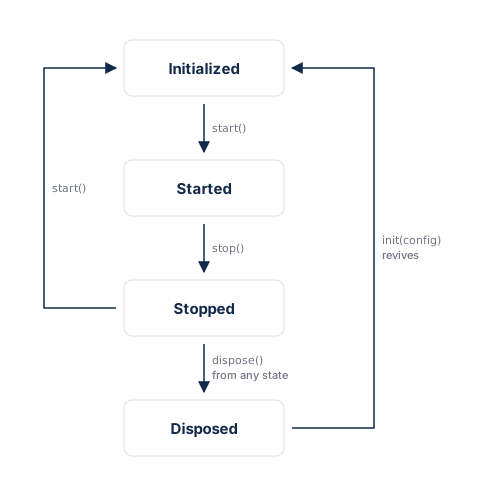
init()はライフサイクルごとに1回のみ実行されます。これは、初期化されていない(または廃棄済み)状態からのみ呼び出せます。新しい設定で再度初期化するには、まずdispose()を呼び出し、次にinit()を再度呼び出します。
dispose()はどの状態からでも呼び出すことができます。シングルトンを初期化されていない状態に戻すため、後でinit()またはattach()によって正常に復元されます。dispose()は永久的に破棄する場合のみ使用してください。録画を一時的に一時停止して再開するには、代わりにstop() およびstart() を使用します。
以前のベータ版からのアップグレード
バージョン0.1.0-beta.5ではインストールが簡素化され、SessionReplay APIが刷新されました。SessionReplayはプロセス全体のシングルトンとなり、SessionReplayWidgetラッパーが不要になりました。
破壊的変更
Flutter のみのアプリの場合:
| 古い API | 新しいAPI |
|---|---|
SessionReplay(config) コンストラクター | SessionReplay.instance.init(config) |
SessionReplayWidget(sessionReplay: ..., app: ...) | 削除されました。 ウィジェットのラップは不要です |
sessionReplayProperties() | 削除されました。 リプレイはdeviceIdおよびsessionIdによって照合されます |
ハイブリッドおよびadd-to-appの場合:
| 古い API | 新しいAPI |
|---|---|
SessionReplayConfig.shouldInitializeNativeSDK: false | 削除されました。 SessionReplay.instance.attach()を呼び出します |
ensureInitialized() | SessionReplay.instance.attach() |
Flutter 専用アプリ
コンストラクタとSessionReplayWidgetラッパーをSessionReplay.instance.init()とstart()に置き換えます
// Before
final sessionReplay = SessionReplay(
  SessionReplayConfig(apiKey: '...', sampleRate: 1.0),
);
runApp(SessionReplayWidget(sessionReplay: sessionReplay, app: const MyApp()));
await sessionReplay.start();
// After
SessionReplay.instance.init(          // synchronous, no await
  SessionReplayConfig(apiKey: '...', sampleRate: 1.0),
);
await SessionReplay.instance.start();
runApp(const MyApp());                // no SessionReplayWidget wrapping needed
init()ライフサイクルごとに1回限りです。 新しい設定で再初期化する前に、await SessionReplay.instance.dispose()を呼び出してください。- セッター(
setSessionId()、setDeviceId()、setOptOut())は引き続きinit()とstart()間で機能します。
ハイブリッドとadd-to-app
プレースホルダ設定とウィジェットラッパーを1回のattach()呼び出しで置き換えます:
// Before — placeholder config + widget wrapper
return SessionReplayWidget(
  sessionReplay: SessionReplay(
    const SessionReplayConfig(
      apiKey: 'YOUR_API_KEY',
      deviceId: 'YOUR_DEVICE_ID',
      shouldInitializeNativeSDK: false,
    ),
  ),
  app: MaterialApp(...),
);
// After — one line per entry point, no config needed
void main() {
  WidgetsFlutterBinding.ensureInitialized();
  SessionReplay.instance.attach(); // native owns config and lifecycle
  runApp(const MyApp());
}
- すべてのDartエントリーポイントで
attach()を呼び出します。各Flutterエンジンはそれぞれ独自のSessionReplay.instanceを使用して独立しています。 - ホストアプリのネイティブSDKバージョンピン(Gradle
resolutionStrategy.force(...)など)をすべて削除し、Flutterプラグインが宣言した範囲内で解決できるようにします。
セッションリプレイのプロパティ
sessionReplayProperties()へのすべての呼び出しを削除します。 Amplitudeは、deviceId および sessionIdによってリプレイをアナリティクスイベントと一致させます。 これらの識別子がアナリティクスイベントとともに送信する識別子と一致していることを確認してください。 詳細については、セッションの照合を参照してください。
AmpMask、AmpUnmask 、およびAmpBlock プライバシーウィジェットは変更されていません。
データのリテンション、削除、プライバシー
キャプチャを実装する際には、同意に関するガイダンスを確認してください。
データ保持期間
ネイティブSDKおよびFlutter SDKのデータ保持に関するガイダンスと変更の適用日については、セッションリプレイのデータライフサイクルに関するリファレンスをご覧ください。
DSAR API
DSAR API によって返されるリプレイのメタデータについては、セッションリプレイの DSAR メタデータをご覧ください。
データ削除
ユーザーおよびプロジェクトの削除時の動作については、セッションリプレイのデータ削除を参照してください。
ボットフィルター
ボットのフィルタリングおよびプロパティフィルターの制限については、セッションリプレイのボットフィルタリングへ移動してください。
既知の制限事項
- ベータ版のステータス:API は変更される可能性があります。 安定版リリース前に、互換性を損なう変更が発生する可能性があることに注意してください。
- RSuperellipseキャプチャ: Flutter 3.32以降が必要です。基本機能はFlutter 3.29.2以降で動作します。
- マルチビューアプリ:Flutter専用モードでは、SDKはアプリのプライマリレンダービューをキャプチャします。複数のFlutterエンジンを実行するハイブリッドおよびadd-to-app設定については、各Dartエントリポイントで
attach()を呼び出します(ハイブリッドとadd-to-appを参照)。 - リモート設定の上書き:
enableRemoteConfigがtrueの場合、サーバー設定によりローカルsampleRate設定とプライバシー設定が上書きされることがあります。 - ネイティブSDKの依存関係: iOSは
AmplitudeSessionReplay~>0.12.2を使用しています。Androidはsession-replay-android[0.27.0, 0.28.0)を使用しています。
トラブルシューティング
セッションリプレイがAmplitudeに表示されない
セッションの再生は次の理由で表示されないことがあります。
- ネットワーク接続が不十分です。
- サンプリングがセッションを除外しました(
sampleRate低すぎます)。 - セッションに対して、一致する
deviceIdおよびsessionIdを含むイベントが送信されていません。 init()後のSessionReplay.instance.start()呼び出しが欠けています。
設定を確認する
sampleRateが0より大きいことを確認してください。デフォルトは0.0で、これはセッションをキャプチャしません。SessionReplay.instance.init()の後にSessionReplay.instance.start()を呼び出していることを確認してください。apiKey、deviceId、sessionIdがアナリティクスイベントで送信する値と一致していることを確認してください。
ネットワーク接続を確認する
アプリがインターネットにアクセスできることを確認してから、もう一度お試しください。
サンプルレートの確認
デフォルトは sampleRate です。 0.0レートをより高い数値に更新してください。 詳細については、サンプリングレートを参照してください。
セッションリプレイ処理エラー
リプレイは、取り込みから数分以内にAmplitudeに表示されます。遅延やエラーは以下の原因で発生する可能性があります:
- セッションリプレイとアナリティクス・インストルメンテーションとの間でのAPIキーまたはデバイスIDの不一致。
- セッションリプレイが間違ったプロジェクトを参照しています。
- 短いセッション。 ユーザーが初期化から数秒以内にバウンスした場合、SDKはリプレイデータをアップロードする時間がない可能性があります。
これは役に立ちましたか?