Getting set up with Amplitude Data
Amplitude Academy

Get Started with Amplitude Data
Learn the fundamentals of Amplitude Data.
Get startedAmplitude Data governs the event taxonomy behind your Amplitude project. It defines events and properties in a shared plan, validates incoming data against that plan, and provides tools to clean, enrich, and monitor data after ingestion. Use it when multiple teams instrument the same product and you need one source of truth for what every event means.
Start here if you're standing up a new Amplitude project. If you already send data and need to model it for analysis, go to the data planning playbook instead.
The implementation workflow
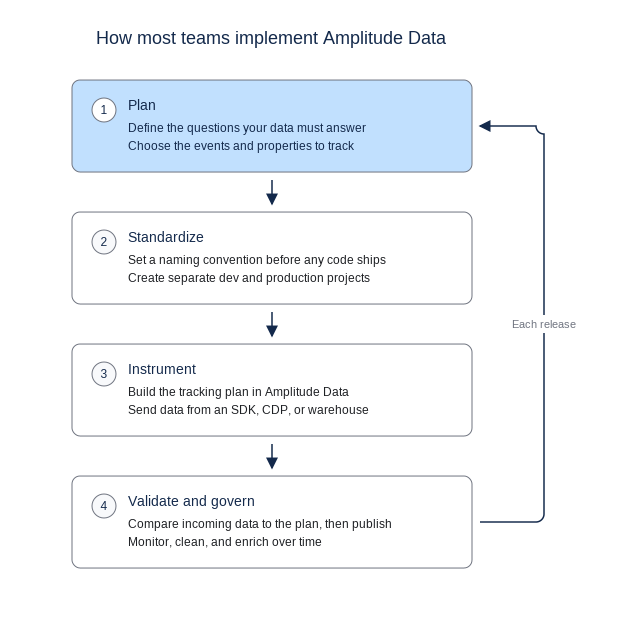
Most teams follow the same four stages. The order matters: Amplitude can't rename or restructure an event in the raw data after it arrives, so the decisions in stages 1 and 2 are the expensive ones to get wrong.
| Stage | What you do | Where to go |
|---|---|---|
| 1. Plan | Decide what questions the data must answer, then pick the events and properties that answer them. | Instrumentation pre-work, what events you need |
| 2. Standardize | Fix a naming convention and create separate development and production projects. | Naming conventions |
| 3. Instrument | Build the tracking plan in Amplitude Data, then send data from an SDK, a CDP, or a warehouse. Turn on Autocapture for baseline coverage. | Create a tracking plan, Autocapture |
| 4. Validate and govern | Compare incoming data to the plan, publish to production, then monitor and clean as the product changes. | Observe, protect your schema |
This covers the common case. Teams with a strict consent model, multiple regions, or an existing CDP have extra steps — privacy and consent and common patterns cover those.
For the branch-by-branch version of stages 3 and 4, including how engineering pulls your plan with Ampli, refer to the planning and instrumentation workflow.
Plan before you instrument
Two decisions come before anyone writes instrumentation code, because neither is cheap to reverse.
Decide what to track
Identifying the events and properties you want to track is essential to maximizing your data. A solid tracking plan helps you answer business questions and prevents gaps in your analyses.
- To get started quickly, read about what events you need. That article recommends events and properties commonly tracked in each industry.
- Refer to the data planning playbook for a deeper understanding of creating a taxonomy from scratch.
- When you've identified events and properties to track, refer to creating your tracking plan.
Alongside events, plan these two pieces of the schema:
- User properties: attributes specific to individual users, such as location, language, account type, or money spent. Refer to user properties and event properties.
- Group types: required for account-level reporting, which counts by a distinct user property group rather than individual users. If you instrument Amplitude through mParticle, Segment, or Tealium, partner limitations may cap how many group types you can use.
Establish a naming convention
Simple, self-explanatory names that follow a consistent convention make your plan understandable across your organization. Consistent naming also prevents data quality issues, because strings passed to Amplitude are case-sensitive.
For example, if v1.0 of your app logs Play song and v2.0 logs play song, Amplitude treats them as two separate events. You can't change an event's name in the raw data after you instrument it, which is why this decision belongs before the first deploy and not after.
Set your naming convention in Settings, and Amplitude Data prompts anyone who creates events to follow that convention.
Separate your environments
Set up at least two projects: one for your development or staging environment, and one for production. Separate projects keep testing data out of your business reports and give you somewhere to try data management tools before applying them to production data. Refer to creating a project in Amplitude.
Keep a testing project for every production project in your organization so you can verify events before they reach production.
Choose how data gets in
Instrumenting for Amplitude Data is the same work as instrumenting Amplitude generally — there's no separate Data-specific setup. Use the standard guides:
- Autocapture is the fastest way to start. One SDK snippet collects sessions, page views, clicks, form interactions, file downloads, and marketing attribution with no event-by-event instrumentation. Turn it on first to get baseline analytics while you scope custom events, then add precision tracking for the actions specific to your business. Most teams run both.
- Get data into Amplitude walks through the API key, the SDK snippet, and the available APIs.
- Client-side vs server-side compares the source types and helps you pick. Amplitude recommends server-side tracking for events that require high precision, and client-side tracking for everything else.
- Common patterns covers the four architectures teams run: Amplitude alone, Amplitude with a CDP, Amplitude with a warehouse, and both.
- Ampli generates a type-safe wrapper from your tracking plan, so instrumentation can't drift from the plan silently.
If you send data server-side with the HTTP API, send a session_id and an insert_id with each event.
Govern your data after launch
Once data flows, Amplitude Data covers the rest of its life:
- Enrich metadata on events and properties so your company shares one definition of every piece of tracking.
- Clean your data by transforming existing events and properties, dropping incorrect data from queries, and blocking or deleting data you no longer want to collect.
- Enrich your data with custom events, lookup tables, and derived properties.
- Monitor your data with Observe, which compares incoming data to your plan in real time.
- Automate quality work with Data Assistant, which recommends and automates changes that improve data quality.
Backfill historical data
Consider backfilling if you want to analyze historic data in Amplitude, or if your product already has existing users and you want Amplitude to reflect when those users were new. Refer to data backfill for instructions.
Was this helpful?
For AI agents: a documentation index is available at /docs/llms.txt. Append .md to any page URL for markdown, or send Accept: text/markdown.