For AI agents: a documentation index is available at /docs/llms.txt. Append .md to any page URL for markdown, or send Accept: text/markdown.
세션 리플레이 플러터 독립형 SDK
이 문서에서는 Flutter용 세션 리플레이의 설치에 대해 설명합니다.
iOS 및 Android 전용
세션 리플레이 Flutter SDK는 iOS 및 Android만 지원합니다. 이 SDK는 Flutter 웹, macOS, 윈도우 또는 리눅스를 지원하지 않습니다.
얼리 액세스
Flutter용 세션 리플레이는 얼리 액세스 단계에 있습니다. API는 변경될 수 있으므로 기능이 일반 출시되기 전에 상당한 변화가 있을 것으로 예상해야 합니다.
이전 베타에서 업그레이드하는 경우, 중대한 API 변경에 대한 자세한 내용은 이전 베타 버전에서 업그레이드를 참조하십시오.
Flutter용 세션 리플레이와 관련된 문제를 리포트하려면 Amplitude 서포트에 문의하십시오.
시작하기 전에
최신 버전의 amplitude_session_replay 패키지를 사용하십시오.
세션 리플레이 Flutter SDK를 사용하려면 다음이 필요합니다.
- 애플리케이션이 iOS 13.0 이상 또는 Android 5.0 이상(minSdk 21)에서 실행됩니다.
- 프로젝트에서 Dart SDK 3.7.2 이상과 Flutter SDK 3.29.2 이상을 사용합니다.
- SDK에
device ID및session ID를 제공할 수 있습니다. 이러한 값은 이벤트 속성으로 Amplitude에 전송하는 식별자와 일치해야 합니다.
SDK는 세션 관리를 제공하지 않습니다. 귀하의 애플리케이션 또는 타사 연동은 세션 ID 또는 장치 ID가 변경될 때 SDK를 업데이트해야 합니다.
호환성
| 요구 사항 | 최소 버전 |
|---|---|
| Dart SDK | 3.7.2 |
| Flutter SDK | 3.29.2 |
| iOS | 13.0 |
| Android minSdk | 21 (Android 5.0) |
| Android compileSdk | 36 |
빠른 시작
pubspec.yaml에 세션 리플레이 추가:
dependencies:
  amplitude_session_replay: ^1.0.1
그런 다음 flutter pub get를 실행하십시오.
SessionReplay은(는) 프로세스 전반에 걸친 싱글톤입니다. SessionReplay.instance를 통해 액세스하고 직접 구성하지 마십시오.
애플리케이션 코드를 구성합니다.
- API 키, 기기 ID 및 세션 ID를 전달하여
SessionReplayConfig로SessionReplay.instance.init()를 호출하십시오.init()는 동기식입니다. 구성을 저장하고 메시지 채널 핸들러를 설치합니다. - 네이티브 SDK를 초기화하고 녹화를 시작하려면
start()를 호출하십시오. - 세션 ID 또는 기기 ID가 변경되면
setSessionId()또는setDeviceId()를 호출하여 세션 리플레이를 동기화하십시오.
import 'package:amplitude_session_replay/amplitude_session_replay.dart';
import 'package:flutter/widgets.dart';
void main() async {
  WidgetsFlutterBinding.ensureInitialized();
  // init() is synchronous: it stores the config and installs the channel handler.
  SessionReplay.instance.init(
    SessionReplayConfig(
      apiKey: 'YOUR_AMPLITUDE_API_KEY',
      deviceId: 'your-device-id',
      sessionId: DateTime.now().millisecondsSinceEpoch,
      sampleRate: 0.1,
    ),
  );
  // start() initializes the native SDK and begins recording.
  await SessionReplay.instance.start();
  runApp(const MyApp());
}
구성
SessionReplay.instance.init()를 호출할 때 SessionReplayConfig를 통해 다음 옵션을 전달합니다.
| 이름 | 유형 | 필수 | 기본값 | 설명 |
|---|---|---|---|---|
apiKey | String | 예 | — | 인증 및 데이터 라우팅을 위한 Amplitude API 키. |
deviceId | String | 예 | — | 장치 식별자입니다. Amplitude 이벤트와 함께 전송하는 장치 ID와 일치해야 합니다. 최소 6자 이상이어야 합니다. |
sessionId | int | 아니요 | -1 | 에포크 이후의 세션 식별자(밀리초)입니다. 값이 -1인 경우 활성 세션이 없으며 세션 리플레이는 기록되지 않습니다. Amplitude 이벤트와 함께 전송하는 세션 ID와 일치해야 합니다. |
sampleRate | double | 아니요 | 0.0 | 재생을 위해 캡처할 세션의 비율입니다(0.0–1.0). 예를 들어 0.4는 세션의 40%를 캡처합니다. |
logLevel | LogLevel | 아니요 | LogLevel.warn | 로깅 세부 정보 수준. 옵션: LogLevel.off, LogLevel.error, LogLevel.warn, LogLevel.log, LogLevel.debug. |
privacyConfig | PrivacyConfig | 아니요 | PrivacyConfig.medium | 자동 마스킹 동작입니다. 옵션: PrivacyConfig.conservative, PrivacyConfig.medium, PrivacyConfig.light. |
enableRemoteConfig | bool | 아니요 | true | Amplitude 서버에서 원격 구성을 활성화합니다. |
optOut | bool | 아니요 | false | true인 경우 세션 리플레이는 데이터를 기록하거나 업로드하지 않습니다. 런타임 시 변경하는 데 setOptOut()사용합니다. |
serverZone | ServerZone | 아니요 | ServerZone.us | 데이터 상주를 위한 서버 영역입니다. EU 데이터 센터의 경우 ServerZone.eu로 설정합니다. |
Remote configuration
Enable remote configuration to set Sample Rate and Masking Level in Amplitude.
Remote configuration and testing
With enableRemoteConfig set to true, settings you define in Amplitude take precedence over settings you define locally in the SDK. For this reason, while testing your application, you should disable remote configuration to ensure you can set sampleRate to 1, and ensure you capture test sessions.
화면상의 데이터 마스킹
세션 리플레이는 개인정보 보호 제어를 위한 세 가지 Flutter 위젯을 제공합니다. 이러한 위젯은 래핑된 위젯의 전체 하위 트리에 적용됩니다. 우선 순위: AmpBlock > AmpMask > AmpUnmask.
개인정보 보호 수준
이 privacyConfig 옵션은 자동 마스킹 동작을 제어합니다.
| 레벨 | 행동 방식 |
|---|---|
PrivacyConfig.conservative | 모든 텍스트와 모든 양식 필드를 마스크합니다. |
PrivacyConfig.medium (기본값) | 모든 양식 필드와 텍스트 입력을 마스크합니다. |
PrivacyConfig.light | 암호 필드만 마스크합니다. |
AmpMask
캡처된 텍스트의 모든 문자를 별표(*)로 바꿉니다. 따라서 원본 텍스트 길이와 레이아웃은 그대로 유지됩니다. 이 옵션을 사용하여 자동 개인정보 보호 수준에서 포착할 수 없는 중요한 정보를 보호할 수 있습니다.
AmpMask(
  child: Text('Sensitive information'),
)
AmpBlock
전체 하위 트리를 기록할 수 없도록 차단하고 이를 위치 표시자로 바꿉니다. 매우 민감한 콘텐츠에 이 옵션을 사용하십시오.
AmpBlock(
  child: TextField(
    decoration: InputDecoration(labelText: 'Password'),
  ),
)
AmpUnmask
개인정보 보호 수준 규칙에서 자동 마스킹을 방지합니다. 개인정보 보호 수준에 의해 마스킹될 콘텐츠를 이 옵션을 사용하여 표시할 수 있습니다. AmpUnmask은(는) 수동 AmpMask 또는 AmpBlock을(를) 무시할 수 없습니다:
AmpUnmask(
  child: Text('Public content'),
)
사용자 옵트아웃
사용자를 세션 리플레이 수집에서 제외하려면 초기화 중에 optOut: true를 전달하거나 런타임 시 setOptOut(optOut: true)를 호출하십시오. 옵트아웃된 사용자는 재생 데이터를 기록하거나 업로드하지 않습니다.
await SessionReplay.instance.setOptOut(optOut: true);
EU 데이터 상주
EU 데이터 센터를 사용하는 Amplitude 고객은 세션 리플레이에 액세스할 수 있습니다. 초기화 중에 serverZone를 ServerZone.eu로 설정하십시오.
SessionReplay.instance.init(
  SessionReplayConfig(
    apiKey: 'YOUR_AMPLITUDE_API_KEY',
    deviceId: 'your-device-id',
    sessionId: DateTime.now().millisecondsSinceEpoch,
    serverZone: ServerZone.eu,
  ),
);
Sampling rate
By default, Session Replay captures 0% of sessions for replay. Use your SDK's sampleRate configuration option to set the proportion of sessions to capture.
For manual and dynamic sampling, quota planning, and quota accounting, go to Configure Session Replay sampling.
SessionReplay.instance.init(
  SessionReplayConfig(
    apiKey: 'YOUR_AMPLITUDE_API_KEY',
    deviceId: 'your-device-id',
    sessionId: DateTime.now().millisecondsSinceEpoch,
    sampleRate: 0.01, // Capture 1% of sessions
  ),
);
세션 ID 업데이트
세션 ID가 변경될 때(예: 사용자 로그인 또는 세션 시간 초과) 세션 리플레이를 업데이트하십시오.
final newSessionId = DateTime.now().millisecondsSinceEpoch;
await SessionReplay.instance.setSessionId(newSessionId);
녹화 시작 및 중지
특정 페이지 또는 기능에 대한 녹화를 제어합니다.
// Stop recording before entering a restricted area
await SessionReplay.instance.stop();
// Resume recording after leaving the restricted area
await SessionReplay.instance.start();
리플레이 수집 비활성화
세션 리플레이를 활성화한 후에는 다음 중 하나가 될 때까지 앱에서 실행됩니다.
- 사용자가 앱을 떠납니다.
SessionReplay.instance.stop()을(를) 호출하십시오.SessionReplay.instance.dispose()을(를) 호출하십시오.
사용자가 앱의 제한된 영역으로 이동하기 전에 호출하여 사용자가 해당 영역에 있는 동안 재생 수집을 비활성화하십시오SessionReplay.instance.stop().
사용자가 앱의 제한되지 않은 영역으로 돌아왔을 때 재생 수집을 다시 활성화하려면 SessionReplay.instance.start()를 호출하십시오.
하이브리드 및 앱에 추가
Flutter 모듈이 이미 Amplitude 세션 리플레이 네이티브 SDK를 통합한 네이티브 iOS 또는 Android 호스트 내에서 실행되는 경우, init() 대신 SessionReplay.instance.attach()를 호출하십시오. 이렇게 하면 메시지 채널 처리기가 설치되며 호스트 앱의 네이티브 SDK가 API 키, 기기 ID, 세션 ID, 샘플링, 마스킹 및 업로드 생애주기 분석을 소유하게 됩니다. SessionReplayConfig를 전달하지 마십시오. 이 모드에서는 네이티브 SDK가 구성을 소유합니다.
import 'package:amplitude_session_replay/amplitude_session_replay.dart';
import 'package:flutter/widgets.dart';
void main() {
  WidgetsFlutterBinding.ensureInitialized();
  // The native SDK owns config and lifecycle. attach() only installs the
  // channel handler so native start commands reach the Flutter engine.
  SessionReplay.instance.attach();
  runApp(const MyApp());
}
하이브리드 모드에서 네이티브 SDK는 레코딩 생애주기 분석을 소유합니다. start(), stop(), flush(), setOptOut(), setSessionId() 및 setDeviceId()는 경고를 기록하고 아무 작업도 수행하지 않습니다. 대신 네이티브 SDK에서 이러한 설정을 구성하십시오. dispose()는 Dart 채널 핸들러와 엔진만 해제하고 네이티브 SDK는 그대로 둡니다.
앱이 여러 개의 Flutter 엔진을 실행하는 경우(예: FlutterEngineGroup와 같이 여러 개의 Dart 진입점이 있는 경우), 각 진입점에서 attach()를 호출하십시오. 각 엔진은 자체 SessionReplay.instance를 사용하여 자체 아이솔레이트를 실행합니다.
방법
SessionReplay.instance 싱글톤에서 다음 메서드를 호출하십시오.
| 메서드 | 반품 | 설명 |
|---|---|---|
init(SessionReplayConfig) | void | 구성을 등록하고 채널 핸들러를 설치합니다(Flutter 전용 모드). 동기식이며 생애주기 분석당 한 번만 실행됩니다. 새 구성으로 다시 초기화하기 전에 dispose()를 호출하십시오. |
attach() | void | 채널 핸들러를 하이브리드 모드로 설치합니다. 이 모드에서는 네이티브 SDK가 구성 및 생애주기 분석을 소유합니다. 대신 init()을 사용하십시오. |
start() | Future<void> | 녹화를 시작하십시오. 첫 호출시 네이티브 SDK를 초기화합니다. |
stop() | Future<void> | 녹화를 중지하십시오. 재개하려면 start()를 호출하십시오. |
dispose() | Future<void> | 모든 리소스를 릴리스하고 싱글톤을 초기화되지 않은 상태로 되돌립니다. 다시 사용하려면 init() 또는 attach()를 호출하십시오. |
flush() | Future<void> | 보류 중인 전체 재생 데이터를 강제 업로드합니다. 앱이 백그라운드되거나 종료되기 전에 유용합니다. |
setSessionId(int) | Future<void> | 세션 ID를 업데이트합니다. |
sessionId() | Future<int> | 현재 세션 ID를 가져옵니다. |
setDeviceId(String) | Future<void> | 장치 ID를 업데이트합니다. |
deviceId() | Future<String> | 현재 장치 ID를 가져옵니다. |
setOptOut(optOut: bool) | Future<void> | 런타임 시 옵트아웃을 토글합니다. true 시에는 기록 및 데이터 업로드를 중지합니다. |
optOut (게터) | bool | 현재 옵트아웃 상태를 확인하십시오. |
생애주기 분석
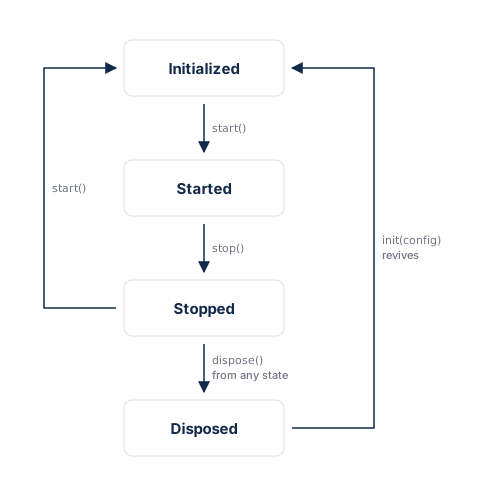
init()은 생애주기 분석당 한 번만 수행됩니다. 즉, 초기화되지 않았거나(또는 폐기된) 상태에서만 호출할 수 있습니다. 새 설정으로 다시 초기화하려면 먼저 dispose()를 호출한 다음 init()를 다시 호출하십시오.
어떤 상태에서든 dispose()를 호출할 수 있습니다. 싱글톤을 초기화되지 않은 상태로 되돌리므로, 나중에 init() 또는 attach()가 이를 깔끔하게 되살립니다. 영구 분해 시에만 dispose()를 사용하십시오. 녹화를 일시적으로 일시중지했다가 다시 시작하려면 stop() 및 start()를 대신 사용하십시오.
이전 베타 버전에서 업그레이드
버전 0.1.0-beta.5는 설치를 단순화하고 SessionReplay API를 재작업합니다. SessionReplay는 이제 프로세스 전반에 걸친 싱글톤이므로 SessionReplayWidget 래퍼가 더 이상 필요하지 않습니다.
호환성을 깨뜨리는 변경 사항
Flutter 전용 앱의 경우:
| 이전 API | 새로운 API |
|---|---|
SessionReplay(config) 생성자 | SessionReplay.instance.init(config) |
SessionReplayWidget(sessionReplay: ..., app: ...) | 제거되었습니다. 위젯 래핑이 필요 없음 |
sessionReplayProperties() | 제거되었습니다. deviceId 및 sessionId별 리플레이 매치 |
하이브리드 및 add-to-app의 경우:
| 이전 API | 새로운 API |
|---|---|
SessionReplayConfig.shouldInitializeNativeSDK: false | 제거되었습니다. 호출 SessionReplay.instance.attach() |
ensureInitialized() | SessionReplay.instance.attach() |
Flutter 전용 앱
생성자와 SessionReplayWidget 래퍼를 SessionReplay.instance.init() 및 start()(으)로 교체하십시오.
// Before
final sessionReplay = SessionReplay(
  SessionReplayConfig(apiKey: '...', sampleRate: 1.0),
);
runApp(SessionReplayWidget(sessionReplay: sessionReplay, app: const MyApp()));
await sessionReplay.start();
// After
SessionReplay.instance.init(          // synchronous, no await
  SessionReplayConfig(apiKey: '...', sampleRate: 1.0),
);
await SessionReplay.instance.start();
runApp(const MyApp());                // no SessionReplayWidget wrapping needed
init()은(는) 생애주기 분석당 한 번만 실행됩니다. 새 구성으로 다시 초기화하기 전에await SessionReplay.instance.dispose()를 호출하십시오.- 세터(
setSessionId(),setDeviceId(),setOptOut())는 여전히init()와start()사이에서 작동합니다.
하이브리드 및 앱에 추가
위치 표시자 구성 및 위젯 래퍼를 단일 attach() 호출로 교체하십시오.
// Before — placeholder config + widget wrapper
return SessionReplayWidget(
  sessionReplay: SessionReplay(
    const SessionReplayConfig(
      apiKey: 'YOUR_API_KEY',
      deviceId: 'YOUR_DEVICE_ID',
      shouldInitializeNativeSDK: false,
    ),
  ),
  app: MaterialApp(...),
);
// After — one line per entry point, no config needed
void main() {
  WidgetsFlutterBinding.ensureInitialized();
  SessionReplay.instance.attach(); // native owns config and lifecycle
  runApp(const MyApp());
}
- 모든 Dart 진입 지점에서
attach()를 호출하십시오. 각 Flutter 엔진은 자체SessionReplay.instance를 갖춘 고유한 아이솔레이트입니다. - 모든 호스트 앱 네이티브 SDK 버전 핀(예: Gradle
resolutionStrategy.force(...))을 제거하고 Flutter 플러그인이 선언한 범위 내에서 버전이 확인되도록 하십시오.
세션 리플레이 속성
sessionReplayProperties()에 대한 모든 호출을 제거합니다. Amplitude는 deviceId 및 sessionId에 의해 리플레이를 분석 이벤트와 일치시킵니다. 이러한 식별자가 분석 이벤트와 함께 전송한 식별자와 일치하는지 확인하십시오. 자세한 내용은 세션 일치를 참조하십시오.
AmpMask, AmpUnmask 및 AmpBlock 개인정보 보호 위젯은 변경되지 않았습니다.
Data retention, deletion, and privacy
Review consent guidance when you implement capture.
Retention period
For native and Flutter SDK retention guidance and the effective date of changes, go to the Session Replay data lifecycle reference.
DSAR API
For replay metadata returned by the DSAR API, go to Session Replay DSAR metadata.
Data deletion
For user and project deletion behavior, go to Session Replay data deletion.
Bot filter
For bot filtering and property-filter restrictions, go to Session Replay bot filtering.
알려진 제한 사항
- 베타 상태: API는 변경될 수 있습니다. 안정적인 릴리스 이전에 호환성을 깨뜨리는 변경 사항이 있을 수 있습니다.
- RSuperellipse 캡처: Flutter 3.32 이상이 필요합니다. 기본 기능은 Flutter 3.29.2+에서 작동합니다.
- 다중 뷰 앱: Flutter 전용 모드에서 SDK는 앱의 기본 렌더 뷰를 캡처합니다. 여러 Flutter 엔진을 실행하는 하이브리드 및 앱 추가 설정의 경우 각 Dart 진입 지점에서
attach()를 호출하십시오(하이브리드 및 앱 추가 참조). - 원격 구성 재정의:
enableRemoteConfig가true인 경우 서버 설정이 로컬sampleRate및 개인정보 보호 설정을 재정의할 수 있습니다. - 네이티브 SDK 종속성: iOS는
AmplitudeSessionReplay~>0.12.2를 사용합니다. Android는session-replay-android[0.27.0, 0.28.0)을 사용합니다.
문제 해결
세션 재생이 Amplitude에 나타나지 않습니다.
세션 재생이 나타나지 않을 수 있는 이유는 다음과 같습니다.
- 네트워크 연결 부족.
- 샘플링에서 세션이 제외되었습니다(
sampleRate너무 낮음). - 세션에 대해 일치하는
deviceId및sessionId와 함께 전송된 이벤트가 없습니다. init()이후SessionReplay.instance.start()호출이 누락되었습니다.
구성 확인
sampleRate이0보다 큰지 확인하십시오. 기본값은 세션을 캡처하지 않는0.0입니다.SessionReplay.instance.init()이후SessionReplay.instance.start()을 호출하는지 확인하십시오.apiKey,deviceId및sessionId가 분석 이벤트와 함께 전송한 값과 일치하는지 확인하십시오.
네트워크 연결 확인
앱이 인터넷에 액세스할 수 있는지 확인하고 다시 시도하십시오.
샘플링 속도 확인
기본 sampleRate은(는) 0.0입니다. 속도를 더 높은 숫자로 업데이트하십시오. 자세한 내용은 샘플링 속도를 참조하십시오.
세션 리플레이 처리 오류
리플레이는 수집 후 몇 분 이내에 Amplitude에 나타납니다. 지연 또는 오류는 다음과 같은 원인으로 인해 발생할 수 있습니다.
- 세션 리플레이와 분석 대상 구간 기기 간에 API 키 또는 장치 ID가 일치하지 않습니다.
- 세션 리플레이가 잘못된 프로젝트를 참조합니다.
- 짧은 세션. 사용자가 초기화 후 몇 초 이내에 이탈하는 경우 SDK가 리플레이 데이터를 업로드할 시간이 없을 수 있습니다.
이 내용이 도움이 되었나요?