For AI agents: a documentation index is available at /docs/llms.txt. Append .md to any page URL for markdown, or send Accept: text/markdown.
オポチュニティに基づいた行動(早期アクセス)
この機能は早期アクセスです。 この期間中、機能のさまざまな側面はまだ開発されている可能性があり、このドキュメントは常に最新であるとは限りません。 ご質問がある場合は、までお問い合わせください。Amplitude Support.
ディスカバリーは、そのサイクルの一部にすぎません。価値は、オポチュニティに基づいて行動することから生まれます。2つの一般的な方法で実行できます。1つは、Amplitude UIでオポチュニティを確認してルーティングする方法で、もう1つは、Amplitude MCPサーバーを通じてオポチュニティをエージェントネイティブに読み取り、トリアージして実装する方法です。
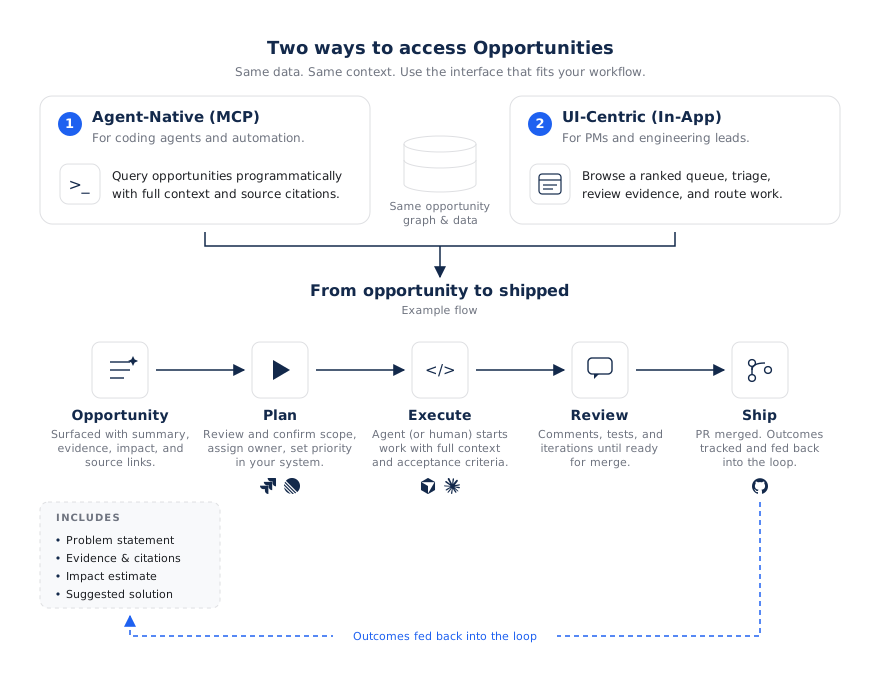
AmplitudeのUIで
プロダクト領域のオポチュニティをレビューし、その1つを前進させます。
- トリアージ: オポチュニティのステータスを更新するか(たとえば、新規から計画中へ)、またはオポチュニティを却下します。状況や決定内容を記録するためにコメントを追加します。
- 改善: 計画を直接編集するか、グローバルエージェントを使用してフォローアップ分析を実施し、行動に移す前にエビデンスやソリューションを明確にします。
- 実行へのルート: 製品内のCTAを使用して、オポチュニティをJira、Linear、GitHub、またはコーディングエージェントに送信します。
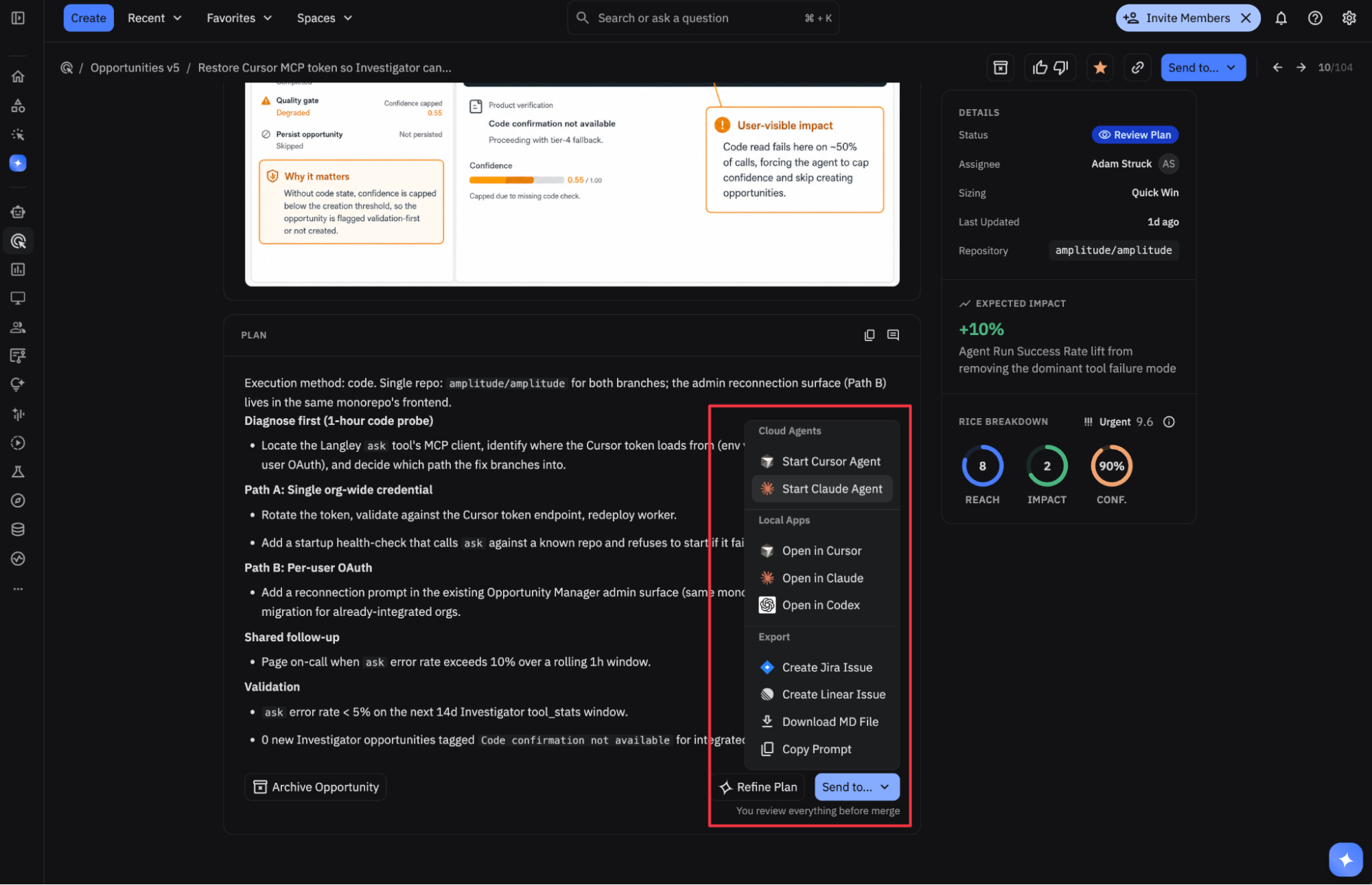
まず実際に1つ行動しましょう。
価値を実感する最も手っ取り早い方法は、自信を持って取り組める小さなオポチュニティを1つ選び、それをチケット、PR、またはリリース済みへの変更へと、最後まで進めることです。
MCPを使用したエージェントネイティブ
エディタで作業を続けたい場合は、Claude Code、Cursor、Codex、または他のMCPクライアントでAmplitudeのMCPサーバーに接続してください。これにより、オポチュニティのコンテキストを読み取りおよび編集したり、自然言語による作業のトリアージを行ったり、コーディングエージェントを調整したりして、オポチュニティの実行計画に基づいたプルリクエストを下書きしたりできます。
インストールと認証の手順については、Amplitude MCPサーバーのドキュメントを参照してください。
オポチュニティMCPツール
接続すると、これらのツールによってAIクライアントがオポチュニティを操作できるようになります。これはオポチュニティ固有のツールセットであり、AmplitudeMCPの完全なカタログではありません。
| ツール | その機能 |
|---|---|
list_objectives | 作業範囲を決めるために、プロダクト領域(目標)をリストアップしてください。 |
list_opportunities | プロダクト領域、ステータス、またはタグ別にフィルタリングして、オポチュニティをリストアップします。 |
search_opportunities | 自然言語によるセマンティック検索でビジネスチャンスを見つけましょう。 |
get_opportunity | エビデンス、スコアリング、実行計画など、1つの機会に関する詳細情報をすべて把握できます。 |
get_relations | オポチュニティ・グラフを横断します。PR、指標、エージェント、プロダクトマップのノードがリンクされています。 |
update_opportunity_status | ライフサイクルを通してオポチュニティを移動します(例「進行中」または「検討中」に移動)。 |
update_opportunity | オポチュニティのタイトル、説明、タグ、またはメタデータをより詳細に定義します。 |
add_opportunity_comment | 機会に関するフィードバックや妨げとなる要因、または意思決定を残しましょう。 |
submit_opportunity_idea | プロダクト分野内でAIを利用した調査を行うための新しいアイデアを提出してください。 |
create_relation | オポチュニティをプルリクエスト、エージェント実行、またはメトリックにリンクします。 |
ツールの使用状況
使用可能なツールの詳細は、ユーザーのアクセス権限および組織で有効化されている機能によって異なります。ツールの名前と動作は、リサーチプレビュー中に変更される場合があります。
一般的なワークフロー
価値の高い作業内容をトリアージして発見:
MCPによる仕事の発見と割り当て
You
Checkoutプロダクト領域で最も信頼性の高いオポチュニティを見つけます。
- Agent action
Checkoutプロダクト領域を検索する
list_objectives呼び出しlist_opportunitiesを実行し、その結果を絞り込んで優先度順に並べ替えます。 AI
最上位の項目は「支払い前のチェックアウト放棄率を低減する」です。RICEランキングが最高、ステータスが新規で、ファネルチャートと3回のリプレイで裏付けられています。計画全体を開きますか?
オポチュニティのエンドツーエンドでの実装:
オポチュニティからPRを作成する
You
そのオポチュニティを選択してPRを作成します。
- Agent action
完全な実行計画と受け入れ基準を
update_opportunity_status指定get_opportunityし、ステータスを進行中とマークします。 - Agent action
関連付けられたリポジトリを読み取り、変更を実装し、プルリクエストを開きます。PRのオポチュニティへの関連付けを
create_relation指定 - Agent action
し、次に
update_opportunity_statusステータスをレビュー待ちに設定します。 AI
これで完了です。私はこの計画を実施するための下書きPRを開き、それをオポチュニティとリンクさせ、それをレビュー用に移しました。受け入れ基準はPRの説明に記載されています。
プロンプトの例
MCPクライアントで次のことを試してください。
オンボーディングプロダクトエリアで公開されている機会をリストアップしてください。
オポチュニティのエビデンスとターゲットメトリックを示します
opp_8421。
アイデアを提出してください: ユーザーは支払いステップでモバイルチェックアウトを放棄します。 理由を調査します。
オポチュニティを
opp_3318「計画済み」としてマークし、チームが次のスプリントでそれに取り組む予定であるとコメントを記載します。
ループを閉じる
作業が出荷されると、オポチュニティは「出荷済み」となり、その後「測定済み」へと移動し、この変更がターゲットとなるメトリックに関連付けられます。その成果と、途中で残したフィードバックがディスカバリーへと還元されることで、次の一連のオポチュニティはより精度の高いものになります。
セットアップが完了したら、最初の小規模なバッチから始め、信頼性の高いオポチュニティを1つ選択し、通常の実行フローに従って作業してください。 これは通常、価値への最速の道であり、そこから品質を向上させる最速の方法です。 ステータスと測定の仕組みについては、オポチュニティを参照してください。
これは役に立ちましたか?