For AI agents: a documentation index is available at /docs/llms.txt. Append .md to any page URL for markdown, or send Accept: text/markdown.
オポチュニティ:構造とライフサイクル(早期アクセス)
この機能は早期アクセスです。 この期間中、機能のさまざまな側面はまだ開発されている可能性があり、このドキュメントは常に最新であるとは限りません。 ご質問がある場合は、までお問い合わせください。Amplitude Support.
オポチュニティとは、プロダクトに関する実証に基づいた単一の作業単位です。これは、解決すべき問題やプロダクト分野内で追求すべきアイデアです。Amplitudeは、分析をやり直すことなくユーザーまたはコーディングエージェントがすぐに対応できるよう、各オポチュニティを記述しています。
このページでは、オポチュニティに含まれる内容と、それが辿るライフサイクルについて説明します。
オポチュニティの構造
あらゆるオポチュニティは、単なるタイトル以上のものです。分析、エビデンス、下書きの計画を1つのレビュー可能なオブジェクトにまとめています。
問題と解決策
- プロダクトのコンテキスト: 現在の状態とこれが重要な理由をわかりやすくまとめたものです。
- ソリューションプラン: 提案された変更。人間やコーディングエージェントがそれに基づいて行動できるように記述されます。
エビデンス
各オポチュニティは、引用によってそれを裏付ける特定のデータにリンクしています。 引用にはソースの名前(例:chart:abc123またはdashboard:uzqxz98z)、結果の簡単な概要、およびその背景にある手法が含まれています。証拠はオポチュニティの根拠となります。あらゆる定量的な主張は、その起源となったチャート、ダッシュボード、セッションリプレイ、またはフィードバックのテーマに遡ることができます。
このシステムは、複数の独立した信号にわたって調査結果を確認してから、それらを反映します。少数のセッションリプレイによって裏付けられた結果は、優先度の高い項目になるのではなく、示唆的なレベルに留まります。
優先度スコア(RICE)
AmplitudeはRICEスコアを使用してオポチュニティを優先させるため、最も収益性の高い作業が上位にランクインします。
- リーチ:変更が影響を及ぼすユーザー数またはセッション数。
- 効果:期待される改善の大きさ。
- 信頼性:裏付けとなる証拠がどれほど強力か。
- 労力:導入にかかるコスト。
スコアは(Reach × Impact × Confidence) / Effortです。スコアが高いほど、努力に対する投資効率が高くなります。
予想される影響
各オポチュニティは、お客様のプロダクト領域のメトリクスに与える影響を推定します。たとえば、「チェックアウト完了率が3.5パーセントポイント上昇」などです。インパクトラインはターゲットメトリックを参照し、大きさと単位を表すので、その施策の妥当性を確認できます。
仕様の信頼度
仕様の信頼度が高い、中程度、低いかは、オポチュニティ割り当ての準備が整っているかどうかを示します。信頼性の高い仕様はコーディングエージェントのために準備ができていますが、信頼性の低い仕様は最初に計画を改善するためにユーザーの介入が必要になる場合があります。
受け入れ基準
オプションの受け入れ基準は、レビュー担当者が結果をどのように機能的に検証するかについて説明します。ユーザーに可視化される動作や作業が完了したことを証明するエンドツーエンドのシナリオについて記述したものです。これにより、PMとコーディングエージェントは「完了」の定義について足並みを揃えることができます。
実行計画
リポジトリをプロダクト領域に接続すると、オポチュニティはターゲットリポジトリを指定し、実際のコードに基づいて変更を行う実行計画を持つことができるため、コーディングエージェントはプルリクエストを下書きできます。
タグ
Amplitudeは複数のファミリーにまたがるオポチュニティにタグを付けます。そのため、オポチュニティをフィルタリングしてルーティングできます。
- サイジング:戦略的、機能的、バグ的、クイックウィン、またはワイルドカード。
- 実行方法:コード、ガイド、またはハイブリッド。
- 場所:フロントエンド、バックエンド、または混合
- 人間による開発が必要、エージェントの自律性が必要、フィードバックが必要:変更にはどれだけの人間の関与が必要か。
オポチュニティのライフサイクル
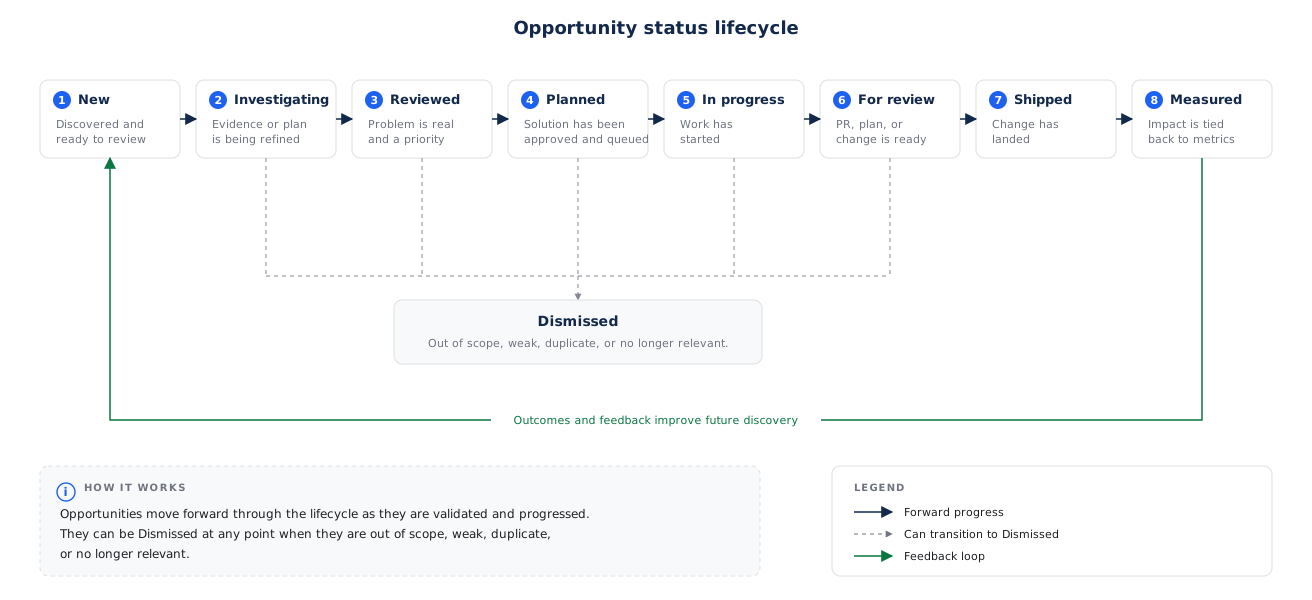
各オポチュニティは、ディスカバリーから成果の測定まで、あるステータスのライフサイクルを経て進みます。お客様とそのチームはオポチュニティを前進させ、エージェントは作業を進めながらステータスを更新することもできます。
| ステータス | 意味 |
|---|---|
| 新規 | 発見されたばかりで、レビューを待っています。 |
| 調査中 | 証拠と計画をより明確にするための調査または改良中。 |
| レビュー済み | 現実的で価値のある問題であると確認され、計画として承認済み。 |
| 計画済み | 着手待ちの状態です。 |
| 進行中 | 積極的に実施されています。 |
| レビュー待ち | 実装はレビュー待ちです(例:オープンなプルリクエスト)。 |
| 出荷済み | マージおよびデプロイ済み。 |
| 測定済み | Amplitudeはターゲットメトリックへの影響を測定しました。 |
| 却下済み | 追求する価値がないものとして捨て去る。 |
レビューとフィードバックの提供
最初のバッチを作成した後、次の3つの簡単な質問に照らして各オポチュニティを確認してください。
- その分析やシグナルは正しいか?
- オポチュニティは妥当な問題ですか?
- 提案された計画は役に立つか?
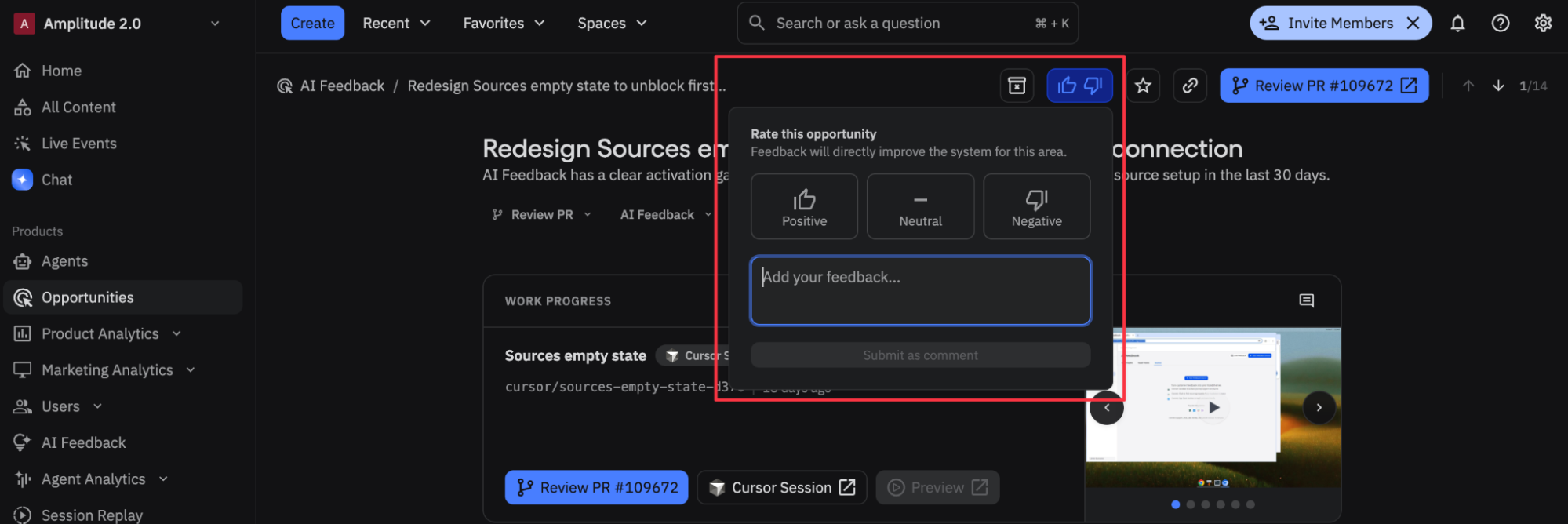
レビュー時には、高評価と低評価のコントロールを使用してください。ラベル付きの入力はすべて、Amplitudeにチームの好みに関するコンテキストを与えるため、次のバッチは自動的に改善されます。 直接コメント、却下、編集、ステータスの変更もシステムにフィードバックされます。
オポチュニティの分析やレコメンデーションが正確でない場合は、行動に移す前に、計画を直接変更するか、グローバルエージェントを使用してフォローアップ分析を実施してください。
次のステップ
- オポチュニティ・グラフで、オポチュニティがどのようにメトリクス、PR、プロダクトマップと関連付けられているかをご覧ください。
- 「オポチュニティに基づいた行動」でオポチュニティを前進させます。
これは役に立ちましたか?