For AI agents: a documentation index is available at /docs/llms.txt. Append .md to any page URL for markdown, or send Accept: text/markdown.
Missing insert_id or session_id: confirm the problem
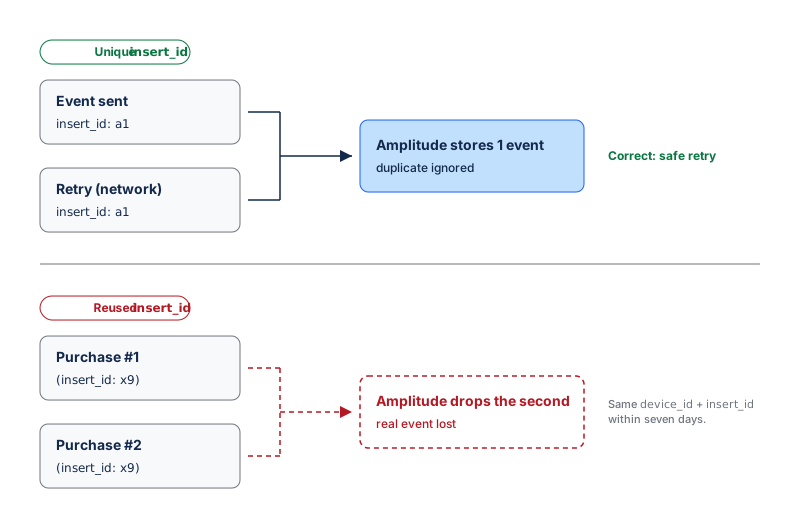
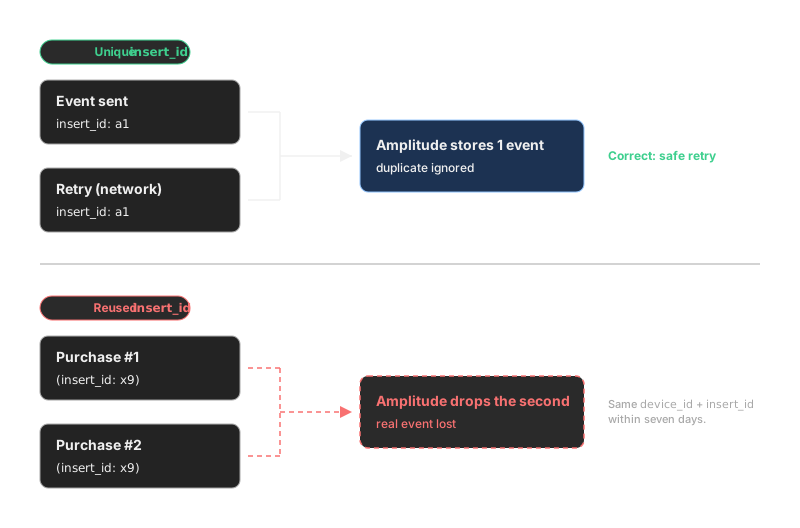
insert_id and session_id protect event counts and session metrics. insert_id lets Amplitude discard duplicate copies of a retried event when the copies have the same device_id. This prevents network retries from inflating event counts. session_id groups a user's events into a session for Session Analysis. Missing values can cause incorrect counts and session metrics.
Data Assistant doesn't check these fields. Requirements vary by source. Amplitude SDKs manage session_id automatically for supported client platforms. Events sent through the HTTP API need an explicit session_id to join session metrics. insert_id matters most for retried server-side events. Audit representative events to confirm both fields.
Run this audit if event counts seem inflated or Session Analysis results seem incorrect. Also run the audit when you add a server or HTTP API source. You need access to User Profiles.
Audit representative events
- List each client SDK, server, and customer data platform source in the project.
- Choose at least one active test event from each source.
- Trigger the test event and open the user's profile in Users > User Profiles.
- Select the event, choose Raw, and record its source library,
insert_id, andsession_id. - For server events that your system retries, confirm that each logical event has a non-empty
insert_id. Retries of the same event must reuse theinsert_idvalue. Different events must use differentinsert_idvalues. - For client SDK events that belong to an in-product session, confirm that
session_idcontains a positive session start time. Thesession_idvalue must remain the same throughout one session. - For HTTP API events that should join Session Analysis, confirm that
session_idisn't missing or-1. - Confirm that
session_id: -1is intentional for out-of-session events, such as some push-notification events.
A sample doesn't measure project-wide coverage
User Profiles and Event Explorer support targeted QA. To calculate missing-field rates across every source, ask your data team to query an authorized export or warehouse copy of the raw events.
How Amplitude handles missing identifiers
Amplitude can't populate insert_id or session_id after ingestion. You must correct the SDK, server, or CDP mapping. For sessions, Amplitude provides one analysis-layer option. An Admin or Manager can define a custom session from another property, from start and end events, or from a timeout. Custom sessions can support Session Analysis without changing every payload. However, custom sessions don't add missing raw session_id values. Custom session definitions also affect session-based charts across the whole project.
Send requirements to the tracking owner
Correcting these fields is an instrumentation change. Send the affected sources to the team that owns your tracking. Copy this message and fill in the brackets:
Some of our events are missing event identifiers. On source [SOURCE], event
[EVENT] arrives with [insert_id missing/duplicated / session_id missing or -1].
For retried server events, send a unique insert_id and reuse it on retries.
For HTTP API events that should join sessions, send session_id as the
session start time in epoch milliseconds. This is [inflating our counts /
breaking Session Analysis].
Get help without engineering resources
You can't add these fields to incoming events yourself. Contact these resources in order:
- Your Amplitude account team or Customer Success Manager.
- A partner or agency that manages your website or app analytics.
- Amplitude Support at gethelp.amplitude.com for product questions.
To correct the affected sources, continue with the engineering solution.
Was this helpful?