For AI agents: a documentation index is available at /docs/llms.txt. Append .md to any page URL for markdown, or send Accept: text/markdown.
Missing User IDs after sign-in: confirm the problem
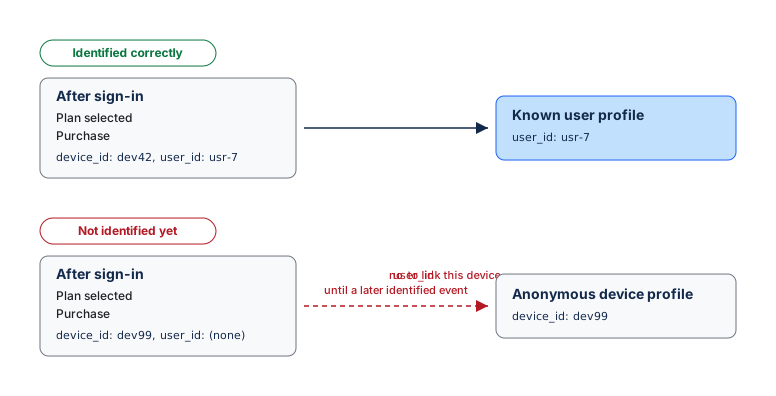
After users sign in, their events should carry a stable user_id. Without a user_id, Amplitude relies on the device's existing identity history. Activity from a new or unlinked device remains anonymous until Amplitude receives the canonical User ID on that device. If Amplitude has already associated the device with a User ID, it may attribute an event without a User ID to the last known user on that device.
Missing User IDs can delay or break cross-device analysis, retention, and funnels that follow a person after login. Amplitude doesn't report an error. The events still arrive, but they lack the identity needed to link a new device to the known person.
Data Assistant reviews your taxonomy, not your identity setup, so it can't detect authenticated events that lack a user_id. You must perform this check manually. The fix requires an instrumentation change, but the audit provides evidence for the engineers who make that change.
Run this audit when you suspect an identity gap or as a scheduled check on a signed-in flow.
Prerequisites
- A test account
- Permission to open User Profiles
Check signed-in events for a User ID
- Open your product in a private browser window or on a test device.
- Complete at least one action before you sign in.
- Sign in with the test account.
- Complete several actions that represent the signed-in experience.
- In Amplitude, go to Users > User Profiles and search for the test account's User ID.
- Open the profile, select the Activity tab, and choose a post-sign-in event.
- Select Raw and confirm the event contains the expected
user_id. - Repeat for each source or platform that sends authenticated activity.
Interpret the audit result
- If every post-sign-in event carries the same stable
user_id, the sample passes. - If a post-sign-in event has no
user_id, write down the event name, device ID, platform, time, source library, and whether the event appears on the known profile. - If you can't find the account by User ID, search by device ID and check whether the signed-in events appear on an anonymous profile.
This is a spot check, not a full measurement. To find the missing-user_id rate across every authenticated event, ask your data team to compare your authentication signal against a privacy-approved raw export.
Amplitude identity behavior and limitations
Amplitude can't add a user_id to the raw event after ingestion. If a later event sends a User ID with the same device ID, Amplitude can associate earlier anonymous activity from that device with the known user. The instrumentation fix still has to happen where your product sends events.
- Use User Lookup and the raw event view to show exactly which events are missing the ID.
- Use Session Replay to confirm that the user signed in during the session before you investigate tracking. Every plan includes Session Replay with plan-specific monthly limits. Growth and Enterprise customers can purchase additional capacity and capabilities. Go to Pricing for current details.
Send findings to your instrumentation owner
The fix requires a code change. Send your engineers the facts from the audit. Copy the following template and replace the bracketed text:
In Amplitude, our signed-in events are missing a stable user_id. After a test
account signs in on a clean device, event [EVENT NAME] on [PLATFORM] arrives
with no user_id. The activity remains on device [DEVICE ID] until a later event
identifies that device. This started around [DATE] / has always been the case. It affects [all
platforms / just iOS / just web]. Set the canonical user_id right after
authentication and before we track post-sign-in events. This is splitting our
retention and cross-device reporting.
Get help without engineering resources
You can't fix this issue inside Amplitude. Someone must change the event-sending implementation. Use these options in order:
- Contact your Amplitude account team or Customer Success Manager. They can scope the problem and direct you to help.
- Contact a partner or agency that manages your website or app analytics.
- Contact Amplitude Support at gethelp.amplitude.com for product questions.
Until engineers fix the instrumentation, mark any signed-in funnel or retention chart that relies on this flow as unreliable.
To correct the instrumentation, follow the engineering solution.
Was this helpful?