For AI agents: a documentation index is available at /docs/llms.txt. Append .md to any page URL for markdown, or send Accept: text/markdown.
Failures you can't see: confirm the coverage gap
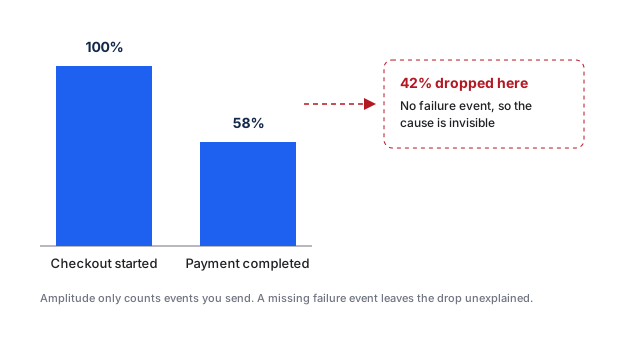
Amplitude should receive a failure event when a checkout, login, payment, or upload fails. Often, you track only the success event. A broken step then looks like a user who left. Conversion appears to drop, but no chart can identify the cause.
Missing failure signals can cause teams to spend weeks optimizing a funnel that measures a product bug. Data Assistant only sees the events your product sends, so it can't identify a missing failure event.
Run this audit on journeys where a failure costs revenue, access, activation, or trust. Use a Funnel Analysis chart for instrumented steps. Session Replay can provide supporting evidence of a visible failure, but a replay doesn't replace a structured failure event.
Audit a critical journey
- List the journeys where a failure affects revenue, access, activation, or trust.
- For each journey, name the successful outcome and every distinct failure outcome that requires a different response.
- In Amplitude Data, go to Data > Events and search for the matching events.
- Review each event's description and properties. Confirm that the definition separates a completed action from a failed attempt.
- Build a Funnel Analysis chart for the expected path and look for unexplained drop-off before the success event.
- Reproduce a safe test failure and use Event Explorer to check which events arrive.
- Record the missing events and missing diagnostic properties in the tracking plan before implementation.
Drop-off doesn't prove a technical failure
Users abandon flows without encountering an error. Confirm a missing failure signal with product behavior, support evidence, application logs, or a controlled test before you request instrumentation.
What Amplitude can and can't do here
Amplitude can't count a failure event that your product never sends, and no chart can reconstruct the event later. Amplitude can help you locate and characterize the instrumentation gap:
- Use Session Replay to watch real sessions and check whether users encounter a visible error or leave without one. Every plan includes Session Replay with plan-specific monthly limits. Growth and Enterprise customers can purchase additional capacity and capabilities. Refer to Pricing for current details.
- After the failure event exists, an alert on the event volume warns you when failures spike. Availability of anomaly detection and alerts varies by plan. Refer to Pricing or contact Amplitude Sales.
Ask Global Agent
Global Agent can build the funnel and identify the drop from plain-language instructions. Try this prompt:
"Build a funnel from Checkout Started to Payment Completed over the last 8 weeks and show me the step with the biggest drop-off."
Review the generated funnel and supporting data to confirm where conversion falls. Global Agent can't add a failure event that your product never sends.
Send the instrumentation gap to the tracking owner
Adding a failure event requires a code change. Send your engineers the confirmed instrumentation gap. Copy and complete this template:
Our [FLOW NAME] flow has no failure event, so we can't see why users drop between
[UPSTREAM EVENT] and [SUCCESS EVENT]. Add an event that fires when the
[FLOW NAME] step fails, with safe diagnostic properties (for example flow, step,
error_type, error_code). No stack traces, tokens, payment details, or emails.
Add it to the tracking plan first. This is hiding real drop-off in our reporting.
If you have no engineering resources
You can't create a missing failure signal inside Amplitude. Contact the following resources in order:
- Your Amplitude account team or Customer Success Manager.
- A partner or agency that manages your website or app analytics.
- Amplitude Support at gethelp.amplitude.com for product questions.
Until the failure event exists, treat the affected funnel as incomplete. Use Session Replay to understand individual cases.
To instrument the missing signals, continue with the engineering solution.
Was this helpful?