For AI agents: a documentation index is available at /docs/llms.txt. Append .md to any page URL for markdown, or send Accept: text/markdown.
No account-level analysis: decide whether you need groups
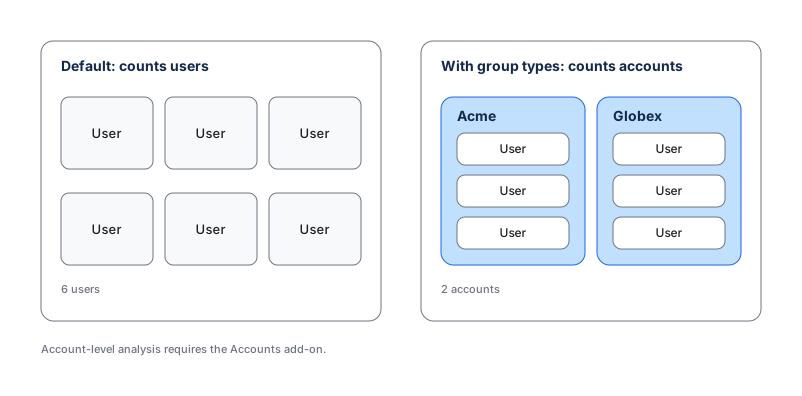
If you sell to companies, some of your most important questions are about accounts, not people: how many accounts activated, which teams adopted a feature, whether a company is healthy at renewal. By default, Amplitude counts individual users. To count accounts, you need group types and the Accounts add-on. Data Assistant can't infer your B2B model, so it won't tell you this is missing.
This page is a decision first, not an instrumentation task. Groups add real value, but they're also an add-on and an implementation project, so it's worth confirming you actually need account-level counting before you commit. Use individual-user analysis when one person completes the behavior you measure. Use account-level reporting when several people contribute to one account outcome, or when the question is how many accounts act, retain, or convert.
Evaluate the reporting need
- List the decisions that need account-level data, such as account activation, team adoption, renewal health, or company conversion.
- For each one, identify the stable business object that owns the outcome.
- Confirm the object has a durable identifier, such as an internal
account_id, rather than a display name. - Decide whether each relevant event belongs to the group only for that event, or whether the person's group membership should persist across future events.
- In Amplitude Data, go to Data > Groups and check whether the project already defines that group type.
- If the group exists, open Users > Group Profiles and confirm test accounts have recent activity.
Accounts is an add-on
Account-level reporting requires the Accounts add-on. Group fields in the HTTP V2 API require the Growth or Enterprise plan plus that add-on. Check Pricing or contact Amplitude Sales before you plan implementation.
What Amplitude can and can't do here
Amplitude can't add group context to events after they arrive, and there's no no-code shortcut that turns user-level data into true account-level counting. If you only need to segment by a company attribute occasionally, a user property such as company_name on each person may answer the question without the full groups model. If you need to count and retain accounts as first-class objects, groups and the Accounts add-on are the right tool. Refer to account-level reporting for what the add-on unlocks.
Ask Global Agent
Global Agent understands your project's taxonomy, so it can inform the decision. Try a prompt like:
"Which group types does this project define, and which have recent activity?"
It tells you what account-level structure already exists, but it can't create group types or enable the Accounts add-on.
Decide and route
If the business can answer its questions at the individual level, don't add a group type. If account-level analysis is genuinely necessary, confirm the add-on with your Amplitude account team, then continue with the engineering solution.
Was this helpful?