For AI agents: a documentation index is available at /docs/llms.txt. Append .md to any page URL for markdown, or send Accept: text/markdown.
One person, many User IDs: confirm the problem
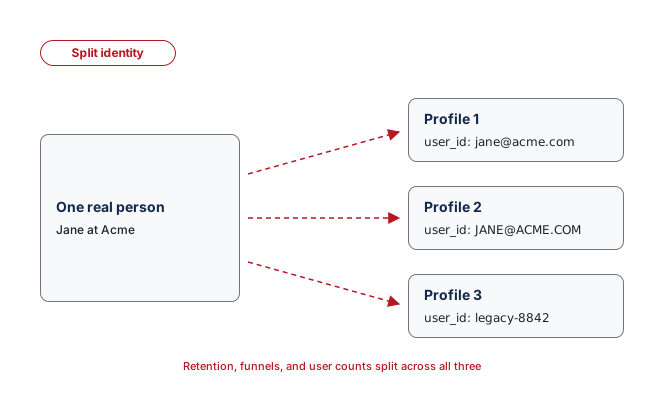
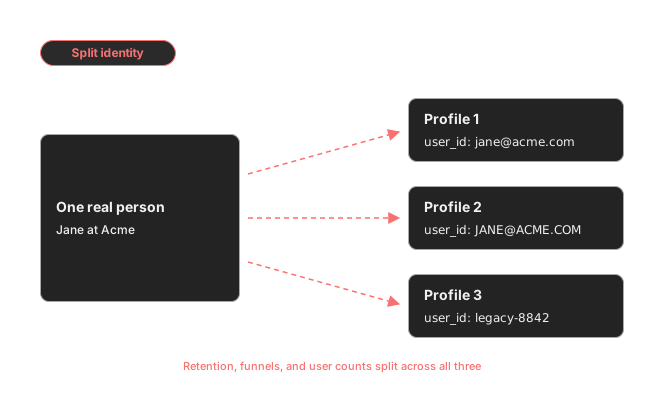
One person should be one Amplitude profile. When different sources send different user_id values for the same human, that person shatters into several profiles. Retention undercounts, funnels break mid-journey, and your active-user numbers drift, because Amplitude is treating one person as three.
It usually comes from small inconsistencies: one source sends an email, another sends an uppercase version, a third sends a legacy account ID. Data Assistant can't catch this, because Amplitude has no way to know which external identifiers belong to one real person. You confirm it against a record you trust.
Run this audit on a known example or a support case, or as a sample-based check. A complete audit needs an authorized identity source outside Amplitude and a privacy-reviewed comparison with exported Amplitude data.
Audit a known person
- Choose a test account or a support case where you have permission to inspect the person's identifiers.
- Record the immutable account ID your backend treats as canonical.
- List any suspected variants: different casing, old account IDs, email addresses, or platform-specific IDs.
- In Amplitude, go to Users > User Profiles.
- Search for each candidate User ID and open every matching profile.
- Compare event times, device IDs, and non-sensitive account properties to confirm whether the profiles are the same person.
- Record which source or platform sends each incorrect User ID.
Don't use personal data as a shortcut
Follow your organization's privacy policy when you compare identities. Don't export or share email addresses or other personal data unless your policy and permissions allow it.
Decide the next step
If the profiles are different people, nothing needs fixing. If they're one person, the source that sends the alternate ID has to change, which is an instrumentation fix.
What Amplitude can and can't do here
Amplitude's standard identity resolution can't merge two established User IDs, so no in-product action combines the historical activity of those profiles in one project. Going forward, you prevent new duplicates by standardizing the ID at the source.
One narrow exception exists at the cross-project level: with the Portfolio add-on, the User Mapping API maps different project-level User IDs to a global User ID for cross-project analysis. It doesn't rewrite user properties or replace correct identity instrumentation. Check Pricing or contact Amplitude Sales if cross-project analysis is what you need.
Hand it to whoever owns your tracking
Send your engineers the exact variants and their sources. Copy this and fill in the brackets:
In Amplitude, one person is split across multiple user_id values. Account
[CANONICAL ID] also appears as [VARIANT 1], [VARIANT 2] from sources [SOURCE A],
[SOURCE B]. This is splitting retention and funnels for that user.
Standardize every source on the immutable backend account id, with consistent
casing, and stop using email/username/platform ids as the user_id.
If you have no engineering resources
You can't merge the existing profiles yourself. To stop new duplicates, you still need a source change. Reach out in this order:
- Your Amplitude account team or Customer Success Manager.
- A partner or agency that manages your website or app analytics.
- Amplitude Support at gethelp.amplitude.com for product questions.
When you're ready to standardize identity and understand the historical limits, continue with the engineering solution.
Was this helpful?