For AI agents: a documentation index is available at /docs/llms.txt. Append .md to any page URL for markdown, or send Accept: text/markdown.
コンテキストをAmplitudeのオポチュニティと結びつける(早期アクセス)
この機能は早期アクセスです。 この期間中、機能のさまざまな側面はまだ開発されている可能性があり、このドキュメントは常に最新であるとは限りません。 ご質問がある場合は、までお問い合わせください。Amplitude Support.
Amplitudeが発見するオポチュニティの質は、各プロダクト領域に関連付けられたコンテキストによって決まります。ディスカバリエージェントは、接続されたインサイトソースを分析し、それらのソース全体で調査結果を裏付け、あらゆるオポチュニティを具体的な証拠に基づかせます。関連性の高いシグナルがより明確でより実証された機会を生み出します。
初日からすべてのソースが必要となるわけではありません。既存のものから始め、活動の拡大に応じてソースを追加してください。 関連性の高いソースが多いほど、エージェントは分析するためのより多くのシグナルを得ることができます。
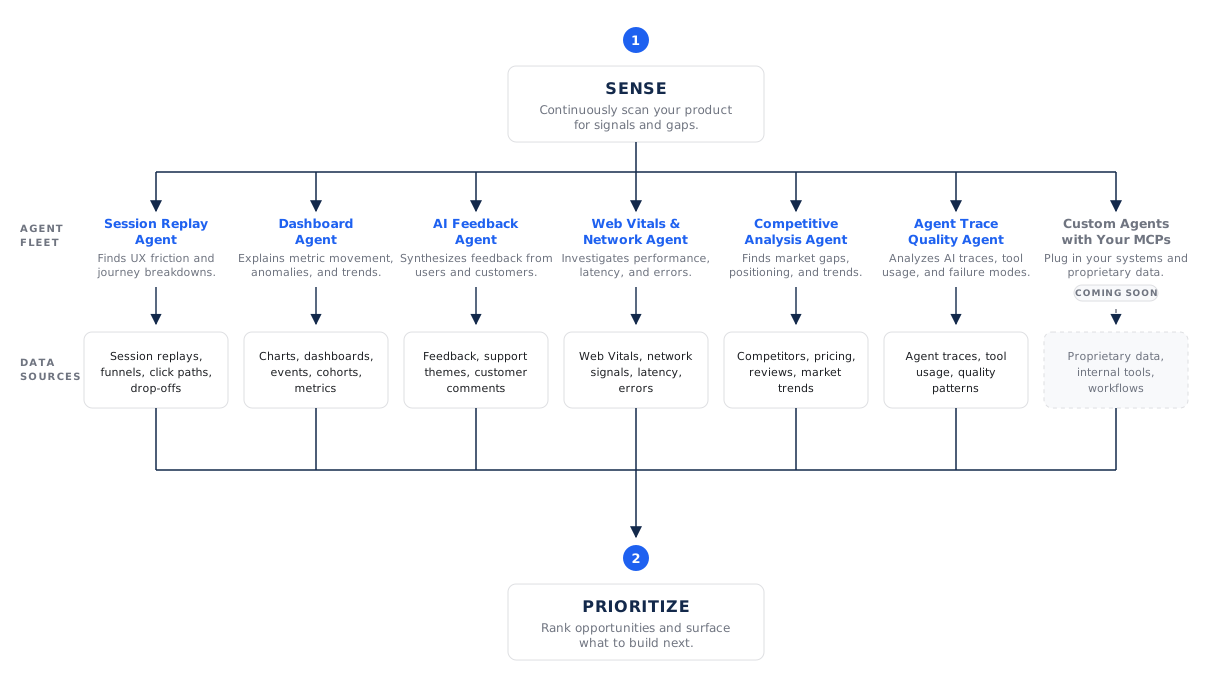
インサイトソース
各プロダクト分野は、次のソースを利用できます。特定のエリアに対して、ディスカバリーがどれを使用するかを制御できます。
| ソース | それが貢献できること |
|---|---|
| プロダクト分析 | 定量的なベースラインを形成するコンバージョン率、ボリュームの傾向、セグメントの行動などを含む既存のチャートとダッシュボード。 |
| セッションリプレイ | ユーザーの行動を視覚的に示す証拠:レイジクリックやデッドクリックなどのフリクションシグナルや、ユーザーが躊躇したり放棄したりする箇所など。 |
| AI Feedback | 定性的なフィードバックに基づくテーマ: サーベイ、サポートチケット、その他のチャネルから得られた苦情、機能のリクエスト、および称賛。 |
| 自動キャプチャ | カスタムインストルメンテーションが不完全であっても、Amplitudeがプロダクトの使用状況を把握するのに役立つインタラクションデータ。 |
| 専門エージェント | ダッシュボード、セッションリプレイ、カスタマーフィードバックなどの他の専門エージェントからの調査結果。 |
| エージェントアナリティクスとトレース | AIエージェントとAI搭載プロダクト体験から得られる使用状況、品質、パフォーマンスに関するシグナル。 |
| 実験 | すでに試されているものも含め、現在実施されている実験や完了済みの実験の結果。 |
| ウェブバイタル | 遅延やページの操作性などのパフォーマンス指標により、技術的なフリクションの特定に役立ちます。 |
| 競合他社の状況 | プロダクト領域で設定された、インスピレーションや市場を意識した推奨事項に使用される競合他社または同等製品。 |
| カスタムエージェント(近日公開予定) | カスタムエージェントが独自のデータソース、内部ツール、ワークフローを分析できるように、独自のMCPコネクタをご用意ください。 |
| 異常(近日公開予定) | メトリックが予期しない動きを起こした場合にアラートを発信するため、検出機能は発生した問題に対応できます。 |
| サーベイ | サーベイが有効な場合のサーベイへの直接回答。 |
| PRレビュー(近日公開予定) | リポジトリに接続したときにコードレビューアクティビティから送信される信号。 |
ソースはお客様の設定に合わせて調整されます。
ディスカバリーは、お客様のプロジェクトおよびプロダクト領域で使用可能なソースを使用します。たとえば、セッションリプレイはリプレイがアクティブな場合にシグナルを提供し、実験を実行すると実験結果がシグナルを提供します。プロダクトエリアの設定を編集することで、プロダクトの理解、調査の指導、計画の作成、コーディング担当者との引き継ぎをより詳細にすることができます。
コードベースを接続する
最も活用できるコンテキストソースはコードベースです。 GitHubリポジトリをプロダクト領域に接続すると、ディスカバリーと実行が3つの方法で改善されます。
- プロダクトの理解: Amplitudeは、プロダクト領域の機能や測定計画の内容、さらにさまざまな機能の構築者をインデックス化し、ディスカバリーの質を向上させます。
- 根拠に基づいた計画: 推奨事項はコードの現在の状態を反映しているため、オポチュニティは、変更内容を抽象的に説明するのではなく、具体的に変更をどこに加えるべきかを示すことができます。
- エージェント対応の実行: 接続されたリポジトリを使用すると、コーディング担当者はオポチュニティの実行計画から直接プルリクエストを下書きできます。
GitHubアクセスとコーディングエージェントを設定するには、Wave設定 > コーディングエージェントに移動します。GitHub アプリを接続し、組織にとって重要なリポジトリを選択してから、各プロダクト エリアに関連するリポジトリを接続します。まずは少数のリポジトリからスタートすることで、推奨事項はプロダクトの現在の状態と変更が必要な箇所を反映できます。
アクセスとプライバシー Opportunities
は既存のAmplitude環境内で動作し、組織のデータアクセス制御と権限を尊重します。Amplitudeはコネクテッドコードを使用して組織の推奨事項を根拠にしています。共有モデルをトレーニングするためではありません。Amplitudeがコードのインデックス作成とコーディングエージェントのサンドボックスをどのように保護しているかについては、コーディングエージェントのセキュリティをご覧ください。
コンテキストが証拠になる方法
Discoveryはこれらの情報源を単に読むだけでなく、引用しています。オポチュニティが主張を作成すると、その主張は発信元となった特定のチャート、ダッシュボード、セッションリプレイ、またはフィードバックテーマにリンクされます。このシステムでは、発見内容を優先度の高い機会に昇格させる前に、複数の独立した信号を確認する必要があるため、1つの弱い信号がロードマップを推進することはできません。
証拠と引用がオポチュニティにどのように表示されるかを確認するには、オポチュニティにアクセスしてください。
これは役に立ちましたか?