For AI agents: a documentation index is available at /docs/llms.txt. Append .md to any page URL for markdown, or send Accept: text/markdown.
Event vs user property confusion: confirm the problem
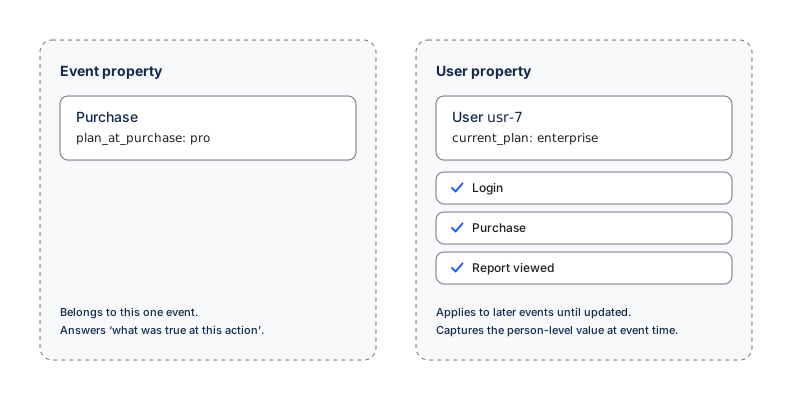
An event property describes one action, such as the item purchased or the error code returned. A user property describes the user at the time of an event, such as their plan or account role. User property values can change. Amplitude applies a new value to later events without rewriting earlier events. When a property has the wrong type, filters and groupings can return an answer that doesn't match the analysis question.
Data Assistant doesn't detect this modeling error. Review the property manually without changing code. If the property type is wrong, correcting the source requires an instrumentation change.
The diagram shows how each property type applies over time. Choose the type based on the analysis question.
Review a property's classification
- Write the analysis question the property has to answer.
- Determine whether the value belongs only to its event or applies to later events from the same user.
- In Amplitude Data, go to Data > Properties and search both the Event Properties and User Properties tabs.
- Check whether the same or a similar name appears under both types.
- Open User Profiles for representative users. Compare the value on individual events with the current user property value at the top of each profile.
- Build an Event Segmentation chart that compares the event property and user property versions. Confirm which version answers the analysis question.
- Record the intended type, source, owner, and whether historical analysis needs a temporary workaround.
Amplitude can't directly convert the property type
Transformations merge event properties with event properties and user properties with user properties. Transformations don't convert an ingested event property into a regular user property or the reverse.
Analysis-layer alternatives to a property type correction
A property type correction happens at the source. Before changing instrumentation, check these analysis-layer options, which don't require an application release:
- For numeric aggregates, counts, or first and last values, Computations can create a computed user property from existing event data. Availability varies by plan, so check Pricing if the feature doesn't appear.
- A derived property can reshape existing data at query time.
Computations and derived properties support analysis, but they don't replace correct source modeling or rewrite raw history.
Ask Global Agent
Global Agent can build a comparison that reveals the modeling problem. Try this prompt:
"Compare [PROPERTY] as an event property and as a user property for [your question], and tell me which one answers it correctly."
Review the generated comparison and its supporting data. You decide which property type fits the business question. Global Agent can't change a property's type.
Send the correction to your tracking owner
When the source model must change, send your engineers the intended classification. Copy and complete this template:
Property [NAME] is modeled as an [event property / user property] but should be a
[user property / event property], because we need to answer [QUESTION].
Send future values as the correct type (target name [NAME]) per the migration
plan. Note this affects new data only and doesn't rewrite history.
If you have no engineering resources
If Computations or a derived property can't answer the question, you need a source change. Contact these resources in order:
- Your Amplitude account team or Customer Success Manager.
- A partner or agency that manages your website or app analytics.
- Amplitude Support at gethelp.amplitude.com for product questions.
When the source model needs correcting, continue with the engineering solution.
Was this helpful?