Platform

AI

Wave
Agents
Amplitude MCP
AI Feedback
Agent Analytics
Early Access Program

Insights

Product Analytics
Marketing Analytics
Session Replay
Heatmaps

Action

Guides and Surveys
Feature Experimentation
Web Experimentation
Feature Management
Activation

Data

Data Governance
Integrations
Security & Privacy
Solutions
Solutions that drive business results
Deliver customer value and drive business outcomes
Amplitude Solutions →

Industry

Financial Services
B2B
Media
Healthcare
Ecommerce

Use Case

Acquisition
Retention
Monetization

Team

Product
Data
Engineering
Marketing

Size

Startups
Enterprise
Resources

Learn

Blog
Resource Library
Compare
Glossary
Explore Hub

Connect

Community
Events
Customers
Partners

Support & Services

Customer Help Center
Developer Hub
Product Updates
Academy & Training
Customer Success

Tools

Benchmarks
Prompt Library
Templates
Tracking Guides
Maturity Model
Event Taxonomy Generator
Pricing
LoginContact salesGet started

AI

WaveAgentsAmplitude MCPAI FeedbackAgent AnalyticsEarly Access Program

Insights

Product AnalyticsMarketing AnalyticsSession ReplayHeatmaps

Action

Guides and SurveysFeature ExperimentationWeb ExperimentationFeature ManagementActivation

Data

Data GovernanceIntegrationsSecurity & Privacy
Amplitude Solutions →

Industry

Financial ServicesB2BMediaHealthcareEcommerce

Use Case

AcquisitionRetentionMonetization

Team

ProductDataEngineeringMarketing

Size

StartupsEnterprise

Learn

BlogResource LibraryCompareGlossaryExplore Hub

Connect

CommunityEventsCustomersPartners

Support & Services

Customer Help CenterDeveloper HubProduct UpdatesAcademy & TrainingCustomer Success

Tools

BenchmarksPrompt LibraryTemplatesTracking GuidesMaturity ModelEvent Taxonomy Generator
LoginSign Up

Heatmaps needed a rebuild, not a fix

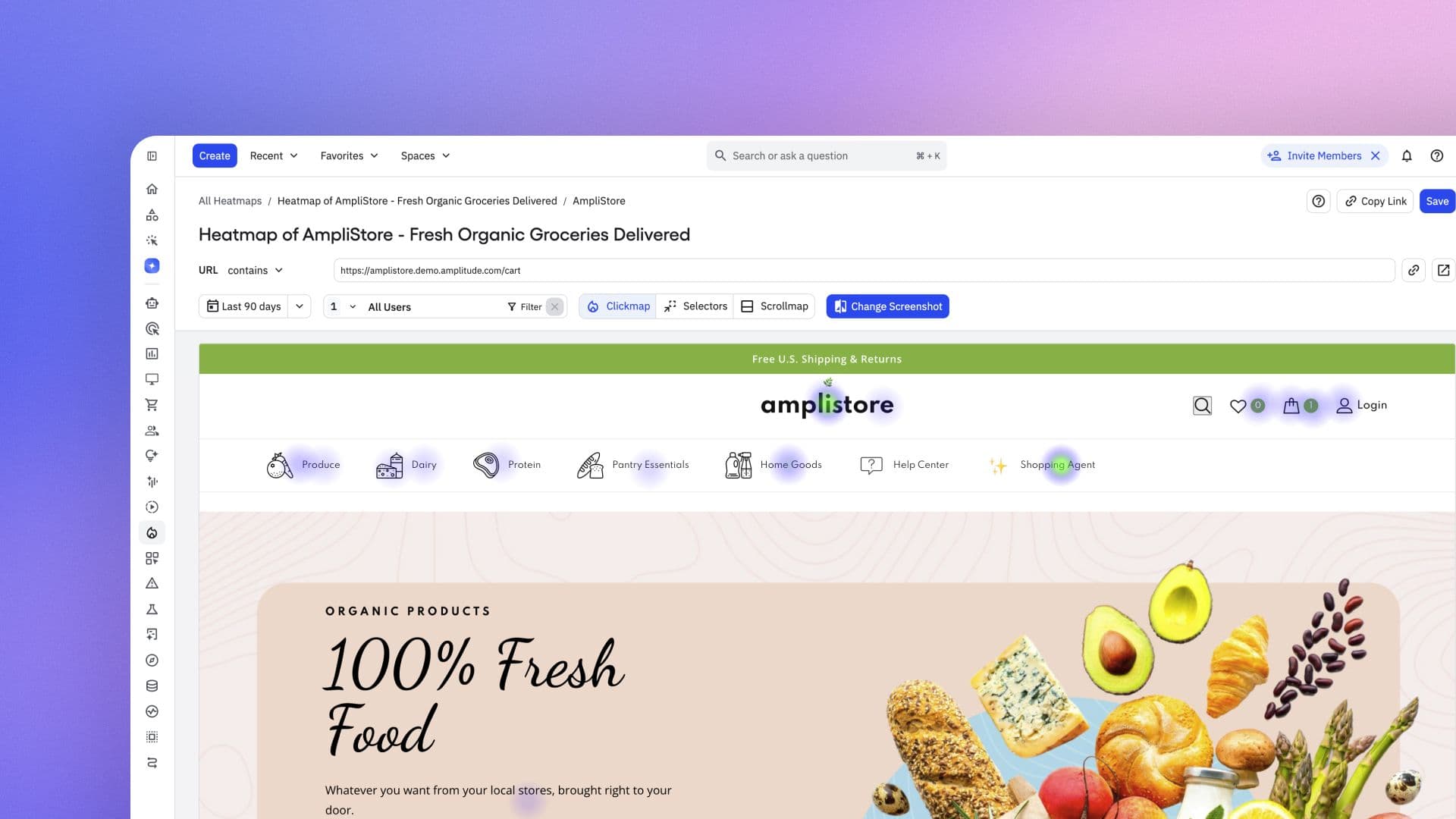
The new Heatmaps is built on more reliable screenshot capture, selector-based placement, and automatic device detection.
Product

May 14, 2026

4 min read

Chad Swenson

Chad Swenson

Principal Product Manager, Amplitude

An image of a webpage with hotspots across the navigation

A heatmap is only as good as the screenshot underneath it. If the background doesn’t match your live page (elements are cut off, layout is shifted, or dynamic content is missing), the click and scroll data drawn on top of it is meaningless. You’re looking at a broken approximation of your page.

For teams running dynamic sites, that was their experience of Heatmaps. We heard it enough times that we stopped patching and started over.

When the canvas is wrong

On SPAs, Angular apps, and pages with hover states or dynamic elements, the captured screenshot often had little resemblance to the live page: elements were cut off, layouts were shifted, and content was missing entirely. The screenshot is the canvas every click dot and scroll gradient gets drawn on, so when it’s wrong, everything on top of it is wrong too. You end up staring at data you can’t trust on a page you barely recognize.

Patching individual issues wasn’t going to fix that. The problems were too interconnected—screenshot capture, element placement, device handling, URL targeting—and each fix exposed the next one. So we rebuilt the whole thing.

A screenshot that actually matches your page

There are now two ways to capture a screenshot for a heatmap: directly from your live site or from a replay. Direct capture, available now to all customers on the latest SDK, is the more significant change. It captures exact page states (hover menus open, navigation expanded, dynamic content loaded) that replay-based capture historically missed or flattened into a default view. You get the page as users actually see it, rather than a stabilized version of it at rest. We also mapped each heatmap to exactly one screenshot, removing a persistent source of confusion about which background the click data was plotted against.

Clicks that land where they should

Even when the screenshot was right, the click data placement sometimes wasn’t. Heatmaps previously positioned data using pixel coordinates, which worked well enough on static pages but broke predictably on anything that shifted between loads, breakpoints, or viewport sizes. Selector-based placement fixes this by anchoring data to the element itself, rather than its position at a specific moment. On responsive layouts and dynamic pages, the dots land where they should regardless of how the page reflows.

Less setup, more analysis

A lot of the friction in Heatmaps was everything you had to navigate before getting there. Manual device selection that produced the wrong screenshot if you guessed wrong. A URL dropdown with enough edge cases that customers had learned to route around it. A scrollmap that showed you the data but made you work to interpret it.


Device detection is now automatic, so you’re not making a choice that affects the output. The URL handling has been fixed and simplified. The scrollmap has a new design with a clearer fold line and a more readable drop-off curve, so you can see where users stop scrolling without having to decode the gradient. And the UI has been cleaned up overall, with unnecessary fields and states removed, to shorten the path between opening Heatmaps and having something worth looking at.

Heatmaps you can trust

Before this rebuild, using Heatmaps on a dynamic site meant working through a checklist of things that might be causing what you were seeing: Was the screenshot captured from the right state? Did the device type affect the layout? Are the click dots actually landing on the right elements? By the time you’d ruled those out, the analysis had become a debugging exercise.

The rebuild eliminates that checklist. Screenshot capture is more reliable, placement is anchored to elements ratheThe value of a heatmap is simple: see where users engage, spot what's working and what isn't, and make a better decision about the page. This rebuild makes sure the screenshot, the placement, and the setup are no longer what stand between you and that answer.

About the author
Chad Swenson

Chad Swenson

Principal Product Manager, Amplitude

More from Chad

Chad Swenson is a Principal Product Manager at Amplitude, where he focuses on Session Replay, Heatmaps, and Zoning Insights.

More from Chad
Topics

Amplitude Heatmaps

Product Releases

Recommended Reading

article card image
Read 
Product
How to Secure AI Agent Traces Without Losing the Signal

Aug 28, 2026

7 min read

article card image
Read 
Product
Connecting agent performance to product outcomes

Aug 20, 2026

10 min read

article card image
Read 
Customers
The hidden cost of a bad AI answer

Aug 19, 2026

6 min read

article card image
Read 
Insights
Verification loops in software factories: What PMs need to know

Aug 19, 2026

11 min read

Platform
  • AI Agents
  • Agent Analytics
  • AI Feedback
  • Amplitude MCP
  • Product Analytics
  • Web Analytics
  • Feature Experimentation
  • Feature Management
  • Web Experimentation
  • Session Replay
  • Guides and Surveys
  • Activation
Compare us
  • Adobe
  • Google Analytics
  • Contentsquare
  • Fullstory
  • Heap
  • LaunchDarkly
  • Mixpanel
  • Optimizely
  • Pendo
  • PostHog
Resources
  • Resource Library
  • Blog
  • Agent Prompt Library
  • Product Updates
  • AI Early Access Program
  • Amp Champs
  • Amplitude Academy
  • Events
  • Glossary
  • Free Chart Maker
Partners & Support
  • Status
  • Contact Us
  • Customer Help Center
  • Community
  • Developer Docs
  • Partner Program
  • Partner Directory
  • Become an affiliate
Company
  • About Us
  • Careers
  • Press & News
  • Investor Relations
  • Diversity, Equity & Inclusion
View markdown
Terms of ServicePrivacy NoticeAcceptable Use PolicyLegal
EnglishJapanese (日本語)Korean (한국어)Español (LATAM)Español (Spain)Português (Brasil)Português (Portugal)FrançaisDeutsch
© 2026 Amplitude, Inc. All rights reserved. Amplitude is a registered trademark of Amplitude, Inc.
Blog
InsightsProductCompanyCustomers
Topics

101

AI

APJ

Acquisition

Adobe Analytics

Agents

Amplify

Amplitude AI

Amplitude Academy

Amplitude Activation

Amplitude Agent Analytics

Amplitude Analytics

Amplitude Audiences

Amplitude Community

Amplitude Feature Experimentation

Amplitude Full Platform

Amplitude Guides and Surveys

Amplitude Heatmaps

Amplitude Made Easy

Amplitude Session Replay

Amplitude Web Experimentation

Amplitude on Amplitude

Analytics

B2B SaaS

Behavioral Analytics

Benchmarks

Churn Analysis

Cohort Analysis

Collaboration

Consolidation

Conversion

Customer Experience

Customer Lifetime Value

Customer Support

DEI

Data

Data Governance

Data Management

Data Tables

Digital Experience Maturity

Digital Native

Digital Transformer

EMEA

Ecommerce

Employee Resource Group

Engagement

Engineering

Event Tracking

Experimentation

Feature Adoption

Financial Services

Funnel Analysis

Getting Started

Global Agent

Google Analytics

Growth

Healthcare

How I Amplitude

Implementation

Integration

Kimi

LATAM

LLM

Life at Amplitude

MCP

Machine Learning

Marketing Analytics

Media and Entertainment

Metrics

Modern Data Series

Monetization

Next Gen Builders

North Star Metric

Open-Weight AI Models

Partnerships

Personalization

Pioneer Awards

Privacy

Product 50

Product Analytics

Product Design

Product Management

Product Releases

Product Strategy

Product-Led Growth

Recap

Retention

Revenue

Startup

Tech Stack

The Ampys

Warehouse-native Amplitude