Web vitals in Amplitude: Understand and optimize web performance
Improve your website user experience and SEO ranking by measuring and taking action on your Web Vitals.

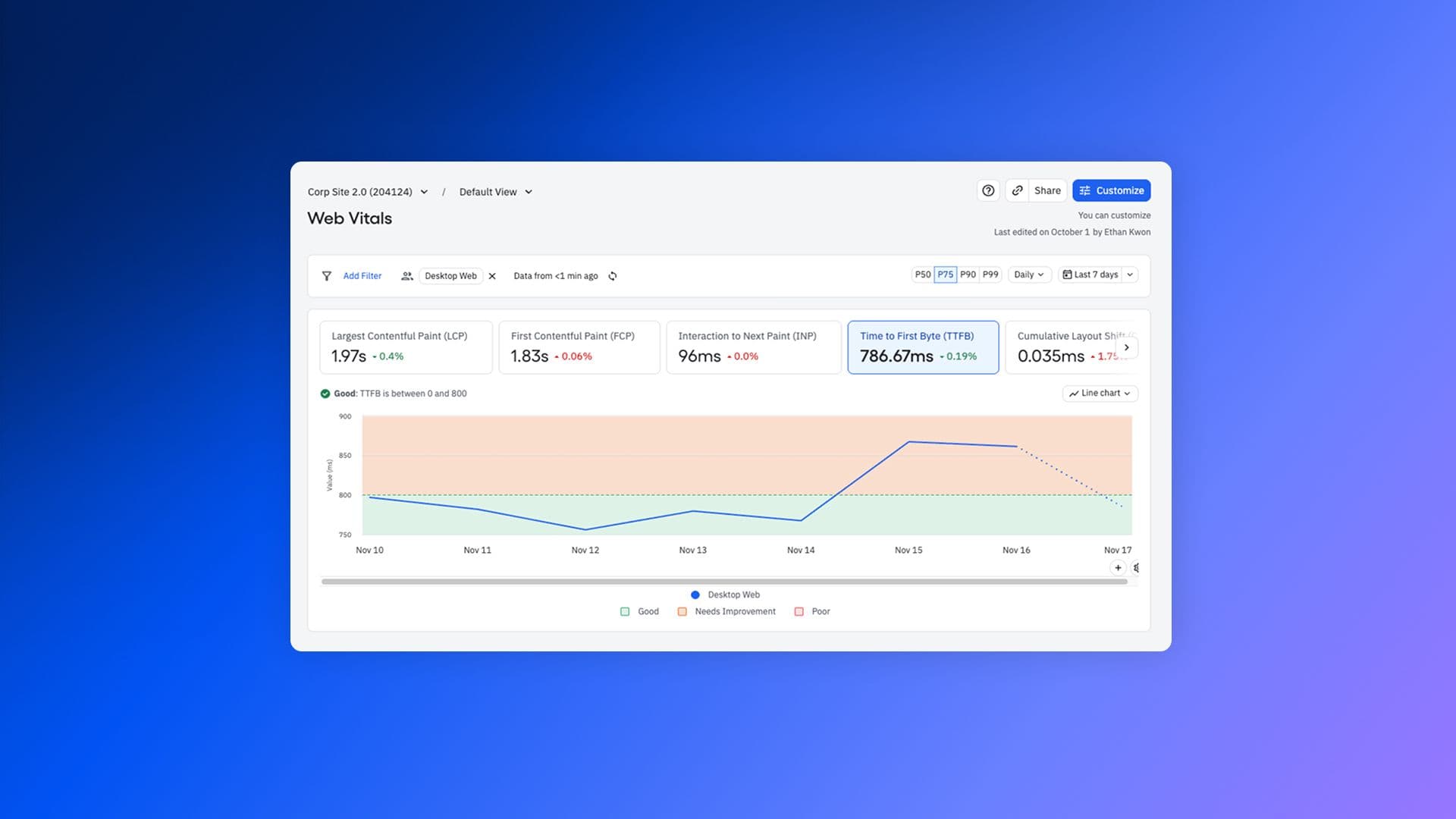
Web teams: get ready to defibrillate your vitals. Starting today, you can now track Web Vitals in Amplitude with auto-collection in our browser SDK and a purpose-built marketing hub to visualize them.
Web Vitals are an important way to get performance and SEO signals for your site, but those scores aren’t as meaningful if they’re siloed off on their own. By bringing Web Vitals into Amplitude, you’ll be able to track, query, segment, and compare them with the rest of your behavioral data.
What are Web Vitals?
Originally defined by Google, Web Vitals are a set of standardized performance metrics that serve both as quality signals for your website and as ranking factors that Google uses for search engine optimization. Tracking them helps you understand if your site is able to deliver the great user experience you want it to.
Amplitude now captures the Core Web Vitals along with a couple of others:
- Largest Contentful Paint (LCP): How long it takes for the largest content block on the screen to render when a user navigates to a page.
- First Contentful Paint (FCP): How long it takes for the first content block on the screen to render.
- Time to First Byte (TTFB): The time between when a user starts to navigate to a page and when the first byte of a response begins to arrive.
- Cumulative Layout Shift (CLS): A measure of how much users are affected by unexpected layout shifts in page content.
- Interaction to Next Paint (INP): The maximum time between an interaction (tap, mouse click, keyboard interaction) and the next paint.
Why measure Web Vitals in Amplitude?
While it’s true that web teams can already get their Web Vitals with tools like PageSpeed Insights, those metrics exist in a vacuum. Measuring in Amplitude gives you a seamless way to take action on your quality signals and optimize your site’s performance and SEO rankings.
1) Filter Web Vitals scores by segment: Filtering by groupings like connection type, device type, country of origin, and feature flags helps you understand your scores more deeply.
2) Connect Web Vitals to individual user journeys. You can look at the user journey of users who have poor Web Vitals scores and see how it affected their habits.
LCP score grouped by performance (good, needs improvement, poor)
3) Troubleshoot poor-performing web vitals scores. By connecting poor web vitals scores to Amplitude Session Replay, you can gain better insights as to what’s causing user experience problems.
In fact, here at Amplitude, we’ve already been using our Web Vitals feature internally to improve web performance. Tracking these scores helped with our recent homepage redesign, and we continue to monitor vitals across our site to deliver better user experiences to our visitors.
How do you use Web Vitals in Amplitude?
The setup required to start capturing Web Vitals is very easy and is included in all Amplitude plans:
- Set up the Browser SDK on your website if you haven’t already (minimum version 2.30.1).
- In your configuration, set “autocapture.webVitals=true” (or just set “autocapture=true” to enable all of our great autocapture functionalities).
Once you’ve deployed the SDK, you’ll automatically see an event coming through called “[Amplitude] Web Vitals.” This event captures all of the Web Vitals metrics.
To view your vitals, log in to Amplitude and visit Marketing Analytics > Web Vitals. From that hub, there are lots of ways to dig in:
- A line chart shows your website’s Web Vitals performance over time.
- Choose individual Web Vitals and percentile scores to explore more.
- Filter by user segments like device or region.
- Filter by URL to see which individual pages are performing the best or worst.
For a more detailed breakdown, see our docs.
Revitalize your web performance
Capturing Web Vitals has been easy for web teams to do, but getting the context for those scores and being able to act on that context hasn’t.
By capturing Web Vitals through Amplitude, we aim to change that. Segmenting, querying, and pairing your scores with session replays will give you greater insights into how your website performs, how usable it is, and how to go about delivering a high-quality web experience to your customers. Try it out today, and let’s build a better web together.
How is your website performing? Find out easier than ever with a free Amplitude account and our browser SDK. Enable autocapture for Web Vitals to start understanding how well your website is performing so you can deliver a great user experience for your customers.

Dan Graham
Senior Software Engineer, Amplitude
Dan is a Senior Software Engineer on the Developer Experience team, specializing in development of Amplitude's Browser SDK.
More from DanRecommended Reading

Find Your Holiday Checkout Friction Before Peak Traffic Does
Oct 26, 2026
8 min read

Amplitude + GitHub Agents: Closing the Product Learning Loop
Oct 19, 2026
4 min read

Lessons from consolidating our MCP server
Oct 6, 2026
10 min read

What AI engineers do in the age of agentic code
Oct 1, 2026
14 min read