Claude Cowork for PMs: 5 Playbooks to Get Started
Whether you’re tired of manual market research or just curious about new AI tools, these playbooks can jumpstart your AI product management efficiency.

These playbooks originally appeared on LinkedIn.
Still doing release notes, triage, research, and interview scheduling manually?
At Amplitude, we’re undergoing an AI transformation, not just with our own platform, but with how we do our work. That means our product, engineering, design, and even sales and marketing teams are all finding new ways to save time and energy with AI tools.
As part of that work, I built these 5 ready-to-use Claude Cowork playbooks for product managers. I originally made them for myself and my peers at Amplitude, but they’ve been such time-savers that I thought I should open-source them to the wider PM community.
If you’ve seen Claude Cowork, you know how powerful it is. If you aren’t sure where to start, these real PM use cases are the perfect place. And if you have ideas on how to make these even better, please reach out!
TL;DR: Here’s a link to the playbook doc and the Amplitude connector. Good luck and have fun!
How the playbooks work
These playbooks help PMs automate tasks like market research, support triage, and release notes. AI really shines with these kinds of tasks, which are too complex semantically to do well with algorithms but are repetitive enough to be, frankly, a pain.
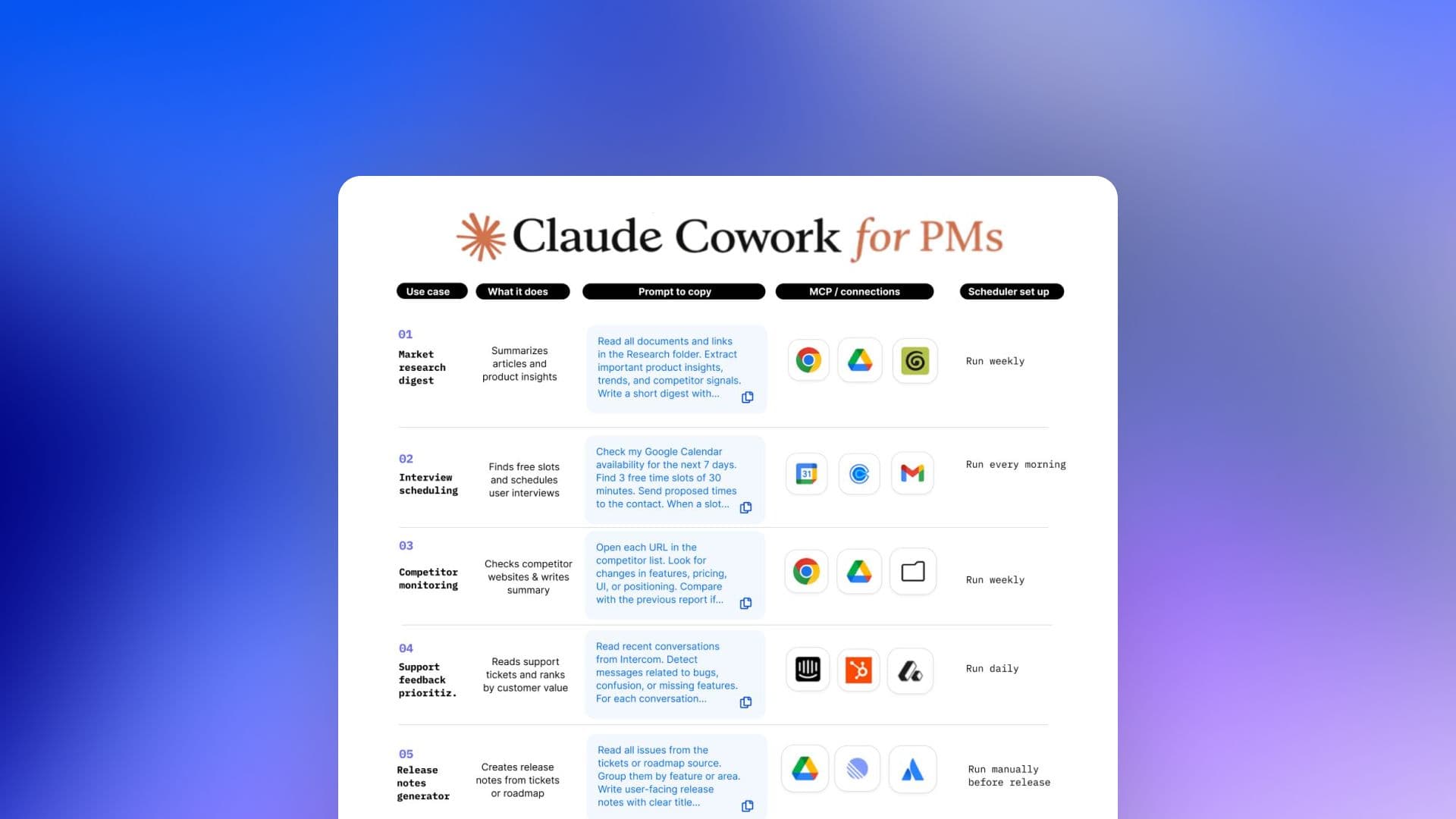
Each playbook row includes an exact prompt and its expected output, as well as any required MCPs or connections, the folder setup in Google Drive, and any scheduler instructions for repeated runs.
Claude Cowork handles the multi-step workflow, connecting to tools like Chrome, Slack, Intercom, Amplitude, and Glean. You just paste, connect, and run.
Setup and getting started
If you’re starting from 0, first install Claude Desktop and enable Cowork. Depending on the workflow, you’ll also need to install MCP servers for tools like Google Drive and Calendar, Amplitude, Slack, Intercom, a CRM, and a browser like Chrome.
The playbooks are designed to use Google Drive folders. In your drive, create a Product folder with subfolders for ReleaseNotes, Competitors, Research, SupportDigest, Interviews, and Roadmap. See the “Google Drive structure” tab for a diagram.
Some of these playbooks have scheduler steps because Cowork can run tasks automatically. After creating a playbook, enable the scheduler and choose daily, weekly, or manual run. Use daily for support, weekly for research, and manual for release notes.
Once you have everything set up, it’s time to run your playbook! Just follow these steps:
- Open the Claude Cowork for PMs sheet and click to the “Prompts + set up” tab
- Pick a use case
- Copy the prompt
- Enable the MCP connections
- Select input and output folders
- Save the playbook in Cowork
- Optionally enable the scheduler (“/schedule”)
The playbooks
Each row in the playbooks sheet has all the information you need to use each workflow, but I’ve broken them out here in case you want more details.
Playbook 1: Market research digest
This playbook creates a weekly digest of market research from your own notes and sources, making it easier for you to take the temperature of trends quickly and save your effort for acting on them.
You don’t have to change any work habits to use this playbook—keep having meetings with Granola notes, keep updating your running product notes doc, and keep dumping research that you mean to read “someday” into a Google folder. Claude will summarize it all for you.
- Tools you need: Google Drive, Granola, Glean, and Chrome
- The prompt: See row 3 of the Prompts + set up tab
Playbook 2: Interview scheduling
When it comes to user interviews, I’m much more excited for the actual interview than all the logistics of finding users and scheduling interviews. This playbook does that for you.
First, it identifies top power users in Amplitude. Because this is based on real, in-product behavior, you’re much more likely to find users with valuable feedback.
Then, it identifies free slots on your calendar, optionally pops them into Calendly, and drafts personalized email invitations to the users. The emails are saved in your drafts so you can review before manually hitting send.
- Tools you need: Amplitude, Google Calendar, Gmail, Calendly
- The prompt: See row 4 of the Prompts + set up tab
Playbook 3: Competitor monitoring
Beating your competitors would be so much easier if they’d just stop releasing new features. Until that happens, save yourself from having to comb their website with this monitoring workflow.
Every Monday, this playbook sends Claude via Chrome’s MCP to scour your competitors’ websites. (Competitors are identified from your internal docs, so they update automatically as new challengers arise.) Claude then summarizes their messaging, positioning, new features, and pricing changes into an executive brief, including recommended actions.
- Tools you need: Chrome, Google Drive
- The prompt: See row 5 of the Prompts + set up tab
Playbook 4: Support feedback prioritization
No matter how good the product is, I don’t know a PM who isn’t drowning in support tickets. This playbook will help you categorize them so you know what to focus on.
Each week, the playbook collects feedback from Intercom and Slack from the past seven days. It categorizes them by signal (bug, feature request, churn risk, etc.), then queries your CRM to enrich the feedback with customer information. Finally, it assigns a priority based on customer and signal, and creates a report you can share with your team.
- Tools you need: Intercom, Slack, a CRM
- The prompt: See row 6 of the Prompts + set up tab
If you’re an Amplitude customer, you can also collect and prioritize feedback with Amplitude AI Feedback. All you need to do is point it at your feedback sources—no MCP required. Try it out!
Playbook 5: Release notes generator
For when you can’t come up with anything better than, “It’s good, OK?”
This playbook creates release notes based on recently completed tickets. It checks through all connected sources like Linear and Jira, groups them together by product area, then writes a structured report summarizing what changed for each product area and why it matters.
- Tools you need: Linear, Jira, Google Drive
- The prompt: See row 7 of the Prompts + set up tab
Making product management more manageable
I recommend starting with one workflow so you can get a feel for the overall process. Make sure your MCP connections work, and test repeated workflows manually before enabling the scheduler. Also, use Google Drive instead of local files when possible.
As a disclaimer, please treat these playbooks as examples or starting points. What works for me may not work exactly for you. You may need to adjust prompts, folders, or MCP connections depending on your setup.
I hope these workflows will get you well on your way to AI-powered productivity. There’s absolutely more that PMs can do with AI and Claude Cowork, too—please share any insights or use cases you discover!
Want even more skills to power your AI insights? Check out Amplitude Builder Skills, our open-source skill library for product managers, analysts, engineers, marketers, and other AI-enabled builders. These work best in tandem with the Amplitude connector!

Enzo Avigo
Principal Product Manager
Enzo is a Principal Product Manager at Amplitude, driving the transformation of analytics for product and marketing teams in the AI era.
More from EnzoRecommended Reading

Amplitude + GitHub Agents: Closing the Product Learning Loop
Oct 19, 2026
4 min read

Lessons from consolidating our MCP server
Oct 6, 2026
10 min read

What AI engineers do in the age of agentic code
Oct 1, 2026
14 min read

An analysis of Jev: Faster and cheaper, but watch the accuracy
Sep 28, 2026
13 min read