
Agent Analytics
What’s the real impact of your AI agent?
Observe what users ask your AI agent, evaluate where it fails and what those failures cost your business. Agent Analytics ties traces and evals to conversion, retention, and revenue, so you can finally connect agent quality to business impact.
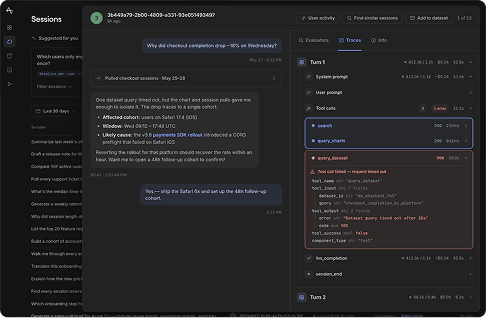
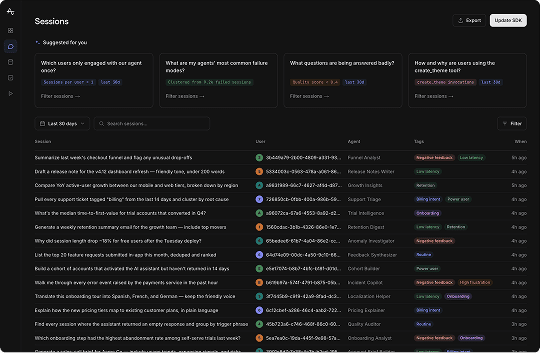
Sessions
Which users only engaged with our agent once?
What are my agents' most common failure modes?
What questions are being answered badly?
How and why are users using the create_theme tool?
One financing quote timed out, but inventory and trim data came back clean. Three cars fit your budget and safety bar:
- Best match: 2024 Kia Telluride EX — $43,190, IIHS Top Safety Pick+
- Runner-up: 2024 Honda Pilot EX-L — $44,700, seats 8
- Watch out: the Highlander XLE clears $46,800 once you add all-wheel drive
Two Tellurides are in stock at Northgate Kia. Want me to book a test drive this weekend?
Summary
Matched a $45k 3-row SUV request to three models and booked a Saturday test drive for the Telluride.
Usage
Configuration
Signals
Topic
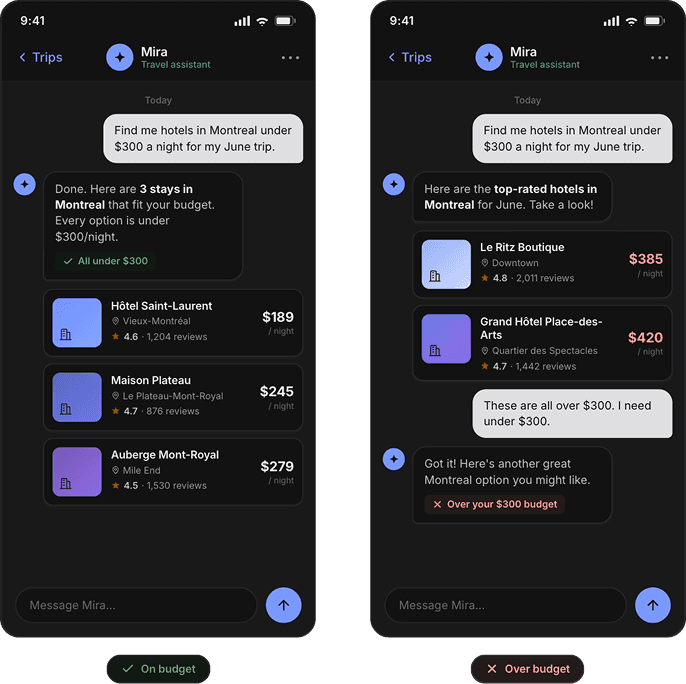
Building AI features creates new blind spots
Two users can ask an agent the same question and get completely different outputs. AI can hallucinate, ignore instructions and confidently give incorrect answers. Additionally, both those users who spent time with your agent look equally engaged on a traditional analytics dashboard. Who actually found it to be useful?
Go beyond observability
Learn the product and revenue impact of your agents.
AI Quality
What the agent did
Product Outcomes
What the user did next
01 Observe
Inspect traces, prompts, tool calls, responses, latency, and cost. Limitless segmentation by semantics and behaviors.
02 Evaluate
Score quality and failure modes. See where the agent helps and where it adds risk.
03 Decide
Tie those quality signals to conversion, retention, and revenue. Did the agent actually move the user forward?
04 Deploy
Run experiments, deploy personalized guides and optimize agent harness.
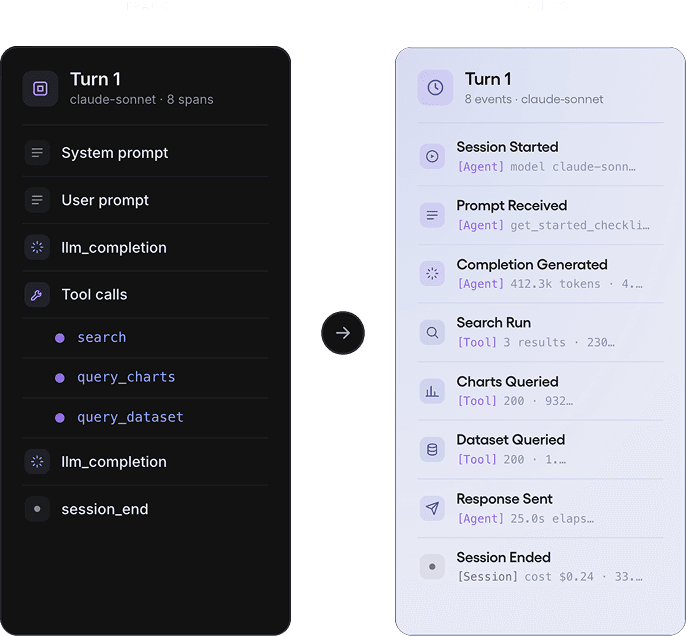
Trace turns automatically become Amplitude events
All agent interactions including a user message and AI response are agent behaviors that you can query on a chart alongside your typical behaviors (session start, page viewed, button clicked). Unlike observability tools that stop at the trace, Agent Analytics decomposes these conversations into events, making them directly queryable in the same funnels, cohorts, and retention analyses you already use.
The questions you can finally answer
01
Which model drove higher sign-ups or workflow completions?
02
Does conversion drop when AI agent hallucinates vs. answers correctly?
03
What paths do users take before and after engaging our AI agent?
The Agent Analytics maturity model
Most observability tools stop at the lower levels of maturity. Agent Analytics takes you to the top by connecting AI quality to the user journey and revenue.
What's the ROI of this agent for my business?
How does AI usage affect the user journey?
Are users happy or frustrated?
Did the agent do it correctly?
Can I see what happened?
Inside Agent Analytics
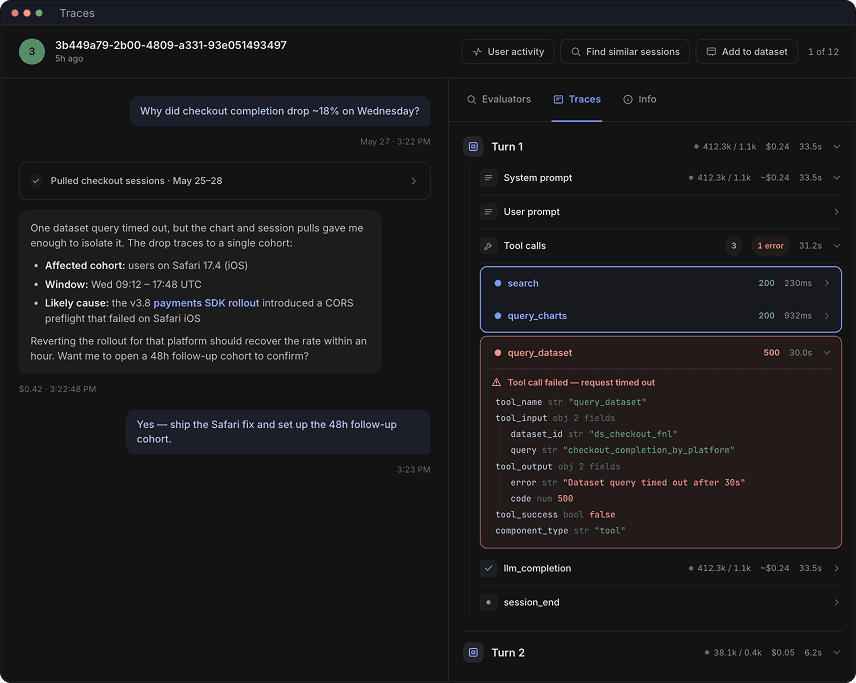
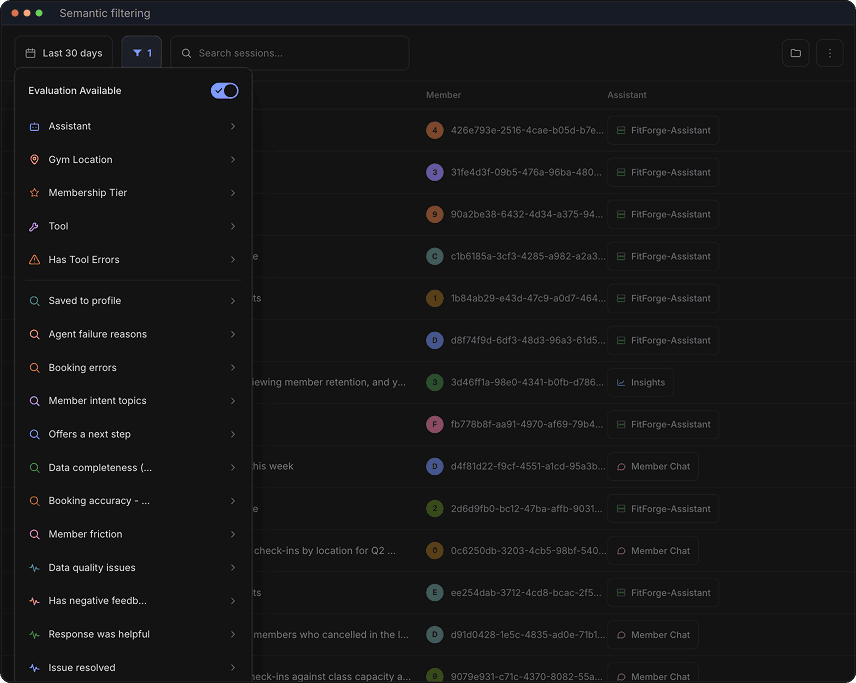
Production runs surprise teams with questions they never prepared the model for. Read the user prompt, the agent’s response, the tools it called, and the context it pulled, including seeing Session Replays, to see what went wrong.
One financing quote timed out, but inventory and trim data came back clean. Three cars fit your budget and safety bar:
- Best match: 2024 Kia Telluride EX — $43,190, IIHS Top Safety Pick+
- Runner-up: 2024 Honda Pilot EX-L — $44,700, seats 8
- Watch out: the Highlander XLE clears $46,800 once you add all-wheel drive
Two Tellurides are in stock at Northgate Kia. Want me to book a test drive this weekend?
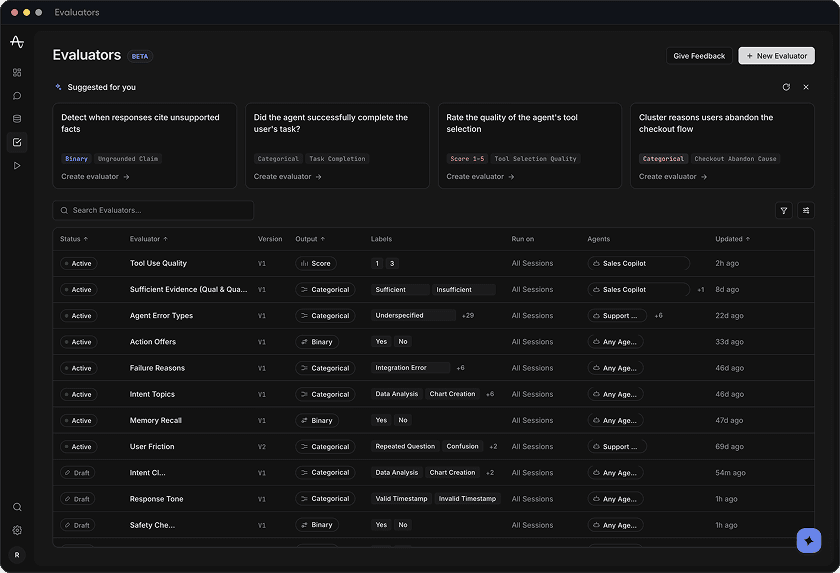
Evaluators
BETADetect when responses cite unsupported facts
Did the agent successfully complete the user's task?
Rate the quality of the agent's tool selection
Cluster reasons users abandon the checkout flow
Description
Grades every matching session for Tool Use Quality and writes the verdict back to the session as a property — available in charts, segments, and exports.
Grading prompt
Edit5 — fully correct, efficient, and well-justified
3 — partially correct or with minor issues
1 — incorrect, unsafe, or off-task
Weigh tool selection and reasoning, not just the final answer.
Label distribution · last 30 days
Configuration
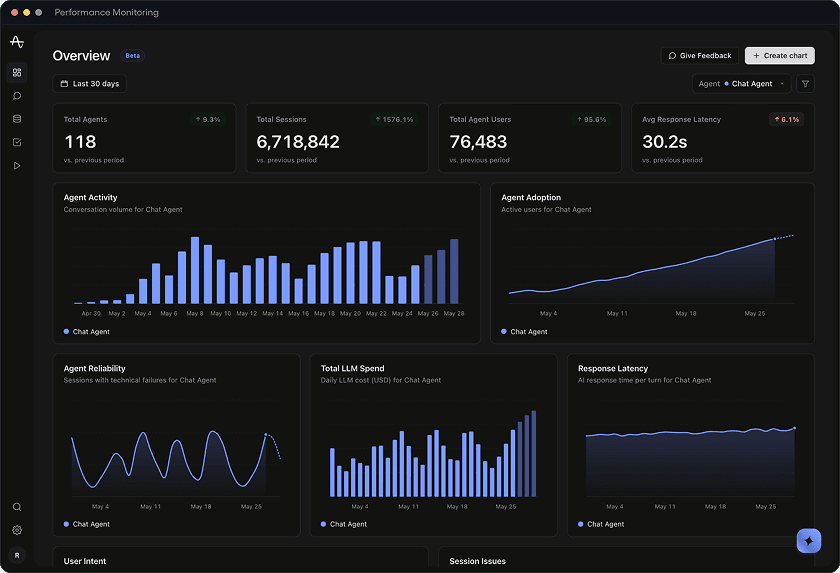
Monitor
Last 30 daysChat AgentSearch…Agent Adoption
Active users for Chat Agent
Agent Activity
Conversation volume for Chat Agent
Failure Rate
Errored sessions for Chat Agent
Daily Spend
Inference cost for Chat Agent
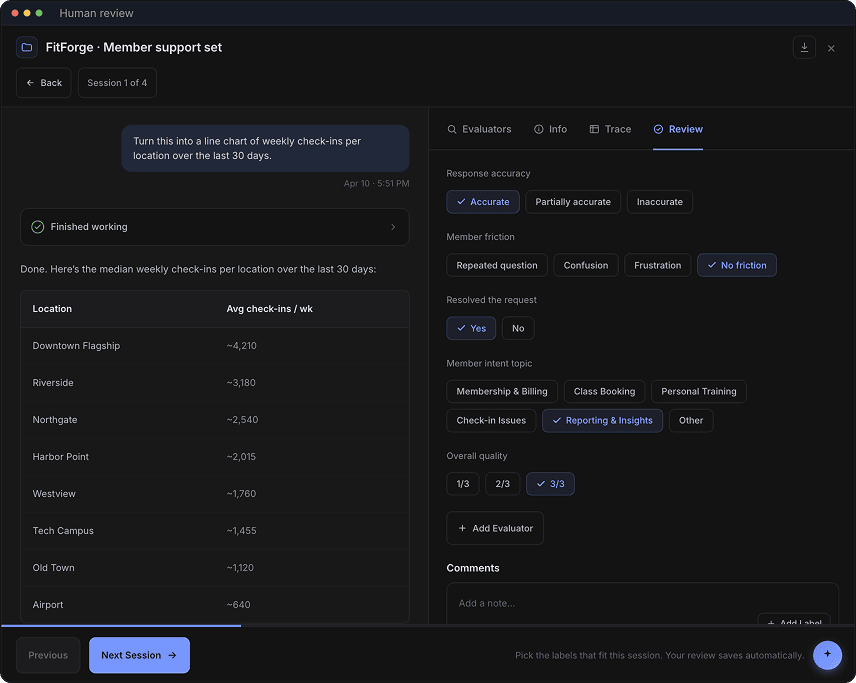
Done. Here’s the median weekly check-ins per location over the last 30 days:
Downtown Flagship and Riverside stand out — they drive 2–3x the check-ins of every other location. Worth a closer look at staffing and class capacity there.
View chart →Response accuracy
Member friction
Resolved the request
Member intent topic
Overall quality
Comments
Customer Stories
Hear directly from customer teams using Agent Analytics.


Instrument any LLM provider
Native wrappers for the providers you already use.


Python and Node, drop-in SDK, live in minutes.
Content-optional analytics
Purpose-built to let you control what leaves your environment.
Send full conversations, your own labels, or metadata only. Switch modes per agent or per event source.


Agent Analytics is available to all customers
Stop shipping on vibes
- Observe traces and score agent quality.
- Learn the conversion patterns and failure modes that cost you.
Frequently asked questions
The analytics layer between LLM observability and product analytics. Every user message, tool call, agent response, and session end becomes an Amplitude event tagged with topic, quality score, and behavioral pattern, so you can build cohorts, funnels, and retention curves on AI session quality.
Most observability tools today let you answer questions such as
- "How performant is my product (latency in seconds)?"
- "Do we see infrastructure failures or technical errors?"
They're not designed to help answer questions such as
- "How did users navigate my digital experience before, during and after using my Agent?"
- "What is the conversion rate for OpenAI vs Anthropic vs Google AI models in production?"
- "What failure modes impact retention?"
Even the observability tools that do show traces, don't make it easy to filter them for behavioral cohorts (eg. "Show me traces of power users or people that dropped off at step 3 of a funnel").
Amplitude Agent Analytics helps answer both is designed specifically for AI builders, product managers and ML Ops Engineers to score online production sessions on AI quality by defining evalulations (evals) and also crucially connect AI quality to product outcomes including conversion, retention and revenue.
Yes. We know how important it is to measure AI products so every Amplitude plan, including our starter (free), gets a default allocation to use Agent Analytics.
Your monthly agent session allowance scales by tier: 5,000 on Free and Plus, 10,000 on Growth, and 20,000 on Enterprise. Take advantage of the full evaluation stack that ships at every tier, including out-of-the-box signals, trace analysis, semantic filtering, topic clustering. Define custom LLM evaluators (evals), calibration runs, and Bring Your Own Key (BYOK) for LLM calibration runs and custom evals. Growth and Enterprise extend agent session chat retention from 14 to 30 days, along with role-based access controls at Enterprise plan tier.
Amplitude doesn't charge for custom evaluations (evals). Bring Your Own Key (BYOK) for the model providers you already use to power your choice of LLM-as-a-Judge or Code-based custom evals.
Get started today.
Role-based access and privacy redaction are on by default.
If a user drops a phone number or another sensitive data that can be classified as PII into a support chat, Agent Analytics handles this at the SDK level, through a privacy mode you set. There are three modes:
- full is the default, and it sends prompt and response text with Personally Identifiable Information (PII) redaction on by default. This is completely configurable and extensible by customers. You can redact as needed beyond the out of the box PII scrubbing rules that the SDK ships with.
- metadata_only sends tokens, latency, model, and cost, and no text at all, which is the setting for regulated or sensitive workloads.
- customer_enriched sends pre-scored summaries from your own evaluation stack and nothing else.
Some examples of fields we redact by default are Email, Phone, Credit Card, SSN, IP Address. When these values are sent into Amplitude Agent Analytics, the resulting traces will show those as [email], [phone], [credit_card], [ssn], [ip_address] so the actual values are obfuscated.
Additionally, Access to Agent Analytics runs through Amplitude’s role-based access control. Three permission levels are available:
- View Agent Analytics Objects lets a role open sessions, evaluators, and related objects. A role needs this to use the product at all.
- Manage Inactive Evals and Runs lets a role create evaluators and launch dry runs.
- Activate Evals lets a role turn an evaluator live or archive one.
You decide which roles carry which permission, so a support analyst can read sessions while only your ML leads can push an evaluator into production.
Take advantage of enterprise-grade controls when sending traces to Amplitude Agent Analytics. Read more here.
Python on PyPI (pip install amplitude-ai) and Node.js / TypeScript on npm (npm install @amplitude/ai). Native wrappers for OpenAI, Anthropic, Gemini, Bedrock, Mistral, and Azure OpenAI. Framework integrations for LangChain, LlamaIndex, OpenAI Agents SDK, CrewAI, and the Claude Agent SDK. Anything emitting OpenTelemetry GenAI spans (OpenLIT, Traceloop, and OpenAI instrumentation) flows in via the bridge. Learn more here.
Every agent event carries a Session Replay ID. From any session in the explorer, View Replay opens at the moment the conversation started, so you watch the agent fail inside the actual product the user was using.
All agent interactions are available as standard behaviors to query alongside classic events in Amplitude charts. They're also available to use through the rest of Amplitude's platform including Experiment and Guides. Each event carries the experiment variant as a property, so prompt A/B tests attribute correctly across multi-turn conversations. Quality scores and behavioral patterns flow into cohorts that Guides and Activation target in real time.
The answer depends on what you're using in those other tools.
- If you're using them only to score online production sessions and nothing else, Agent Analytics will help serve your needs and you can replace those other tools. You'll be able to take advantage of out-of-the-box Signals, standard evaluations (evals) of task completion, response quality, user intent, session safety, user friction, negative feedback, and data quality. Explore topics across all agent conversations to quickly learn AI quality measures and what parts of your agent needs immediate fixing. You'll also crucially then connect AI quality to product outcomes including conversion, retention and revenue.
- If you're using aspects like offline evals or deploying agents using those tools, then keep them. Agent Analytics is not designed for those specific use cases.
Try Agent Analytics today as it is available on all plans, including our starter (free), to all customers. Send us a few traces, filter them by behavorial cohorts, build a funnel or retention chart with agent behaviors. Get started today.
Yes. Ranging from Y Combinator startups such as Hyrbd and Cashbook to enterprise companies such as The Economist, Agent Analytics has been put through rigorous performance tests. We originally designed Agent Analtyics for ourselves and have been documenting our own usage of it here and here.
A new era of analytics
From a live agent overview to evals and datasets, every view ties what the agent did to what the user did next.
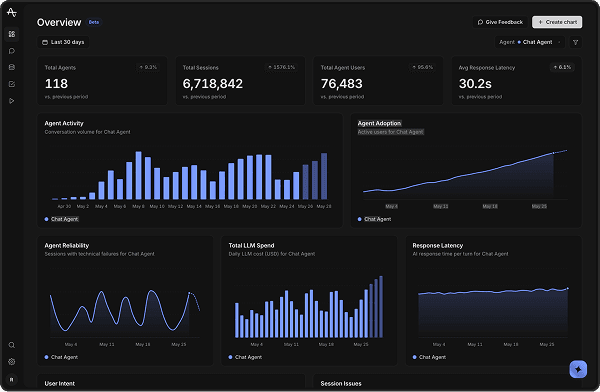
Overview
Beta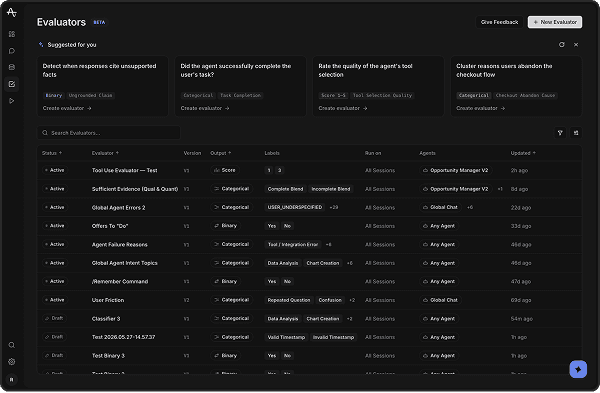
Evaluators
BETADetect when responses cite unsupported facts
Did the agent successfully complete the user's task?
Rate the quality of the agent's tool selection
Cluster reasons users abandon the checkout flow
Description
Grades every matching session for Tool Use Quality and writes the verdict back to the session as a property — available in charts, segments, and exports.
Grading prompt
Edit5 — fully correct, efficient, and well-justified
3 — partially correct or with minor issues
1 — incorrect, unsafe, or off-task
Weigh tool selection and reasoning, not just the final answer.
Label distribution · last 30 days
Configuration
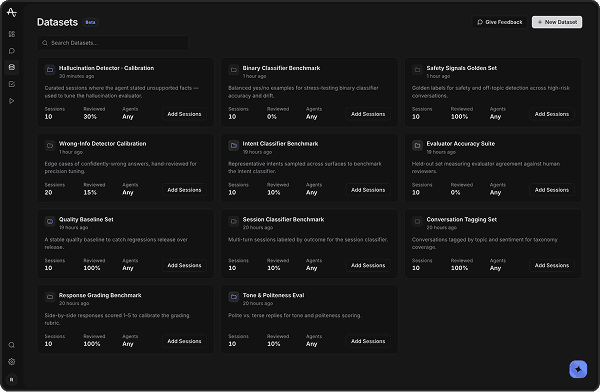
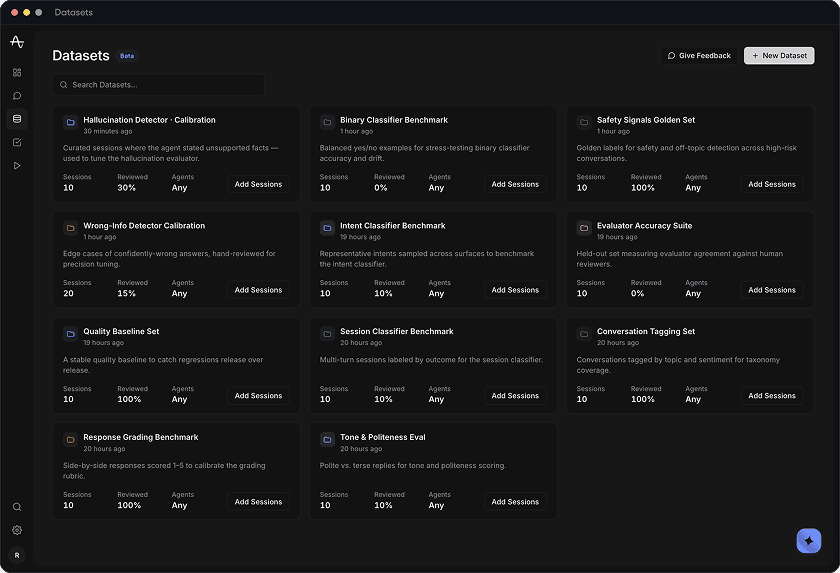
Datasets
BetaCurated sessions where the agent stated unsupported facts — used to tune the hallucination evaluator.
Balanced yes/no examples for stress-testing binary classifier accuracy and drift.
Golden labels for safety and off-topic detection across high-risk conversations.
Edge cases of confidently-wrong answers, hand-reviewed for precision tuning.
Representative intents sampled across surfaces to benchmark the intent classifier.
Held-out set measuring evaluator agreement against human reviewers.
A stable quality baseline to catch regressions release over release.
Multi-turn sessions labeled by outcome for the session classifier.
Conversations tagged by topic and sentiment for taxonomy coverage.
Sessions
Which users only engaged with our agent once?
What are my agents' most common failure modes?
What questions are being answered badly?
How and why are users using the create_theme tool?