Platform

AI

Wave
Agents
Headless Amplitude
Agent Analytics
Amplitude MCP
AI Feedback
Early Access Program

Insights

Product Analytics
Marketing Analytics
Session Replay
Heatmaps

Action

Guides and Surveys
Feature Experimentation
Web Experimentation
Feature Management
Activation

Data

Data Governance
Integrations
Security & Privacy
Solutions
Solutions that drive business results
Deliver customer value and drive business outcomes
Amplitude Solutions →

Industry

Financial Services
B2B
Media
Healthcare
Ecommerce

Use Case

Acquisition
Retention
Monetization

Team

Product
Data
Engineering
Marketing

Size

Startups
Enterprise
Resources

Learn

Blog
Resource Library
Compare
Glossary
Explore Hub

Connect

Community
Events
Customers
Partners

Support & Services

Customer Help Center
Developer Hub
Product Updates
Academy & Training
Customer Success

Tools

Benchmarks
Prompt Library
Templates
Tracking Guides
Maturity Model
Event Taxonomy Generator
Pricing
LoginContact salesGet started

AI

WaveAgentsHeadless AmplitudeAgent AnalyticsAmplitude MCPAI FeedbackEarly Access Program

Insights

Product AnalyticsMarketing AnalyticsSession ReplayHeatmaps

Action

Guides and SurveysFeature ExperimentationWeb ExperimentationFeature ManagementActivation

Data

Data GovernanceIntegrationsSecurity & Privacy
Amplitude Solutions →

Industry

Financial ServicesB2BMediaHealthcareEcommerce

Use Case

AcquisitionRetentionMonetization

Team

ProductDataEngineeringMarketing

Size

StartupsEnterprise

Learn

BlogResource LibraryCompareGlossaryExplore Hub

Connect

CommunityEventsCustomersPartners

Support & Services

Customer Help CenterDeveloper HubProduct UpdatesAcademy & TrainingCustomer Success

Tools

BenchmarksPrompt LibraryTemplatesTracking GuidesMaturity ModelEvent Taxonomy Generator
LoginSign Up
Changelog/Custom Session Set-up Improvements
Session Replay·Feb 26, 2024

Custom Session Set-up Improvements

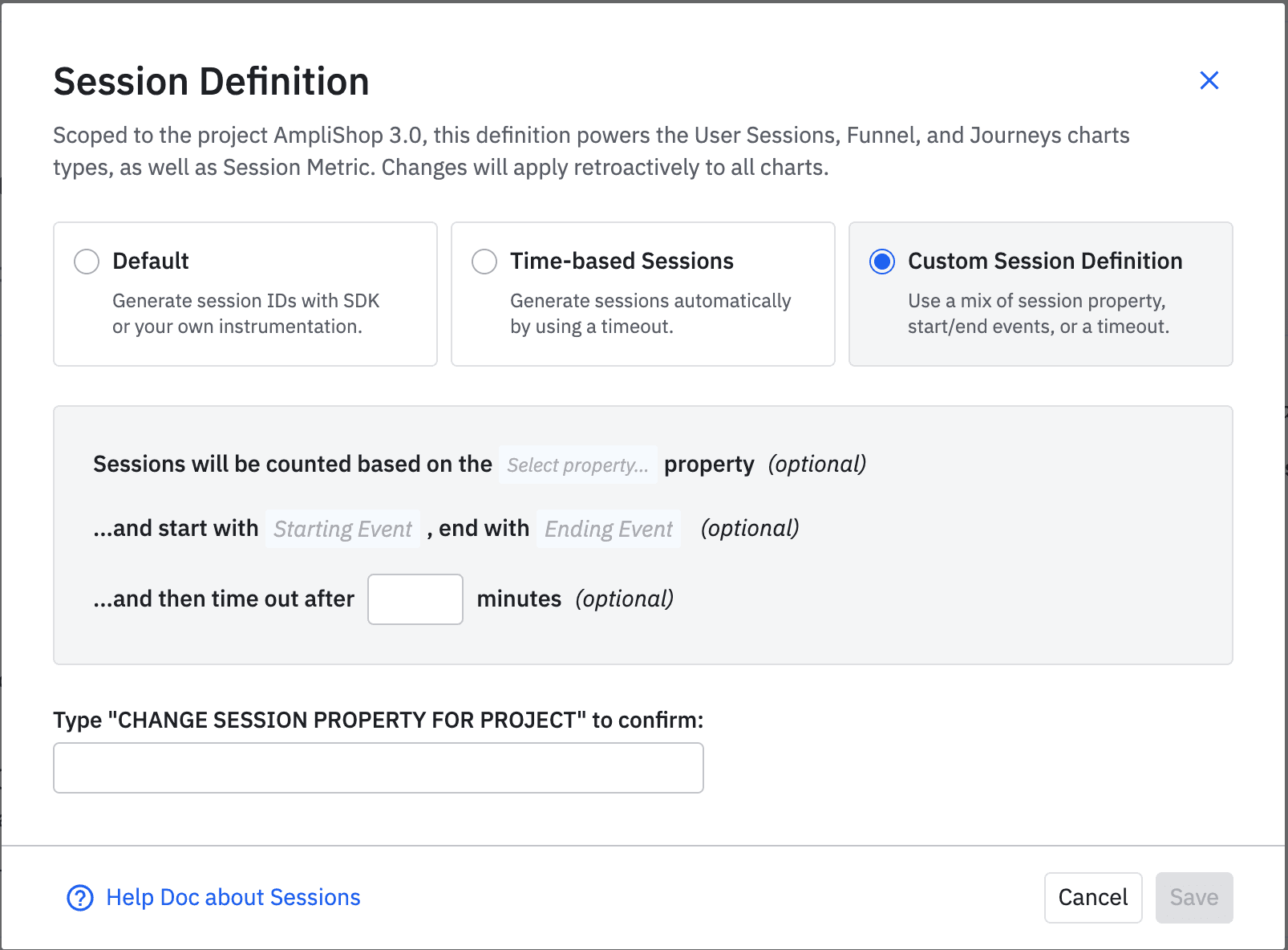
Improvements to usability and clarity of session definitions, proactive notifications when session definitions change, and troubleshooting support via a banner in session charts.
Custom Session Set-up Improvements

What it is

Platform
  • Wave
  • AI Agents
  • Agent Analytics
  • AI Feedback
  • Amplitude MCP
  • Product Analytics
  • Web Analytics
  • Feature Experimentation
  • Feature Management
  • Web Experimentation
  • Session Replay
  • Guides and Surveys
  • Activation
  • Heatmaps
Compare us
  • Adobe
  • Google Analytics
  • Contentsquare
  • Fullstory
  • Heap
  • LaunchDarkly
  • Mixpanel
  • Optimizely
  • Pendo
  • PostHog
Resources
  • Resource Library
  • Blog
  • Agent Prompt Library
  • Product Updates
  • AI Early Access Program
  • Integrations
  • Events
  • Amplitude Academy
  • Glossary
  • Amp Champs
  • Free Chart Maker
Partners & Support
  • Status
  • Contact Us
  • Customer Help Center
  • Community
  • Developer Docs
  • Partner Program
  • Partner Directory
Company
  • About Us
  • Careers
  • Press & News
  • Investor Relations
  • Diversity, Equity & Inclusion
View markdown
Terms of ServicePrivacy NoticeAcceptable Use PolicyLegal
EnglishJapanese (日本語)Korean (한국어)Español (LATAM)Español (Spain)Português (Brasil)Português (Portugal)FrançaisDeutsch
© 2026 Amplitude, Inc. All rights reserved. Amplitude is a registered trademark of Amplitude, Inc.

Description: Previously, many customers couldn’t get the insights they should have gotten from the session analysis because of an improperly defined session definition. These new updates:

  • Improve usability and clarity of how the session definitions work by updating the UI for the custom session definition modal.
  • Proactively notify users when a session definition changed by sending notifications (email + in-app) after the project session definition is updated.
  • Help users troubleshoot on their own when they see a flatlined sessions chart and should try custom sessions to unblock analyses by adding a troubleshooting banner in the user sessions charts to encourage users to check their session definition.

Available in EUDC: Yes

Where:

  • Change session definition: Project settings page > “Session Definition” button on the top-right.
  • Notification setting: Personal settings > Notifications > Updates about my projects. (Anyone who subscribes to a project can receive session definition update notifications for that project.)
  • Troubleshooting banner: User sessions charts - the banner will show up if there’s no session to display.

Updated help doc: Track sessions

Release details
Release ID
custom-session-set-up-improvements
Shipped
Feb 26, 2024
Area
Session Replay
Follow Session Replay
All updates
← NewerMost recent
Older →End of changelog