Amplitude Plug and Play: New AI Plugin in Claude and Cursor Marketplaces
Introducing the easiest way to turn your favorite AI client into an analytics expert with a single-install Amplitude plugin

Last month, we shipped some major improvements to our MCP-route Amplitude workflows: new tool support for more of the Amplitude platform, an open-source skills repository of fine-tuned agent skills, and a new app that renders charts natively in AI clients.
These features make the AI-client Amplitude experience much more robust and effective at analysis. But to use them, you had to manually install them one by one.
We decided that’s too much clicking.
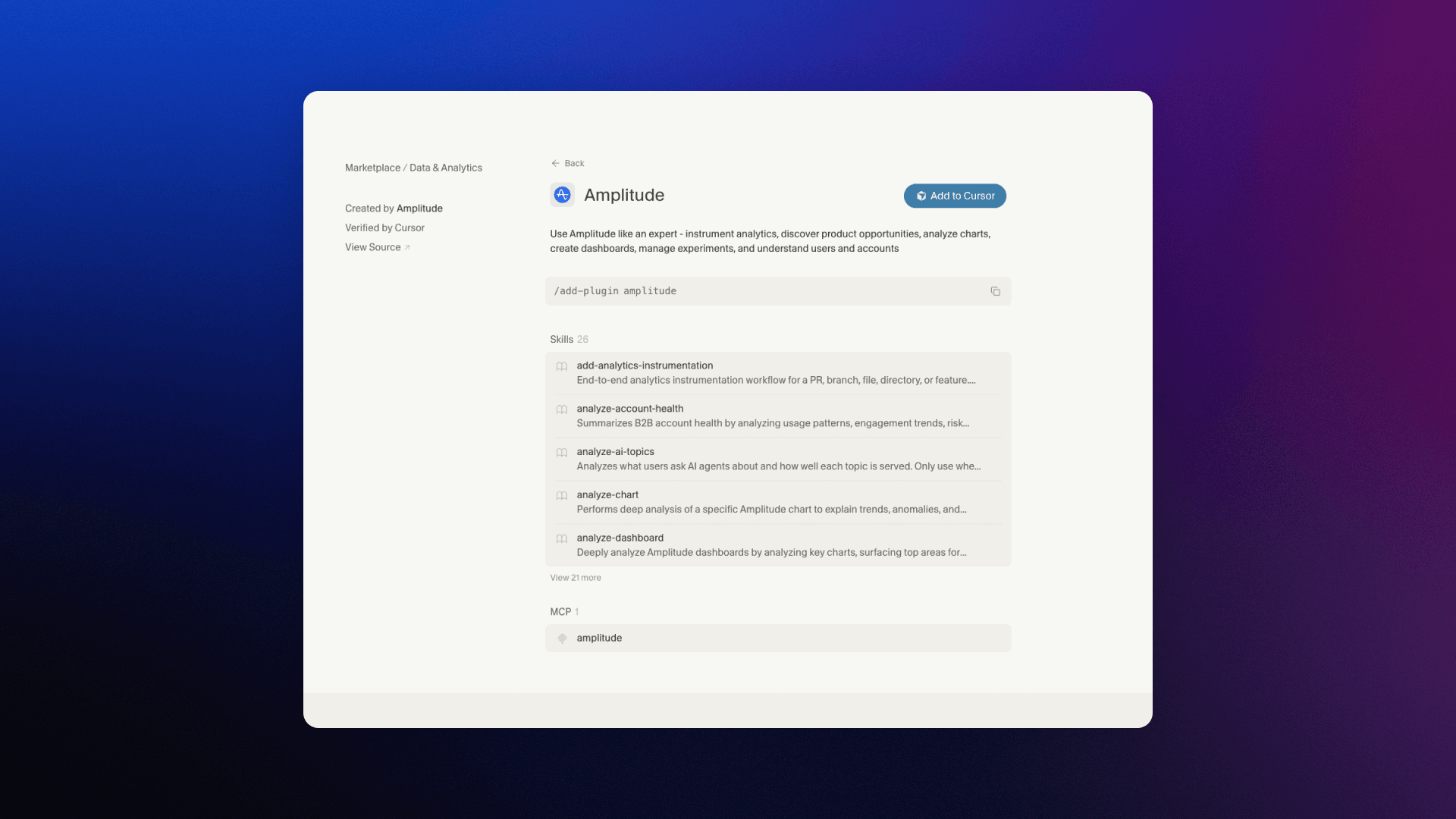
That’s why we packaged everything together in a new Amplitude AI plugin. This single-install plugin is now available directly on the official plugin marketplaces for Cursor and Claude, and can also be downloaded from GitHub for install in Gemini and Codex.
What’s in the plugin?
The Amplitude plugin is a single install for turning your favorite AI agent into an analytics expert. Plug it in, ask Claude to analyze your product data, get an expert-level answer.
Along with connecting to the Amplitude MCP server, the plugin has 25+ reusable analysis and instrumentation skills covering core analytics, product insights, session replay and debugging, AI agent analytics, instrumentation, and product briefings, accessible as slash commands:
- analyze-chart / analyze-dashboard — explain trends, surface anomalies, generate exec-ready summaries
- analyze-experiment — design, analyze, and interpret A/B tests with statistical rigor
- analyze-feedback — synthesize customer feedback into themes and priorities
- analyze-account-health — usage trends, risk signals, and expansion signals for B2B accounts
- discover-opportunities — mine analytics, replays, and feedback for RICE-scored product opportunities
- add-analytics-instrumentation — end-to-end instrumentation from a PR or feature request
- instrument-events / diff-intake / discover-event-surfaces — full instrumentation planning workflow
- daily-brief / weekly-brief — briefings with metric anomalies, experiments, and deployment context
- monitor-experiments — triage active and recently completed experiments, flag stale decisions
- create-chart / create-dashboard — build Amplitude charts and dashboards from natural language
- Plus: replay-ux-audit, debug-replay, diagnose-errors, monitor-reliability, what-would-lenny-do (requires the Lenny's Data MCP), and more
Why use the plugin instead of just the MCP server?
When MCP came out in fall 2025, we immediately saw the promise. For teams working primarily in AI clients, connecting agents directly to the Amplitude API could eliminate the friction of switching between platforms to get product insights. Claude could become your analyst.
However, while MCP was absolutely a step in the right direction, it wasn't flawless. The connection exposes tools to an agent, but the agent may not know how to use those tools the best way possible. Open-ended API calls could go off the rails. Even if a user knew what they were doing with Amplitude and could prompt the agent effectively, there could still be friction.
Enter skills. These are higher-level recipes that agents can use to more accurately perform larger actions with MCP tools. Instead of just instructing an agent how to pull the levers to view a session replay, a skill can explain how session replay tool usage fits into a bigger analytics task like synthesizing a ranked friction map.
Our new plugin packages our MCP connection together with our high-quality Amplitude skills, so you can get the best of AI-native Amplitude easily. And because the plugin operates in your AI client, it works synergistically with any skills, commands, or hooks you’ve already built yourself.
Plug it in and let it rip
The Amplitude plugin is available now in Claude and Cursor’s plugin marketplaces, so you can make it part of your default context without any manual config or docs-reading. You can also download it from GitHub to install in Gemini or Codex. Try it out and let us know what you think!
The plugin was a team effort, and I want to give big thanks to Frank Lee, Jinhao Wan, and Ran Chen for getting the marketplace listings to happen. Eric Kim created the repo and shipped the initial skills, Frank Lee built the bulk of them, Alvin Wang made the instrumentation skills, Brian Giori built the experiment connection, and Chanaka Perera tested and built the docs. Austin Piel, Jason Ma, and Eric Metelka all also contributed.
In the coming weeks, we’ll get the plugin listed in more official marketplaces. We’re also going to keep adding and improving skills and functionality to make your coding agent an even better product analyst. Keep an eye on our GitHub repo for new skills as they come out, and we’ll post on the blog for any bigger updates.
Install the Amplitude plugin in your favorite coding agent today! Now available in the Claude marketplace, the Cursor marketplace, and in the Amplitude skills GitHub repo for use in Gemini and Codex.
For more information or if you have any feedback to file, visit the skills repo.

Karan Johar
Software Engineering Manager and Technical Lead, Amplitude
Karan Johar is a Software Engineering Manager and Technical Lead at Amplitude, leading the middleware and compute systems that power analytics at scale. He oversees the APIs behind charts, cohorts, and metrics—driving performance, reliability, and platform scalability. Previously, he built high-throughput API platforms and core product infrastructure at Dropbox, supporting hundreds of millions of users and mission-critical internal systems.
More from KaranRecommended Reading

Introducing Amplitude Wizard CLI: Set Up Amplitude from Your Codebase
Apr 30, 2026
6 min read

Making AI Search Count (and Convert)
Apr 29, 2026
4 min read

How VEED Evolved Its AI Search Strategy
Apr 29, 2026
3 min read

What’s New with Amplitude Agents
Apr 28, 2026
4 min read