Agents Just Made Your Feature Launch Channel Smarter
Agents handle your data questions, feature flags, and post-launch readouts in one place.

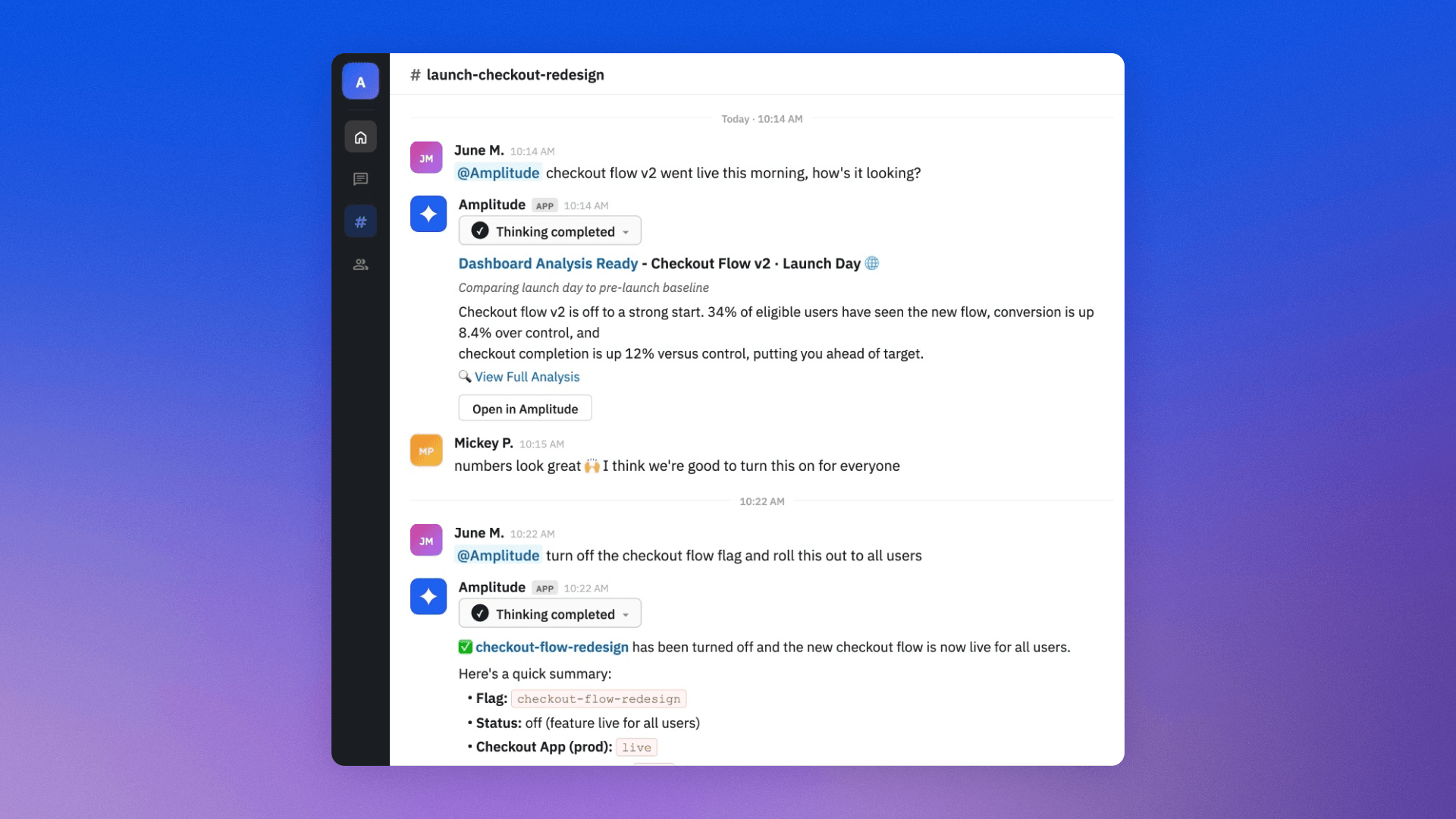
“How is conversion trending on the new flag compared to control?” “Can we ramp it to 25%?”
Before, coordinating a feature launch would involve manually checking feature flag performance, sharing the results in Slack to align your team, and DM’ing your engineer to roll it out to more users. And then doing it all over again the next day. But every moment spent piecing this together yourself is a moment your launch isn’t moving forward.
Today, agents do that work right in your launch channel. They can answer data questions in threads, surface session replays when the numbers don’t add up, and ramp flags without pulling in eng. Agents run the entire launch loop in one place.
Here’s how to set it up using Amplitude AI Agents and Feature Experimentation.
Before launch day: Build the infrastructure
The setup you do before the flag flips determines how smoothly everything runs on launch day. This takes about 20 minutes and pays off on every launch after.
Link your Amplitude Analytics team space to the launch channel
Create a dedicated launch Slack channel (e.g., #checkout-v2-launch) and add the Amplitude bot by typing @Amplitude or inviting it through channel settings. This is how you activate Global Agent in the channel.
Next, connect the channel to your team’s existing Amplitude Analytics team space. Add your launch dashboard, key charts, and post-launch notebook to that space so new artifacts post to the channel automatically. Your team sees what’s live without anyone having to remember to share it.
The channel becomes a shared place to ask questions about your launch data, get AI-generated answers grounded in your Amplitude workspace, and follow links back to charts and dashboards for deeper analysis.
Configure chart alerts on your key metrics
Set alerts on conversion rate, error rate, and activation funnel, routed to your launch channel. Define the threshold that would make you want to investigate. If a 10% drop in checkout completion would make you pause, set the alert at 10% and let Amplitude watch for it. You can also set up a dashboard subscription on your launch dashboard to get scheduled snapshots of key metrics posted directly to the channel.
Set up AI context before launch day
In project settings > AI controls, define your team’s launch goals, success metrics, target segments, and known risks. Adding this context makes Global Agent specific to your launch and your team. You’ll get personalized responses grounded in what your feature launch is actually trying to achieve and measure.
Create the feature flag with the rollout plan built in
With Amplitude Feature Experimentation, create a feature flag for your feature and build the staged rollout directly into it. You can start with 5% to internal users, then 10%, 25%, 50%, and full rollout. Each stage becomes a decision checkpoint; the data you gather at 10% tells you whether 50% is safe. Feature flags are the backbone of the launch. You keep the feature behind a flag, release it to a small cohort first, gradually ramp exposure by percentage, and roll it back quickly if something goes wrong, all while using Slack to discuss what the next best decision is for the launch.
Launch day: Your new command center in Slack
When the flag goes live, the launch Slack channel becomes the place where everything happens.
Start with a smoke test
A smoke test is a quick check to confirm whether your launch works well enough for a full rollout. At 5–10% rollout, which usually focuses on releasing the feature to internal users first, the immediate question is whether the feature is working correctly. You can simply ask the question directly in the launch channel, and Amplitude’s Global Agent will take care of the analysis and respond with the information you need.
@Amplitude, are there any error spikes for users on the checkout-v2 feature flag in the last hour?
@Amplitude, what is the current rollout percentage for checkout-v2?
If the smoke test surfaces a problem, you don’t need to leave the thread to act:
@Amplitude, turn off the checkout-v2 feature flag for all users.
Monitor and hit your rollout checkpoints
Once the smoke test clears, the channel shifts into monitoring mode. Alerts fire when thresholds are hit. Dashboard updates post automatically. When the team hits a scheduled checkpoint, the Global Agent handles the data questions in the thread:
@Amplitude, how is the checkout completion rate for users on the checkout-v2 treatment trending since launch compared to control?
@Amplitude, where in the checkout funnel are users on checkout-v2 dropping off, and is it worse than the control?
With Global Agent acting as your team analyst, there’s no need to wait for reports or spend time building them yourselves. The data, the charts, and the context come to where the discussion is already happening with your team.
At each checkpoint, one of two things happens. If the metrics look good, your team aligns in the thread and ramps the flag:
@Amplitude, ramp the checkout-v2 flag to 25%.
If something looks off, data collection and investigation stay in the channel.
Ask the Global Agent to isolate the issue by segment, property, or time window. When the data can’t explain a drop, the session replay agent surfaces friction patterns across sessions in the affected flow: rage clicks, dead clicks, unexpected UI states, errors. The agent responds with a narrative summary of what users are experiencing, with representative session IDs for going deeper.
Your team reads it in the thread, discusses, and makes the next call for the feature launch.
After launch: Close the loop in Slack
The launch channel doesn’t go quiet after full rollout. It continues to be the place where the team can get data and make decisions.
A few weeks after launch, ask the Global Agent for the quantitative and qualitative readout:
@Amplitude, give me a metrics summary for the checkout-v2 launch. What metrics moved and by how much?
@Amplitude, summarize the experiment results for checkout-v2 and give me a recommendation.
For qualitative signal, the AI feedback agent pulls in feedback from surveys, support tickets, and sales calls and synthesizes them into themes. You’ll see why users feel the way they do about the new checkout experience. Ask @Amplitude for a qualitative summary, and it will pull in themes from the AI feedback agent so you can discuss them in the channel.
If you need to investigate further, you can dig into raw feedback data or validate the full experiment output directly in Amplitude. Use that signal to make the final ship, iterate, or stop call, and link the relevant charts and notebooks back in the channel so everyone stays in the loop.
Run your next feature launch with agents
Agents handle your data questions, ramp your feature flags, and dig into post-launch feedback. You ask in plain language, and they respond in the thread with charts, summaries, and recommendations.
No more pulling charts manually, screenshotting them into Slack, or relying on eng between rollout stages. Agents run your next feature launch from the channel your team is already in.

Tommy Keeley
Director of Product, Growth & AI, Amplitude
Tommy Keeley is Director of Product, Growth & AI at Amplitude, and is an instructor at Product School. He brings over ten years of experience in product management, specializing in viral and core growth strategies, user acquisition, and product engagement. Prior to Amplitude, Thomas held several roles at Dropbox, including Senior Group Product Manager, leading growth initiatives across the platform.
More from TommyRecommended Reading

Amplitude + GitHub Agents: Closing the Product Learning Loop
Oct 19, 2026
4 min read

Lessons from consolidating our MCP server
Oct 6, 2026
10 min read

What AI engineers do in the age of agentic code
Oct 1, 2026
14 min read

An analysis of Jev: Faster and cheaper, but watch the accuracy
Sep 28, 2026
13 min read